How to Choose an HTML to Image API (and When You Don't Need One)
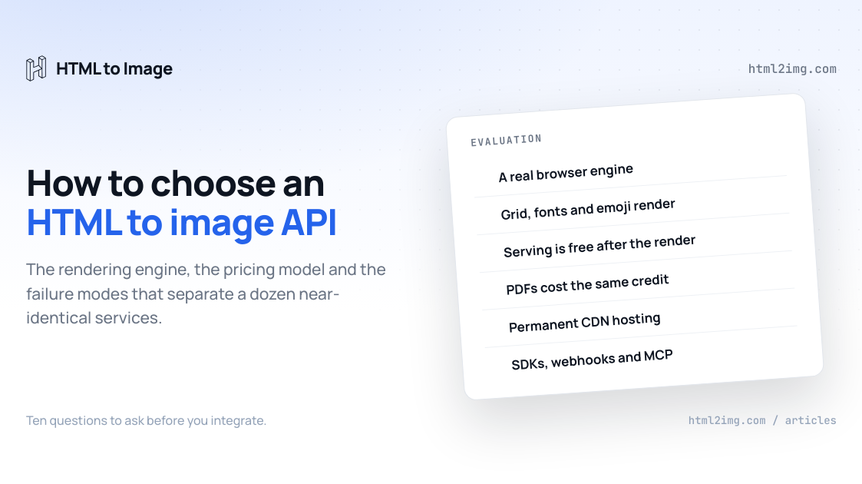
Search for an HTML to image service and you get a dozen landing pages saying the same thing. Pixel perfect rendering. Developer friendly. Fast. Every one of them turns markup into a PNG, every one has a curl example above the fold, and none of them tells you how to tell them apart.
The differences are real. They just live one level down, in the rendering engine, the pricing model and the failure behaviour, and most of them surface three weeks after you integrate rather than during the trial. This guide covers what actually separates these services, roughly in the order the differences will bite, and finishes with the honest version of when you should skip the API entirely and run a browser yourself.
First, the definition, because the category name is doing a lot of work. An HTML to image API takes HTML and CSS over HTTP, renders it in a browser engine on someone else's infrastructure and returns a finished image. You keep writing templates in the language you already write, the service owns Chrome, fonts, scaling and hosting, and your application deals in URLs. That is the pitch everywhere. Everything below is about the parts that vary.
Start with what you are rendering
The shape of your use case settles half the evaluation before you open a single pricing page, so name it first.
Social and Open Graph cards. You need exact dimensions (1200×630 for the standard OG card), full web font support, emoji that render as emoji rather than empty boxes, and output fast enough that a share crawler's first request does not time out. Volume tracks content changes, not traffic, which matters enormously for pricing, as covered below.
Documents. Invoices, receipts and certificates usually need a PNG for embedding and a PDF for download, from the same template. If that is you, the PDF story is not a nice-to-have, it is half the requirement.
Screenshots of live URLs. Capturing pages you did not write means you need URL rendering, full page capture and ideally the ability to crop to a single element with a CSS selector rather than doing pixel maths afterwards.
Charts and data graphics. Rendering Chart.js or D3 output server-side means the service has to execute JavaScript and wait for it to finish drawing before capture. Plenty of renderers cannot.
Images for email. Email clients butcher HTML, so the fix is to render the designed parts as images and embed those. This case leans hard on hosting and serving costs, because every open is a fetch.
Most teams start in one column and end up in three. Weight your evaluation towards a service that covers the columns you will grow into, not just the one you have today.
The rendering engine is the product
Everything else on this page is negotiable. This is not. The engine that turns your markup into pixels decides what your templates are allowed to look like, and there are only three approaches in the wild.
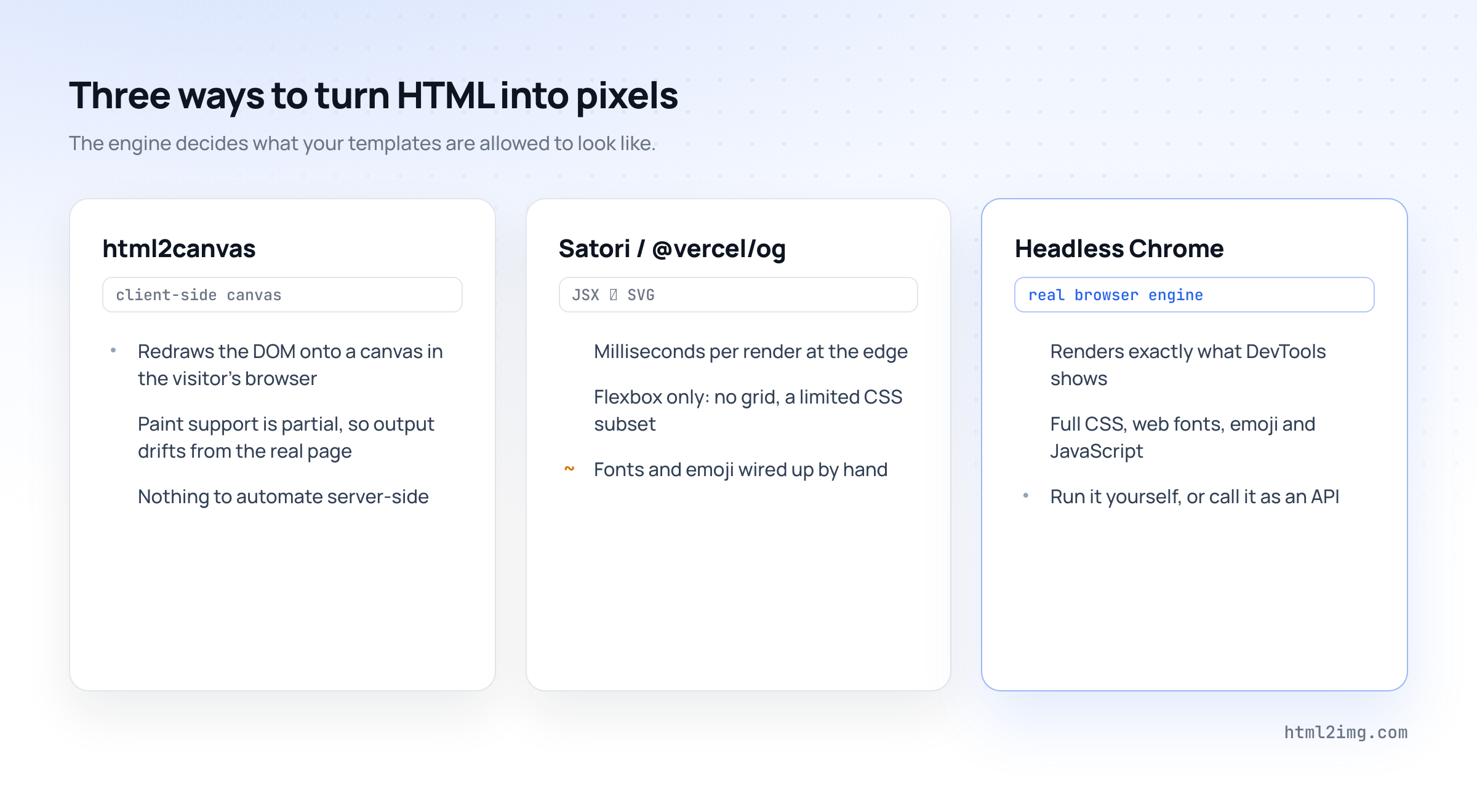
Client-side canvas libraries like html2canvas do not render your HTML at all. They walk the DOM in the visitor's browser and re-draw an approximation onto a canvas. Paint support is partial, output varies by browser, and there is no server-side pipeline to automate. Fine for a "download this view" button, wrong for anything programmatic. The full comparison with html2canvas goes deeper.
Satori, the engine inside @vercel/og, converts JSX straight to SVG without a browser. It is genuinely fast and cheap at the edge, and for a card that is a title, an avatar and a gradient it is a fine answer. The catch is that it is not a CSS engine: layout is flexbox only, with no grid, no pseudo-elements and a limited property list, fonts are loaded by hand and emoji need their own glyph pipeline or they render as empty squares. The day your designer hands over the real brand card, you hit the wall. There is a fuller side-by-side in HTML to Image vs @vercel/og.
A real browser engine, meaning headless Chromium, renders exactly what DevTools shows you. Grid, custom properties, backdrop-filter, variable fonts, emoji, JavaScript, the lot. Every serious API in this category runs one, and so does HTML to Image. The question to put to any provider is blunt: what engine renders my HTML, and if it is not a full browser, where is the list of CSS it does not support?
The practical test takes ten minutes. Take your gnarliest real template, the one with the grid layout, the custom font and an emoji in the title, and run it through the trial. Do not test with the provider's demo HTML. Their demo is chosen to work. You can run that test before signing up for anything: the free HTML to Image Converter renders pasted markup in the browser, so you can see how a real Chromium engine handles your template first and compare the others against it.
What a render costs when it is served ten thousand times
Pricing pages in this category look interchangeable and are not, because the unit being sold differs. There are three models.
Per render, serving free. You pay when an image is created. Once it exists on the provider's CDN, fetching it costs nothing, at any volume, forever. Your bill tracks how often your content changes.
Per request or bandwidth metered. You pay when an image is created and again, one way or another, when it is served, either through request counting or bandwidth line items. Your bill tracks your traffic.
Per image with seat pricing. Common with template-editor products, where plans bundle image quotas with per-user charges aimed at marketing teams rather than engineering budgets.
The distinction matters because of how these images live. An Open Graph card is rendered once and then fetched by every crawler and every share preview for the life of the page. An invoice is rendered once and downloaded whenever the customer wants it. An email image is rendered once and fetched on every open. The render is a one-off event. The serving is unbounded.
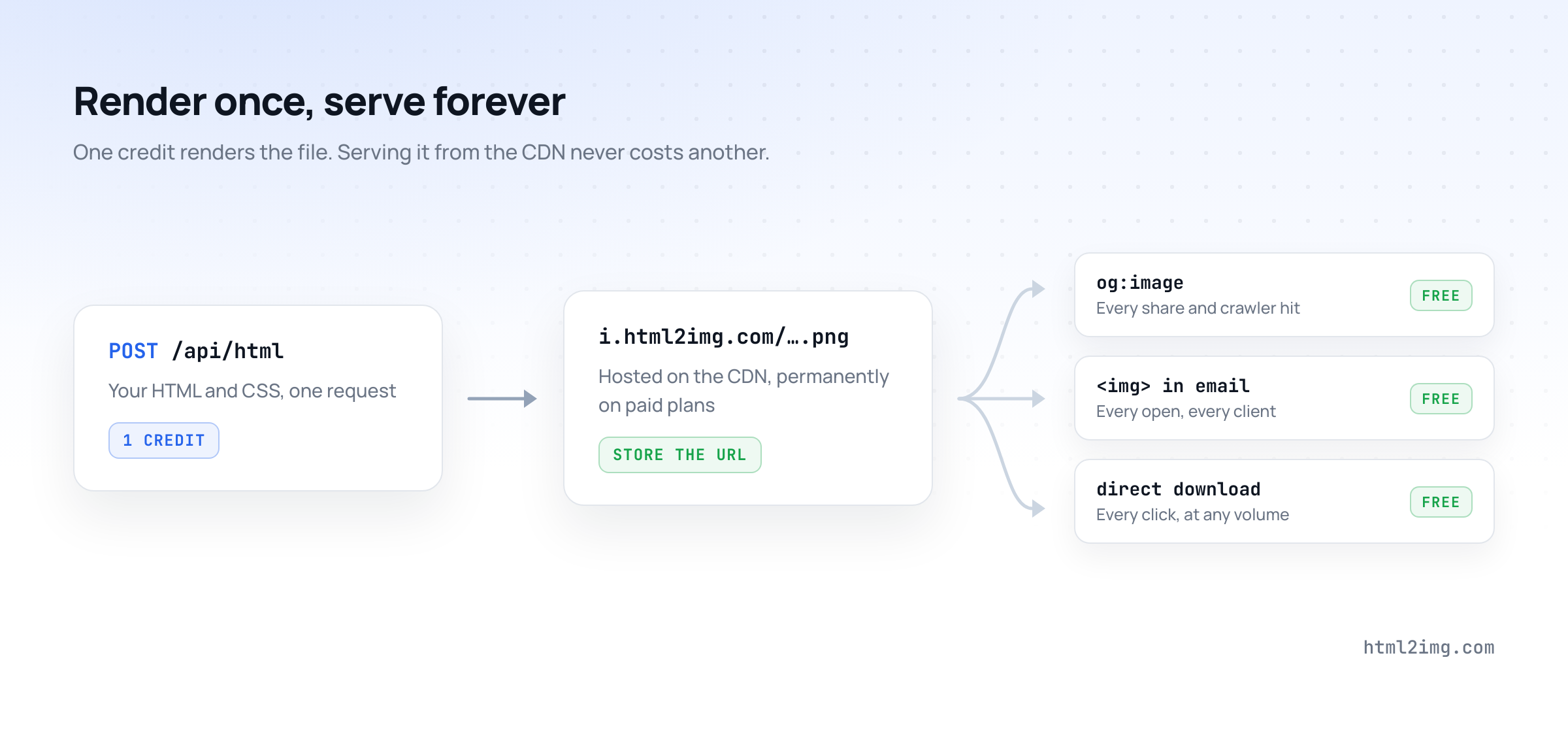
HTML to Image uses the first model, deliberately. One credit renders one file, the response is a URL on the i.html2img.com CDN, and downloads are free and unlimited. A card shared ten thousand times cost one render. On the pricing page that works out at $9 a month for 1,000 renders and $25 for 3,000, and at every published tier it undercuts htmlcsstoimage's equivalent plan.
Two smaller pricing questions worth asking while you are there. First, how the free tier works: 50 credits available immediately with no card is a different trial experience from a drip-fed monthly allowance that runs out mid-test. Second, how long rendered files are hosted. On HTML to Image, renders made on a paid plan stay live permanently, so the URL you store in an og:image tag today is still valid in five years.
For the full build-versus-buy arithmetic, including why the infrastructure was never the expensive part, see the real cost of generating OG images yourself.
Images are half the job: ask about PDF early
Nearly every team that starts with images ends up needing documents. The invoice that renders beautifully as a PNG for the email body needs a PDF attachment. The certificate needs a printable version. The report needs pagination.
At that point you either have one vendor or two, and two means a second API key, a second billing relationship, a second set of failure modes and, worst of all, two template systems drifting apart. The alternative most teams reach for first, a self-hosted PDF library, has its own problems: wkhtmltopdf is dead and unpatched, and dompdf cannot handle modern CSS.
So ask the PDF question during evaluation even if you do not need it yet. Does the service produce PDFs at all? From the same endpoint and the same template as the image? Does a PDF cost more than a PNG? On HTML to Image the answer is one API and one template with format: "pdf" on the request, and a PDF costs the same single credit as an image. Real print concerns like controlling page breaks are handled in CSS, the way they should be.
Templates: visual editors versus raw HTML
There is a fork in this product category and you should know which side of it you are standing on.
One family of products, Bannerbear and Placid among them, is built around a visual template editor. You design a card in their drag-and-drop tool, define variable layers and call the API with values for each layer. This is genuinely the right shape for marketing teams without engineers: nobody writes markup, and non-technical staff can adjust a template on their own. The cost is that your templates live inside someone else's editor, version control is whatever the vendor provides and your design system's CSS cannot come with you. The Bannerbear comparison covers the trade in detail.
The other family, where HTML to Image sits, is code-first. Your template is HTML and CSS, which means it is a file in your repository, reviewed in pull requests, generated by Blade or ERB or JSX, styled by the same Tailwind config as your product and diffable when someone changes it. If you have engineers, this is almost always the better long-term position, because the template layer is real code rather than a parallel design tool to maintain.
The useful middle ground is named templates: store a template with the service once, then send only the variables on each render. HTML to Image supports templates with variables and ships twenty-five ready-made ones, from OG cards to event tickets, available on every plan including the free tier. They are a fast way to evaluate output quality before you write a line of your own markup.
The integration surface
A bare HTTP endpoint is table stakes. What you are really evaluating is how much glue code stands between the service and your stack.
Check for a real SDK in your language, not just a curl example rewritten in ten syntaxes. HTML to Image ships a JavaScript SDK, a PHP SDK and a first-class Laravel package, with worked guides for Python, Rails, React and Vue. If you are on a CMS, look for platform integrations: there are guides for WordPress and a Statamic addon that automates OG images entirely.
One integration question did not exist two years ago and now belongs on the list: can your AI tools use the service? HTML to Image runs an MCP server on every paid plan, which means Claude, Cursor and other MCP-capable assistants can render images directly during a session, using your existing API key as the connection token and the same credit pool as the REST API. If part of your content pipeline is agentic, and increasingly it is, an API your agents can call without custom tooling stops being a novelty and starts being a requirement.
The production details that only show up later
These are the questions that never make it into a feature grid and decide whether week three is quiet or not.
Pages that draw themselves with JavaScript. If your template fetches data client-side or renders a chart on load, a naive renderer captures the loading state. Look for wait_for_selector, which holds capture until a specific element exists, and ms_delay as the blunt fallback.
Retina output. A 1200×630 card looks soft on a high-density screen. A dpi parameter renders at 2× or higher without you maintaining two templates.
Element cropping and full-page capture. A selector parameter captures one element instead of the viewport, and fullpage captures the entire scroll height when you do not know it in advance.
Async delivery. Rendering in a request cycle is fine until it is not. A webhook option lets you fire off a render and get the URL delivered when it is done, which is how bulk regeneration jobs should work.
Where the bytes live. Some APIs return image data and leave storage to you, which quietly adds S3, a CDN and cache invalidation to your side of the project. A service that hosts output on its own CDN and hands you a permanent URL removes that entire workstream.
How failure looks. This one is easy to test and almost nobody does. Send a deliberately broken request during the trial. A good API returns a validation error that names the field. A bad one returns HTTP 200 and a white rectangle, and pixels fail politely, so nobody notices until a launch post unfurls blank on LinkedIn. HTML to Image validates requests and tells you which field is wrong, which is exactly what you want at 2am.
When you do not need an API at all
Credibility check: sometimes the answer to this category is no, and it is worth naming when.
If your cards are simple, your platform is Vercel and your volume is huge, Satori at the edge is fast, cheap and good enough, provided you accept the CSS subset and own the font and emoji plumbing. If you already run a headless browser fleet for scraping or testing, with an engineer whose job it is, rendering images on it rides on maintenance you are paying for anyway. If compliance keeps the render path inside your network, self-hosting is the requirement, not a choice. And at millions of renders a month, steady and predictable, per-render pricing eventually loses to owned infrastructure.
If none of those describe you, the choice is not between free and paid. Running Puppeteer yourself has a real monthly cost in engineering hours that exceeds the price of any plan on this page, and the arithmetic is written out, with numbers, in the OG image cost breakdown and the side-by-side with self-hosted Puppeteer.
Ten questions to put to any provider
Send these with your trial, or better, test them yourself before talking to anyone.
What engine renders the HTML, and is it a full browser?
Here is my hardest real template, with grid, custom fonts and emoji. Render it.
What does serving an image cost after the render?
Does a PDF cost the same as a PNG, from the same template?
How long are rendered files hosted, and on whose CDN?
Is there an SDK for my stack, or am I writing HTTP glue?
How do I capture a page that draws itself with JavaScript?
Can I crop to a CSS selector and render at retina density?
What does a failed render return: a named error or a blank image?
Can my AI tools call this over MCP with the same key?
Any service that answers all ten cleanly is worth your time. Most will go quiet somewhere between four and nine.
How HTML to Image answers them
Since this is our blog, here is our own scorecard against the list, stated plainly so you can check every claim on a free account.
Rendering is real Chromium, so what works in your browser works in the render: grid, variable fonts, emoji, JavaScript, the CSS your design system actually uses. Pricing is per render with free unlimited serving, PNGs and PDFs cost the same single credit and files rendered on a paid plan are hosted permanently on the CDN. Plans start at $9 a month for 1,000 renders, the free tier gives you 50 credits immediately with no card and every plan includes all twenty-five named templates. Integration runs from raw HTTP through the JavaScript and PHP SDKs and the Laravel package to the MCP server on every paid plan. Selector cropping, full-page capture, retina output, JavaScript waits and webhooks are all standard parameters, and a bad request gets you a validation error that names the field.
The whole thing collapses into one call:
curl -X POST https://app.html2img.com/api/html \
  -H "Authorization: Bearer YOUR_API_KEY" \
  -H "Content-Type: application/json" \
  -d '{
    "html": "<div class=\"card\"><h1>Ship the card, skip the browser fleet</h1></div>",
    "width": 1200,
    "height": 630
  }'
Running this in production? Get an API key with 50 free credits, no card needed.
The response is a permanent CDN URL, ready to drop into an og:image tag, an email or an invoice.
One last proof point on method. The two diagrams in this article are not design-tool exports. Each one is a hand-written HTML file rendered to a PNG by the same API this article describes, one credit apiece, hosted at the i.html2img.com URLs your browser just fetched. The evaluation test from earlier, run your real markup through the trial, is the same test we passed to illustrate our own guide.
Ready to run the ten questions against a real account? Browse the templates gallery to see the output quality, or read the docs and put your hardest template through the free tier.

Written by
Mike Griffiths
Mike has spent the last 20 years crafting software solutions for all kinds of amazing businesses. He specializes in building digital products and APIs that make a real difference. As an expert in Laravel and a voting member on the PHP language, Mike helps shape the future of web development.