social template

Facebook Post Image API

Send post title and CTA as JSON, get back a 1200x630 PNG sized for the Facebook feed.

Facebook Post Image template preview, a social image generated by the HTML to Image API

Local businesses, e-commerce stores, and agencies running Facebook pages use the Facebook post image API to ship feed cards without designing each one in Canva. The 1200x630 ratio matches Facebook's feed share image recommendation, and the layout reads cleanly on both desktop and mobile feed views. You post the title, eyebrow, and CTA copy as JSON, and the response holds a PNG ready to attach to a page post, scheduled via Meta Business Suite or the Graph API.

API reference

View the Facebook Post Image API reference

Inputs, defaults, error responses and cURL, PHP, Node and Python code samples.

Read the docs →

Use cases

E-commerce stores producing per-product feed images

Shopify and WooCommerce stores that promote individual products on Facebook benefit from per-SKU images rather than a stock store banner. Loop through your featured products, render a card for each with the product name and CTA, and queue the posts in Meta Business Suite. Riverside Bakery promotes 4 products per week through this flow, and each post performs better than the previous era of sharing the storefront photo with a generic caption.

News outlets sharing articles to a Facebook page

Local news pages benefit from a clean editorial card per article in addition to the link unfurl. Render with the headline, byline, and section badge, attach to the page post, and the result reads as published journalism rather than a personal share. Northwind Weekly uses this for 12 articles per week and the engagement on the page has roughly doubled since the rollout.

Event pages promoting upcoming dates

Community pages and venues promoting events publish reminder cards in the lead-up to each date. Render with the event title, the date, and a CTA to RSVP, schedule across the campaign window, and attendance climbs because supporters see the event multiple times before committing. The Type Conference posts 8 reminder cards across the 6 weeks before the event.

Agencies running organic content for clients

Agencies managing 12+ client pages need a system that produces brand-consistent posts at scale. Use this endpoint with per-client accent colors, logos, and fonts, and the agency can ship a week's worth of posts for every client in a single afternoon. Halberd Software's social agency arm publishes 240 posts per week for 18 clients via this pipeline.

Local businesses sharing offers

Coffee shops, salons, and small retailers can post offer cards without booking a designer for each promotion. Render with the offer headline, expiry, and CTA, attach to the page post, and the card carries enough information that interested customers can act without needing to message the page. Linden & Co's clients run promotions monthly through this flow.

Output specifications

Dimensions
1200x630
Color space
sRGB
Transparency
Not supported
File size range
60 KB to 180 KB

Matches the spec at Meta feed share image guidelines.

How it works

1

Send a JSON payload

POST to the template endpoint with the values you want rendered. Authenticate with your API key.

2

We render the image

The template is rendered server-side as a 1200x630 PNG.

3

You get back a URL

Cache it, embed it in your page, attach it to an email.

Quick example

A single cURL call to render a Facebook Post Image as a PNG:

curl -X POST https://app.html2img.com/api/v1/templates/facebook-post \
  -H "X-API-Key: YOUR_API_KEY" \
  -H "Content-Type: application/json" \
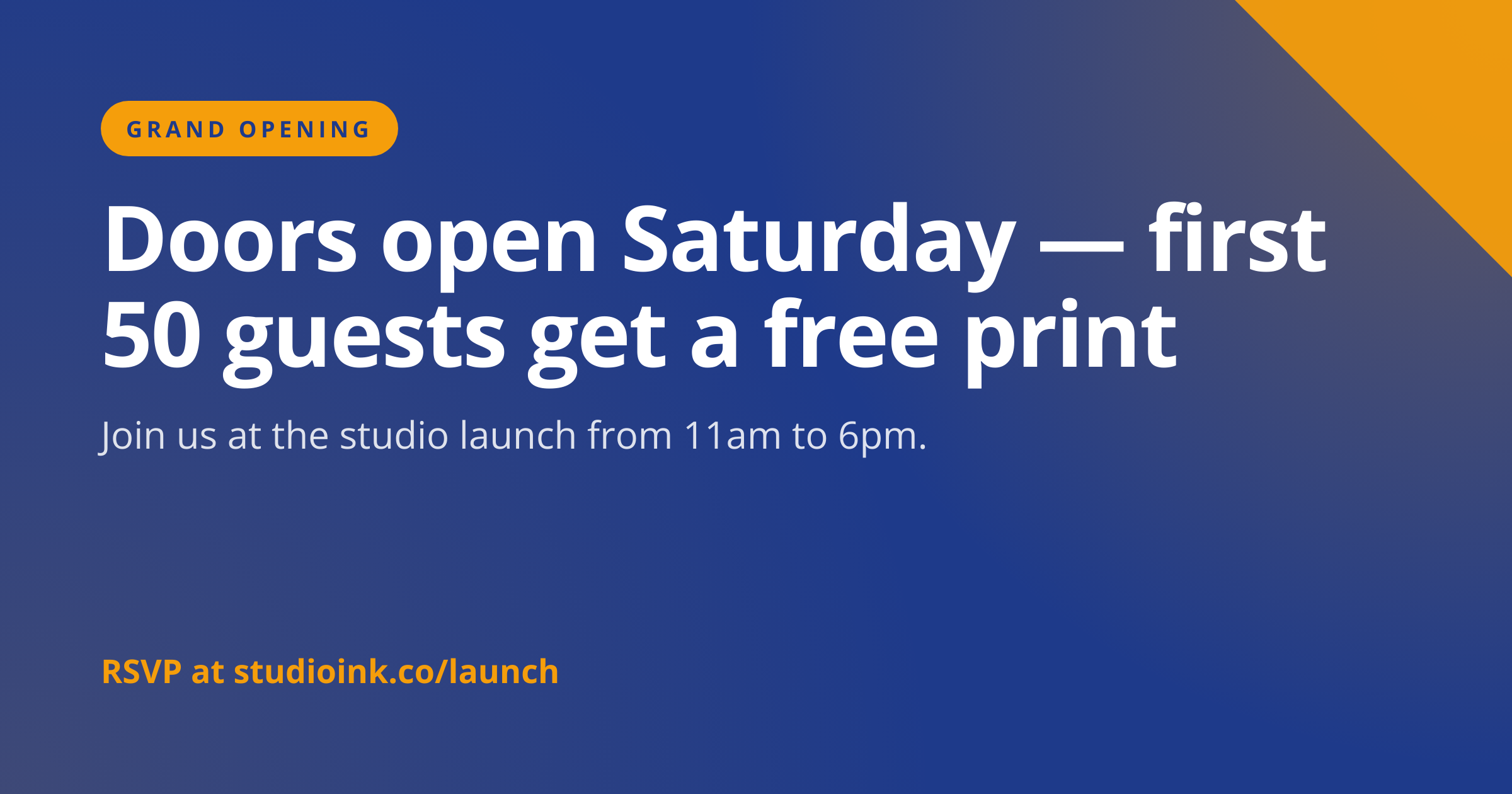
  -d '{"title":"Doors open Saturday \u2014 first 50 guests get a free print","subtitle":"Join us at the studio launch from 11am to 6pm.","eyebrow":"GRAND OPENING","cta":"RSVP at studioink.co/launch","background_color":"#1E3A8A","accent_color":"#F59E0B"}'

For the full PHP, Node and Python equivalents, plus every input the template accepts, see the Facebook Post Image API reference. Setting up your key is covered in the authentication guide.

Common pitfalls

High text density hurts ad delivery

Facebook removed the 20 percent text rule in 2020, but ad-delivery algorithms still favor images with less text. Keep on-image copy concise (under 30 words across title and CTA) so paid distribution stays cost-effective.

Confusing post-attached images with link share previews

A link share unfurl reads the og:image of the destination URL, not the image attached to the post. For link previews, use the open-graph-image template and set og:image on the destination page, since post-attached images do not appear when a link is shared.

Mobile and desktop crop slightly differently

Mobile feed crops at the top and bottom while desktop preserves the full 1.91:1. Keep the focal area centered vertically so both crops show the headline and brand mark. Test on both surfaces before scheduling a campaign.

Inputs at a glance

A quick summary of what the Facebook Post Image template accepts. The full reference, with example values and array shapes, is in the docs.

Name Type Required
title string Required
subtitle string Optional
eyebrow string Optional
cta string Optional
logo_url url Optional
background_color string Optional
accent_color string Optional

See the full inputs reference for descriptions, examples and validation rules.

Related templates

Other templates in the social media category.

Browse by category

A starting point from each of the other two template categories.

Content and marketing

See the full template gallery for every design grouped by category.

Related guides

FAQ

Try it free

25 renders a month on the free tier. See the pricing page for higher-volume plans.