content template

Email Header API

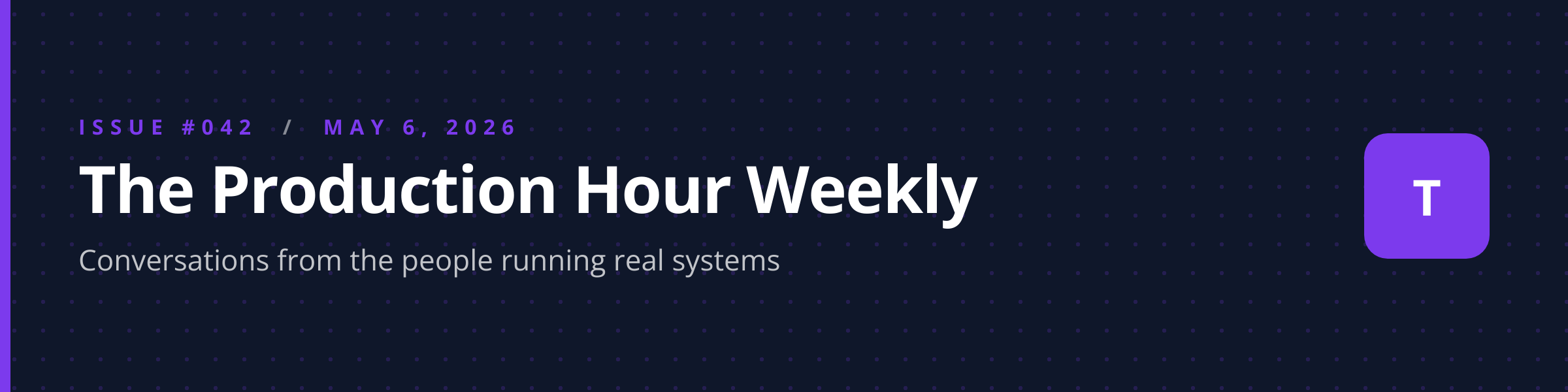
Send title and issue metadata as JSON, get back a 1200x300 PNG sized for email banners.

Email Header template preview, a content image generated by the HTML to Image API

Newsletter publishers and transactional email systems use the email header image generator to ship per-issue banner art that fits cleanly inside Mailchimp, ConvertKit, Brevo, and other ESP templates. The 4:1 ratio matches the wide banner slot most email tools expose at the top of the body, and the layout adapts to issue numbers, dates, and brand logos. You post the title, optional issue number, and brand inputs as JSON, and the response holds a PNG ready to drop into your campaign builder.

Use cases

Newsletter publishers automating per-issue banners

Newsletter operators sending weekly issues benefit from a unique banner per issue rather than reusing one stock graphic. Render with the issue number, headline topic, and accent_color from your brand kit, attach the URL to the campaign template, and each issue ships with fresh artwork. The Production Hour Weekly automates this through a script that runs on Tuesday mornings and produces 52 unique banners a year.

Transactional emails matching banner to message type

Welcome emails, password resets, and receipts benefit from banners that match the message intent rather than reusing a marketing banner. Render variants with type-specific copy ("Welcome", "Reset your password", "Your receipt") and the message reads as deliberate transactional design rather than recycled marketing. Halberd Software ships 8 transactional types through this template across its product flows.

Seasonal campaign banners

Holiday and seasonal campaigns benefit from banners that reflect the season without redesigning the entire email template. Render with the campaign theme as the title and a seasonal accent_color, attach to the existing template body, and the email reads as season-appropriate without designer involvement. Riverside Bakery ships 12 seasonal campaign banners per year through this exact pattern.

Partner co-branded emails

Partner programs that send joint emails benefit from banners that carry both brand marks. Render with two logo URLs combined or with a partnership-specific accent_color, attach to the joint email template, and both partners ship co-branded artwork that reads as intentional collaboration. Linden & Co's 14 partner programs use this for monthly co-marketing pushes.

Internal company comms

Internal newsletters from leadership, HR, or operations benefit from banners that distinguish the source. Render with the team or department name as the title and a department accent_color, attach to internal email templates, and employees can identify the source at a glance. Wren Analytics ships internal updates from 6 departments through this template, with consistent color-coding across the org.

Output specifications

Dimensions
1200x300
Color space
sRGB
Transparency
Supported
File size range
30 KB to 100 KB

Matches the spec at 4:1 landscape banner for ESP body templates.

How it works

1

Send a JSON payload

POST to the template endpoint with the values you want rendered. Authenticate with your API key.

2

We render the image

The template is rendered server-side as a 1200x300 PNG.

3

You get back a URL

Cache it, embed it in your page, attach it to an email.

Quick example

A single cURL call to render a Email Header as a PNG:

curl -X POST https://app.html2img.com/api/v1/templates/email-header \
  -H "X-API-Key: YOUR_API_KEY" \
  -H "Content-Type: application/json" \
  -d '{"title":"The Production Hour Weekly","subtitle":"Conversations from the people running real systems","issue_number":"Issue #042","publication_date":"May 6, 2026","background_pattern":"dots","accent_color":"#7C3AED","background_color":"#0F172A"}'

For the full PHP, Node and Python equivalents, plus every input the template accepts, see the Email Header API reference. Setting up your key is covered in the authentication guide.

Common pitfalls

Dark mode email clients invert backgrounds

A banner designed for a white email body background can break in dark mode when the client inverts surrounding colors. Test in Gmail dark mode and Outlook dark mode, and use a transparent background with dark-mode-safe text colors so the banner adapts to either viewing surface.

Retina rendering looks soft when served at 1x

Email clients on retina displays render images at 2x physical pixels. A 1x banner at 1200x300 looks soft on these screens. Render at 2x DPI by setting dpi=2 on the underlying API for retina-clean results, and the file size still stays manageable.

Wide titles overflow on mobile email clients

Mobile email scales the email body to fit a single column, which can compress a wide title to unreadable size. Keep titles under 50 characters or test in your top three email clients before scheduling a campaign that depends on the title being legible.

Inputs at a glance

A quick summary of what the Email Header template accepts. The full reference, with example values and array shapes, is in the docs.

Name Type Required
title string Required
subtitle string Optional
issue_number string Optional
publication_date string Optional
background_pattern enum Optional
accent_color string Optional
background_color string Optional
brand_logo_url url Optional

See the full inputs reference for descriptions, examples and validation rules.

Related templates

Related guides

FAQ

Try it free

25 renders a month on the free tier. See the pricing page for higher-volume plans.