The Invoice Image Generator renders an invoice as a PNG sized for the email body, typically 600 pixels wide to match the dominant email template width. The image embeds inline in the email so the recipient sees the invoice the moment they open the message, rather than needing to download a PDF attachment first. The same generator outputs a matching PDF for the cases where the recipient needs the formal document, which makes the PNG a preview rather than a replacement for the attachment.
The use case is specifically email deliverability and previewing. Most invoicing tools attach a PDF and leave the email body blank, which means the recipient sees nothing in the message preview, has to download an attachment to see what they have been sent, and sometimes loses the email to spam filtering because attachment-only messages score poorly. Embedding the invoice as an image in the body fixes all three: the preview shows the amount and the due date, the recipient sees the invoice without downloading anything, and the email scores better with filters because it has substantive body content.
How it works
Provide the invoice data as JSON
Pass the invoice number, the issue date, the due date, the line items, the totals, the tax breakdown, and the payment details as a JSON payload. The renderer treats every field as required where the invoice category needs it (line items, totals, dates) and optional where the field varies by jurisdiction (VAT number, registered office address).
Pick the template and branding
Choose from the built-in templates (minimal, traditional, modern bordered, or branded) and set the brand colour and logo. The template controls the layout and the typography, and the brand details overlay the chosen template without changing its structure.
Render the PNG and the PDF together
The same render produces a PNG at 600 pixels wide (for email body embedding) and a PDF at A4 (for the formal attachment). Both render from the same source data, so any change to the underlying invoice produces a matching pair without configuration drift.
Embed in the email body
Copy the hosted PNG URL into the email HTML as an <img> source with explicit width and height attributes. Most email clients display the image inline immediately, and recipients see the invoice in the body without needing to download the attachment first.
When to use it
Service businesses with monthly recurring invoices
Agencies, accountancies, and service businesses that send dozens of monthly invoices benefit from embedding the invoice in the email body. Clients see the amount and the due date the moment they open the email, the open and pay times shorten measurably, and the same email also carries the PDF as the formal record.
SaaS billing emails with line-item context
SaaS platforms that bill monthly with usage-based line items benefit from showing the breakdown inline rather than expecting the customer to download a PDF. The embedded image shows which line item drove the increase from last month, which removes a class of support ticket and surfaces the value the customer received.
Marketplace seller payouts and statements
Marketplaces that pay sellers on a regular cycle benefit from sending a payout statement that shows the breakdown inline. The seller sees the gross, the fees, and the net at a glance, and the same image acts as a permanent record they can search in their inbox later.
Hospitality and event invoicing
Hospitality venues and event businesses that send invoices to corporate clients benefit from a branded inline invoice that signals professionalism. The corporate client forwards the email to accounts payable, the inline image survives the forward (where attachments sometimes get stripped), and the invoice moves through the AP queue faster.
Membership and subscription renewals
Membership organisations that renew annually benefit from a renewal email that includes the invoice inline. The member sees the renewal amount and the period covered without needing to open an attachment, the renewal rate lifts measurably, and the email body provides natural surface area for a renewal call-to-action.
Examples
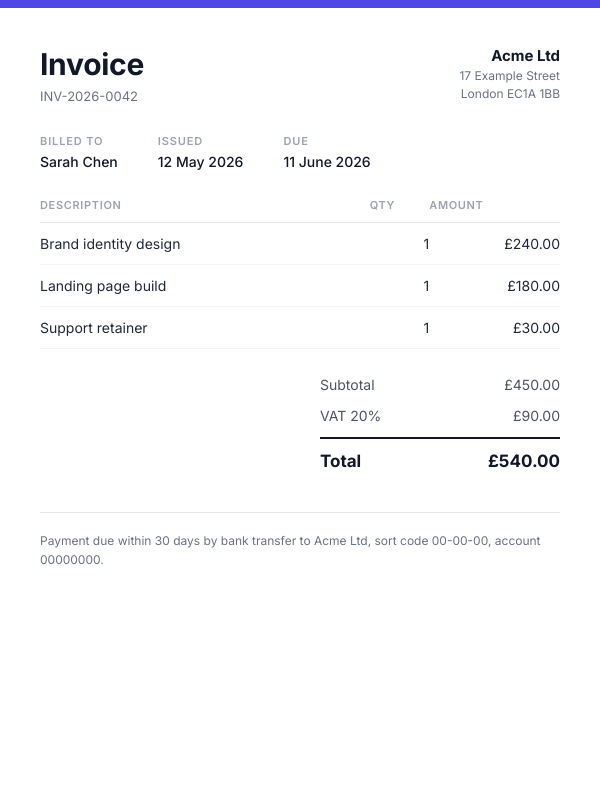
Minimal template, brand-coloured header
White body with a thin brand-coloured header band, line items in a clean table, totals right-aligned, and payment details at the bottom. The default for software and modern service businesses.
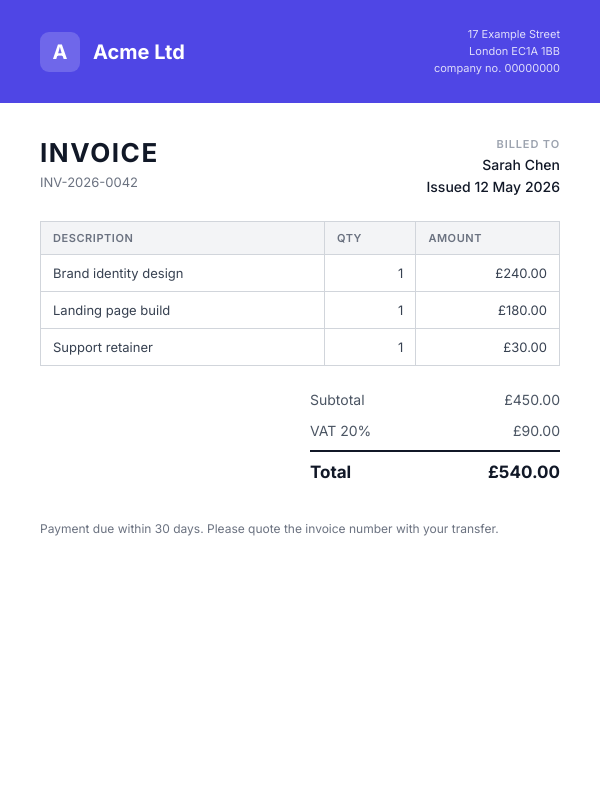
Traditional template with full-width brand band
Full-width branded header with the logo and the company details, then a classic bordered table for the line items and totals. Suits established service businesses and professional firms.
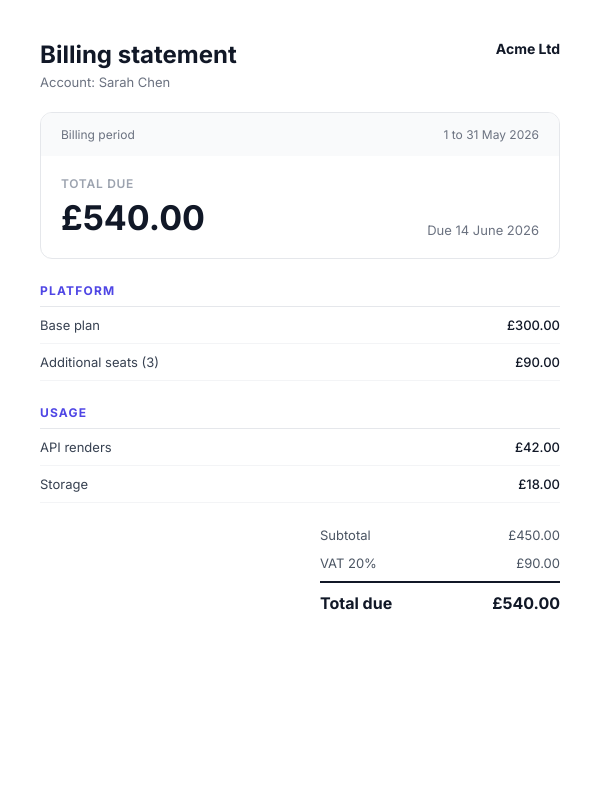
Statement-style summary for SaaS billing
Summary box at the top with the period covered, the total due, and the due date, followed by the line-item breakdown grouped by product or feature. Built for usage-based and subscription billing.
Use it from your code
The Invoice Image Generator runs on the HTML to Image API, and so can you. Every snippet below is a
complete request: swap YOUR_API_KEY for a key from your dashboard and it runs
as-is. The response carries a url for the finished file.
curl -X POST https://app.html2img.com/api/v1/templates/invoice-image \
  -H "X-API-Key: YOUR_API_KEY" \
  -H "Content-Type: application/json" \
-d '{"invoice_number":"INV-2026-0042","issue_date":"Apr 30, 2026","due_date":"May 30, 2026","business_name":"Northwind Studio Ltd","business_address":"12 Bishopsgate\nLondon EC2N 4AT\nUnited Kingdom","business_email":"[email protected]","client_name":"Linden & Co","client_address":"548 Market Street\nSan Francisco, CA 94104\nUSA","client_email":"[email protected]","items":[{"description":"Brand identity design","quantity":"1","unit_price":"$4,800.00","amount":"$4,800.00"},{"description":"Landing page build (8 sections)","quantity":"1","unit_price":"$3,200.00","amount":"$3,200.00"},{"description":"Photography retainer","quantity":"6","unit_price":"$420.00","amount":"$2,520.00"}],"subtotal":"$10,520.00","tax_label":"VAT (20%)","tax_amount":"$2,104.00","total":"$12,624.00","notes":"Payment due within 30 days. Wire transfer details on file.","accent_color":"#0F766E"}'<?php
$payload = [
'invoice_number' => 'INV-2026-0042',
'issue_date' => 'Apr 30, 2026',
'due_date' => 'May 30, 2026',
'business_name' => 'Northwind Studio Ltd',
'business_address' => '12 Bishopsgate\nLondon EC2N 4AT\nUnited Kingdom',
'business_email' => '[email protected]',
'client_name' => 'Linden & Co',
'client_address' => '548 Market Street\nSan Francisco, CA 94104\nUSA',
'client_email' => '[email protected]',
'items' => [
[
'description' => 'Brand identity design',
'quantity' => '1',
'unit_price' => '$4,800.00',
'amount' => '$4,800.00',
],
[
'description' => 'Landing page build (8 sections)',
'quantity' => '1',
'unit_price' => '$3,200.00',
'amount' => '$3,200.00',
],
[
'description' => 'Photography retainer',
'quantity' => '6',
'unit_price' => '$420.00',
'amount' => '$2,520.00',
],
],
'subtotal' => '$10,520.00',
'tax_label' => 'VAT (20%)',
'tax_amount' => '$2,104.00',
'total' => '$12,624.00',
'notes' => 'Payment due within 30 days. Wire transfer details on file.',
'accent_color' => '#0F766E',
];
$ch = curl_init('https://app.html2img.com/api/v1/templates/invoice-image');
curl_setopt_array($ch, [
CURLOPT_POST => true,
CURLOPT_RETURNTRANSFER => true,
CURLOPT_HTTPHEADER => [
'X-API-Key: YOUR_API_KEY',
'Content-Type: application/json',
],
CURLOPT_POSTFIELDS => json_encode($payload),
]);
$response = json_decode(curl_exec($ch), true);
curl_close($ch);
echo $response['url'];const response = await fetch('https://app.html2img.com/api/v1/templates/invoice-image', {
method: 'POST',
headers: {
'X-API-Key': 'YOUR_API_KEY',
'Content-Type': 'application/json',
},
body: JSON.stringify({
"invoice_number": "INV-2026-0042",
"issue_date": "Apr 30, 2026",
"due_date": "May 30, 2026",
"business_name": "Northwind Studio Ltd",
"business_address": "12 Bishopsgate\nLondon EC2N 4AT\nUnited Kingdom",
"business_email": "[email protected]",
"client_name": "Linden & Co",
"client_address": "548 Market Street\nSan Francisco, CA 94104\nUSA",
"client_email": "[email protected]",
"items": [
{
"description": "Brand identity design",
"quantity": "1",
"unit_price": "$4,800.00",
"amount": "$4,800.00"
},
{
"description": "Landing page build (8 sections)",
"quantity": "1",
"unit_price": "$3,200.00",
"amount": "$3,200.00"
},
{
"description": "Photography retainer",
"quantity": "6",
"unit_price": "$420.00",
"amount": "$2,520.00"
}
],
"subtotal": "$10,520.00",
"tax_label": "VAT (20%)",
"tax_amount": "$2,104.00",
"total": "$12,624.00",
"notes": "Payment due within 30 days. Wire transfer details on file.",
"accent_color": "#0F766E"
}),
});
const { url } = await response.json();
console.log(url);import requests
response = requests.post(
'https://app.html2img.com/api/v1/templates/invoice-image',
headers={'X-API-Key': 'YOUR_API_KEY'},
json={
'invoice_number': 'INV-2026-0042',
'issue_date': 'Apr 30, 2026',
'due_date': 'May 30, 2026',
'business_name': 'Northwind Studio Ltd',
'business_address': '12 Bishopsgate\nLondon EC2N 4AT\nUnited Kingdom',
'business_email': '[email protected]',
'client_name': 'Linden & Co',
'client_address': '548 Market Street\nSan Francisco, CA 94104\nUSA',
'client_email': '[email protected]',
'items': [
{
'description': 'Brand identity design',
'quantity': '1',
'unit_price': '$4,800.00',
'amount': '$4,800.00',
},
{
'description': 'Landing page build (8 sections)',
'quantity': '1',
'unit_price': '$3,200.00',
'amount': '$3,200.00',
},
{
'description': 'Photography retainer',
'quantity': '6',
'unit_price': '$420.00',
'amount': '$2,520.00',
},
],
'subtotal': '$10,520.00',
'tax_label': 'VAT (20%)',
'tax_amount': '$2,104.00',
'total': '$12,624.00',
'notes': 'Payment due within 30 days. Wire transfer details on file.',
'accent_color': '#0F766E',
},
)
print(response.json()['url'])using System;
using System.Collections.Generic;
using System.Net.Http;
using System.Net.Http.Json;
var client = new HttpClient();
client.DefaultRequestHeaders.Add("X-API-Key", "YOUR_API_KEY");
var payload = new
{
invoice_number = "INV-2026-0042",
issue_date = "Apr 30, 2026",
due_date = "May 30, 2026",
business_name = "Northwind Studio Ltd",
business_address = "12 Bishopsgate\nLondon EC2N 4AT\nUnited Kingdom",
business_email = "[email protected]",
client_name = "Linden & Co",
client_address = "548 Market Street\nSan Francisco, CA 94104\nUSA",
client_email = "[email protected]",
items = new object[]
{
new
{
description = "Brand identity design",
quantity = "1",
unit_price = "$4,800.00",
amount = "$4,800.00",
},
new
{
description = "Landing page build (8 sections)",
quantity = "1",
unit_price = "$3,200.00",
amount = "$3,200.00",
},
new
{
description = "Photography retainer",
quantity = "6",
unit_price = "$420.00",
amount = "$2,520.00",
},
},
subtotal = "$10,520.00",
tax_label = "VAT (20%)",
tax_amount = "$2,104.00",
total = "$12,624.00",
notes = "Payment due within 30 days. Wire transfer details on file.",
accent_color = "#0F766E",
};
var response = await client.PostAsJsonAsync("https://app.html2img.com/api/v1/templates/invoice-image", payload);
var result = await response.Content.ReadFromJsonAsync<Dictionary<string, string>>();
Console.WriteLine(result["url"]);require 'net/http'
require 'json'
uri = URI('https://app.html2img.com/api/v1/templates/invoice-image')
request = Net::HTTP::Post.new(uri)
request['X-API-Key'] = 'YOUR_API_KEY'
request['Content-Type'] = 'application/json'
request.body = {
invoice_number: "INV-2026-0042",
issue_date: "Apr 30, 2026",
due_date: "May 30, 2026",
business_name: "Northwind Studio Ltd",
business_address: "12 Bishopsgate\nLondon EC2N 4AT\nUnited Kingdom",
business_email: "[email protected]",
client_name: "Linden & Co",
client_address: "548 Market Street\nSan Francisco, CA 94104\nUSA",
client_email: "[email protected]",
items: [
{
description: "Brand identity design",
quantity: "1",
unit_price: "$4,800.00",
amount: "$4,800.00",
},
{
description: "Landing page build (8 sections)",
quantity: "1",
unit_price: "$3,200.00",
amount: "$3,200.00",
},
{
description: "Photography retainer",
quantity: "6",
unit_price: "$420.00",
amount: "$2,520.00",
},
],
subtotal: "$10,520.00",
tax_label: "VAT (20%)",
tax_amount: "$2,104.00",
total: "$12,624.00",
notes: "Payment due within 30 days. Wire transfer details on file.",
accent_color: "#0F766E",
}.to_json
response = Net::HTTP.start(uri.hostname, uri.port, use_ssl: true) do |http|
http.request(request)
end
puts JSON.parse(response.body)['url']Tips
Set width and height attributes on the img tag
Email clients render the image faster when the dimensions are declared in the HTML, and the layout does not shift as the image loads. Set width="600" and height="(actual height)" on the img tag, and the email preview pane sizes correctly even before the image data arrives.
Include alt text that summarises the invoice
The alt text serves both accessibility users and the cases where the recipient's email client blocks remote images. A useful alt text reads something like "Invoice 2026-0148 from Acme Ltd, total £1,240.00, due 30 June 2026", which carries enough detail that the recipient can act on it without seeing the image.
Still attach the PDF
The image in the body is a preview, not the formal document. Accounts payable departments need the PDF for their records, tax authorities expect the PDF on audit, and the recipient may forward the email to a different person who needs the attachment. Send both, and the recipient picks whichever they need.
Host the image somewhere with a stable URL
The hosted CDN URL for the rendered invoice stays valid for as long as the source data does not change, which means the inline image continues to work months or years later when the recipient searches their inbox for an old invoice. Avoid hosting the image at a URL that you rotate or expire, since the historical email loses its preview.
Render once at issue time and store both URLs
The image and the PDF should both be rendered at the moment the invoice is issued and stored against the invoice record in your database. Re-rendering on the fly when the recipient opens the email is slower, costs more, and risks the rendering settings drifting away from the version the recipient first saw.
Frequently asked questions
Why send an invoice as an image instead of just a PDF?
PDFs are formal documents but they live as attachments, which means the recipient sees nothing in the email body or preview pane. Embedding the invoice as an image in the body lifts the open rate, shortens the time to pay, and improves inbox previewing. The PDF still goes along as the formal record.
How wide should the image be?
Six hundred pixels wide is the standard email body width that every major template framework targets. Renders wider than 600 pixels get scaled down by some email clients in ways that soften the type, and renders narrower than 600 pixels look small and underwhelming. Stick with 600 wide and let the height adjust to fit the content.
Do all email clients display inline images?
The major ones (Gmail, Outlook, Apple Mail, Yahoo) display inline images by default for messages the user has read before. New senders sometimes hit the "block remote images" default that some clients apply to first-time messages, which is why every inline image needs a useful alt text fallback. After the first opened message from a sender, images load automatically.
Can I include payment links inside the image?
The image cannot carry clickable links inside itself (it is a flat PNG), but you can place a payment button beneath the image in the email body that links to the payment page. The image surfaces the amount and the due date, and the button next to it takes the recipient to the payment surface in one click.
What about VAT numbers and required invoice fields?
The renderer passes through every field you provide in the JSON, including VAT number, registered office, company number, and any jurisdiction-specific required fields. The legal compliance of the invoice content is the issuing business's responsibility; the renderer just lays out whatever you give it.
Does the same renderer produce PDFs?
Yes, the same JSON payload can render to PDF as well as PNG. Most teams call the renderer twice (once for PNG, once for PDF) at issue time and store both URLs against the invoice record. The two formats stay in sync because they render from the same source data.
Can the image include payment status updates?
The rendered image is static at the moment of render, so it does not update when the invoice gets paid. For status that needs to stay live (such as showing "paid" once payment lands), re-render the image at the status change and update the stored URL. Most teams treat the original image as the issue-time snapshot and rely on the payment system for current status.
Related guides
Invoice PDF API: Generate Invoice and Receipt PDFs from HTML
Invoice PDF API guide: generate invoice and receipt PDFs from HTML or a JSON template with one request. Real A4 output, selectable text, embedded fonts.
HTML Invoice to Image in Laravel: A Working Setup
Rendering invoices as PNGs that actually look professional. Laravel Blade templates, a clean API call, and no Puppeteer to maintain.
More tools
HTML to PDF Converter
Paste an HTML document and get back an A4 PDF with selectable text and embedded fonts.
Markdown to Image Converter
Paste Markdown and get back a styled PNG, headings, tables, code blocks and all.
Open Graph Checker
Fetch any public URL and see exactly how its share preview renders across six platforms.