developer template

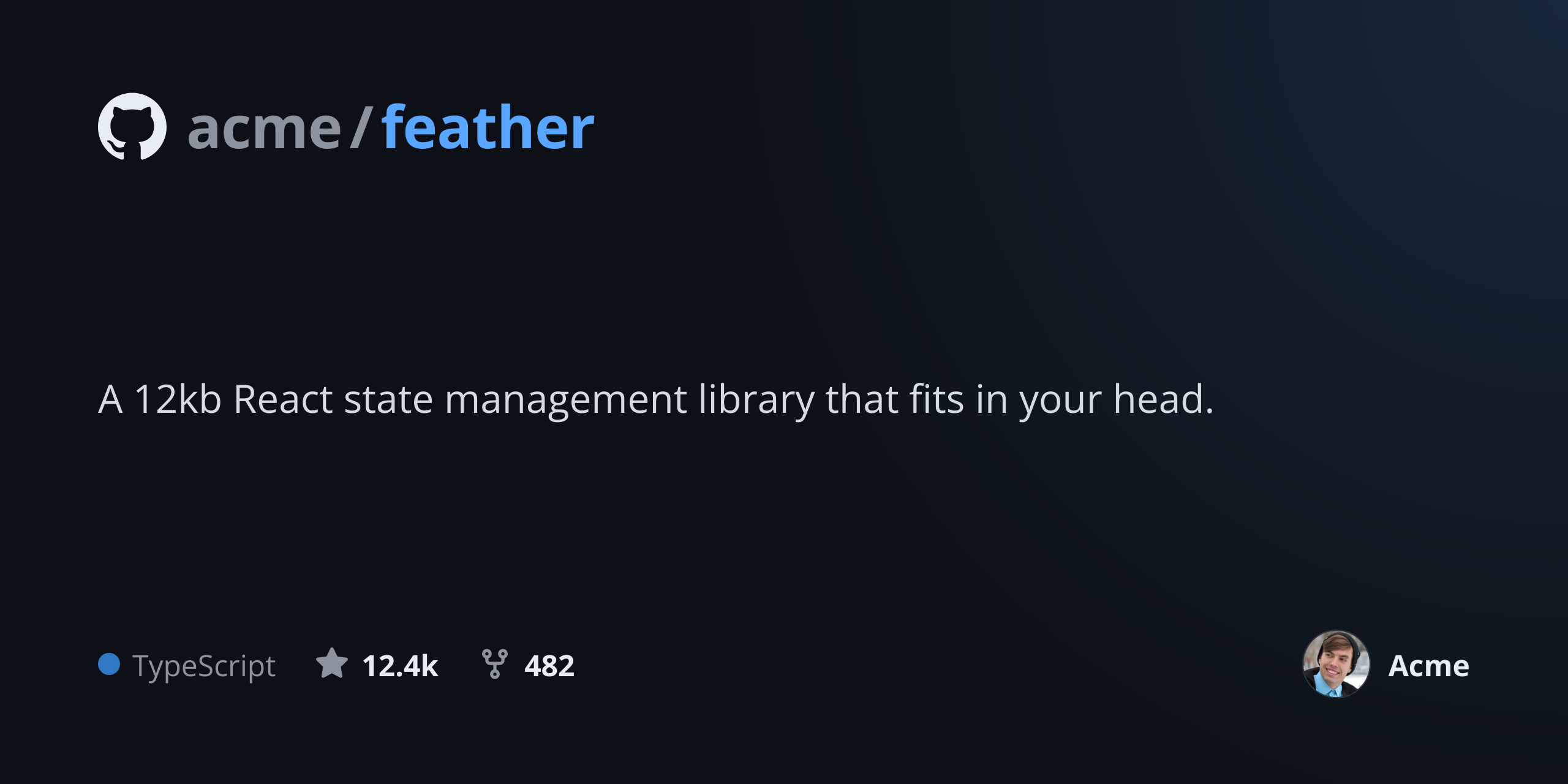
GitHub Social Preview API

Send repo name, language, and stars as JSON, get back a 1280x640 PNG ready for the Social preview field.

GitHub Social Preview template preview, a developer image generated by the HTML to Image API

Open source maintainers and developer marketing teams use the GitHub social preview generator API to keep repository preview images fresh after releases, language tag changes, or org-wide rebrands. The 1280x640 output matches the field GitHub exposes under Settings > Social preview, and the layout includes the language badge, star count, and owner avatar that visitors expect to see. You post repo metadata as JSON and receive a PNG you can upload via the GitHub UI or the REST API.

API reference

View the GitHub Social Preview API reference

Inputs, defaults, error responses and cURL, PHP, Node and Python code samples.

Read the docs →

Use cases

Maintainers auto-generating previews from repo metadata

Maintainers of small package repos refresh the social preview after every minor release. Pull the latest stars and primary language from the GitHub API, post to this endpoint, and upload the resulting PNG via the repos REST API. The preview stays current without you remembering to redesign it. Halberd Software's 14 open source packages all run this update on tag-push, and the rendered cards take about 1.2 seconds each.

Package authors keeping previews fresh after releases

Authors of npm packages or PyPI libraries benefit from a preview that shows the current version. Pass the version string to a custom field in your wrapper, render, and upload. Visitors clicking from a tweet or Slack unfurl land on a repo where the preview matches what they expected. Wren Analytics maintains 22 packages this way and reports a 16 percent uplift in clone-from-tweet rate.

Organizations standardizing previews across repos

Companies with 60 internal-but-public repos can apply a single visual treatment by looping the org's repo list through this endpoint. Each render uses the org logo, accent color, and font choice, while the per-repo data (name, language, description, star count) varies between requests. The result reads as one organization's output across the whole portfolio rather than 60 different design choices stitched together.

Developer marketing pages embedding repo cards

Marketing pages that highlight open source work benefit from card images that look like GitHub but live on your domain. Render once at build time, embed inline, and the page loads without an external embed call. Northwind Labs lists 8 packages on its careers page through this exact pattern, and the cards render at the same fidelity as on GitHub itself.

Conference talk slides showing GitHub repos

Speakers presenting an open source project want a high-resolution slide that reads at the back of a 200-seat room. The 1280x640 PNG scales cleanly to a 16:9 slide and shows the repo name, language, and star count without the speaker switching to the GitHub UI mid-talk. Linden & Co maintainers use this for every conference appearance.

Output specifications

Dimensions
1280x640
Color space
sRGB
Transparency
Not supported
File size range
80 KB to 220 KB

Matches the spec at GitHub repository social preview dimensions.

How it works

1

Send a JSON payload

POST to the template endpoint with the values you want rendered. Authenticate with your API key.

2

We render the image

The template is rendered server-side as a 1280x640 PNG.

3

You get back a URL

Cache it, embed it in your page, attach it to an email.

Quick example

A single cURL call to render a GitHub Social Preview as a PNG:

curl -X POST https://app.html2img.com/api/v1/templates/github-social-preview \
  -H "X-API-Key: YOUR_API_KEY" \
  -H "Content-Type: application/json" \
  -d '{"repo_name":"halberd/feather","description":"A 12kb React state management library that fits in your head.","language":"TypeScript","language_color":"#3178C6","stars":"12.4k","forks":"482","owner_name":"Halberd Software","owner_avatar_url":"https://i.pravatar.cc/160?img=8","background_color":"#0D1117","accent_color":"#58A6FF"}'

For the full PHP, Node and Python equivalents, plus every input the template accepts, see the GitHub Social Preview API reference. Setting up your key is covered in the authentication guide.

Common pitfalls

GitHub does not regenerate cached previews automatically

You upload a new preview but Twitter and Slack still show the old one for hours or days. Re-upload the file (or change the URL via the API path) to force GitHub to refresh its og:image, then refresh the link in Slack manually if needed.

Language tag color mismatches GitHub badge color

Sending a generic accent color produces a badge that looks slightly off compared to the canonical color GitHub uses for that language. Pass language_color matching GitHub's linguist color list (for example, TypeScript uses #3178C6) so the card matches the actual repo page.

Owner name truncation when org and repo names are both long

A 28-character org name plus a 32-character repo name overflow the header slot on a 1280-pixel canvas. Abbreviate the org or use the short org name, since the social preview is the only place the full name needs to appear.

Inputs at a glance

A quick summary of what the GitHub Social Preview template accepts. The full reference, with example values and array shapes, is in the docs.

Name Type Required
repo_name string Required
description string Optional
language string Optional
language_color string Optional
stars string Optional
forks string Optional
owner_name string Optional
owner_avatar_url url Optional
background_color string Optional
accent_color string Optional

See the full inputs reference for descriptions, examples and validation rules.

Related templates

Other templates in the content and marketing category.

Browse by category

A starting point from each of the other two template categories.

See the full template gallery for every design grouped by category.

Related guides

FAQ

Try it free

25 renders a month on the free tier. See the pricing page for higher-volume plans.