developer template

Code Screenshot API

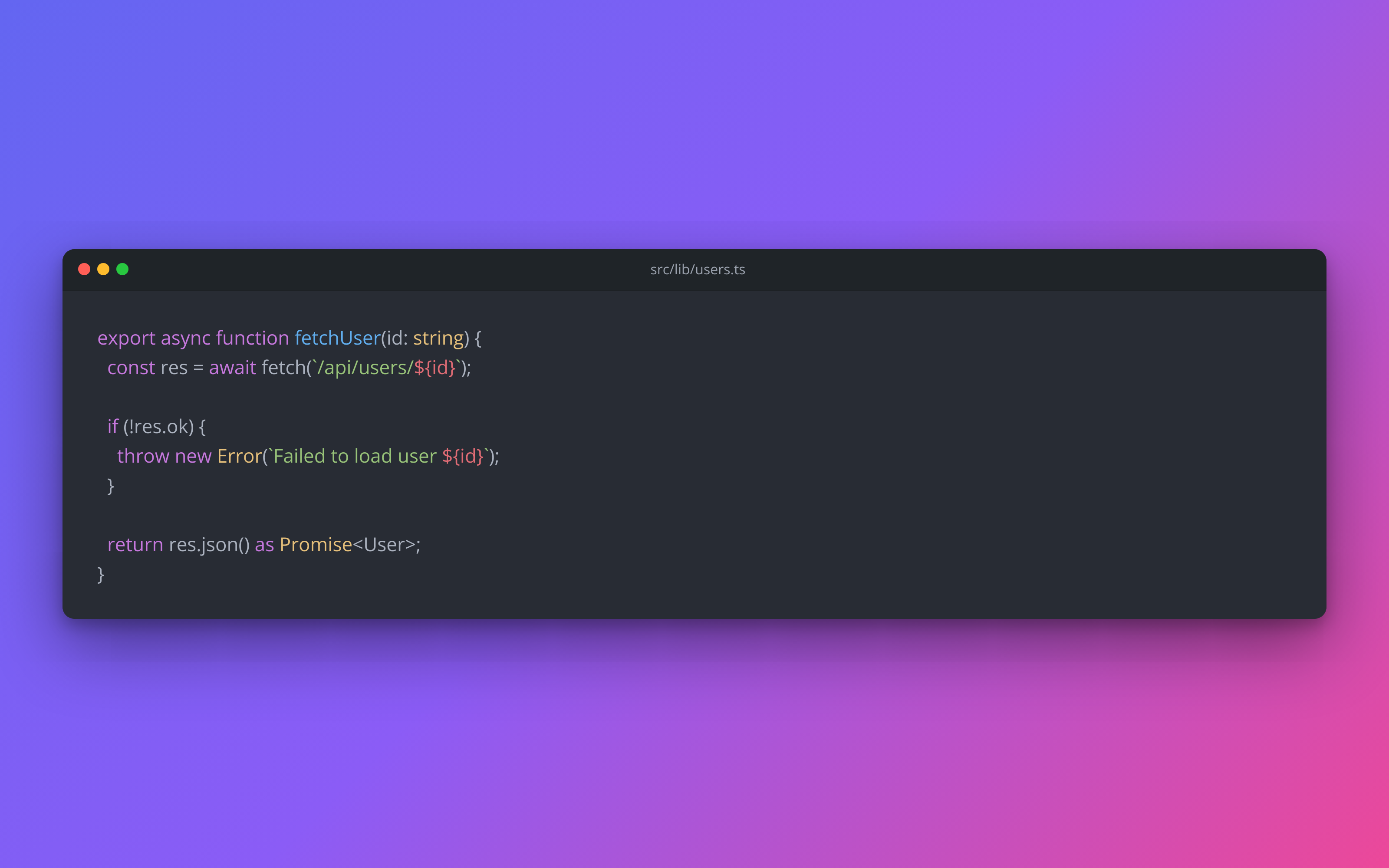
Send the snippet, language, and theme name as JSON, get back a syntax-highlighted PNG.

Prefer to try it in your browser first? Open the Code Screenshot tool.

Code Screenshot template preview, a developer image generated by the HTML to Image API

Developer educators and DevRel teams use the Code Screenshot API to share polished snippets without screenshotting their editor and dragging the result into Figma. Server-side highlighting via scrivo/highlight.php means there is no JS race or font-loading ambiguity, so the same input produces the same output every time. You post the code, language, and theme name as JSON, and the response holds a PNG with window chrome and a themed background.

API reference

View the Code Screenshot API reference

Inputs, defaults, error responses and cURL, PHP, Node and Python code samples.

Read the docs →

Use cases

Developers sharing snippets on social

A staff engineer wants to post a 12-line TypeScript snippet on X and refuses to drag a screenshot of their editor through three crops. Pipe the code into a Raycast or Alfred action that posts to this endpoint and copies the resulting URL to the clipboard. The snippet posts to X with a styled card that reads at a glance in the timeline. Halberd Software's engineering team produces 30 snippets a week through this exact flow.

Documentation sites embedding code blocks as images

Static docs that need to rank in image search benefit from rendered code blocks rather than raw <pre> elements. Generate one PNG per code block during the build, alt-text it, and embed alongside the regular HTML version. Both Google and Bing index the styled snippets, so a search for the API's exact function signature surfaces your docs page. Wren Analytics built this for its REST API reference and reports a 40 percent uplift in image-search traffic.

Tutorial newsletters with styled code

Newsletter tools render monospaced code blocks inconsistently across Gmail, Outlook, and Apple Mail. Sidestep the layout drift by rendering each snippet as a PNG and embedding the URL in the email body. Subscribers see the same code on every client, with the same font and the same syntax colors. Linden & Co's weekly Laravel newsletter uses this pattern across 20 snippets per issue.

Conference talk slides

Speakers presenting code on a 4K projector at the back of a 200-seat room need a snippet that reads from row 30. Render at 2x scale by setting dpi=2 in the render options and slot the resulting image into your slide deck. The Type Conference issued these to 28 speakers last year, and the talks looked uniformly polished even from the cheap seats.

GitHub gist promotion

Gist authors can build a sharable preview that shows the code at the top of the gist page rather than relying on the user clicking through. Render with the gist title and language, post the resulting URL alongside the gist link, and the share previews on X and Slack show the actual code rather than a generic GitHub favicon. Northwind Studio's open source repo benefits from this on every gist link they publish.

Output specifications

Dimensions
1600x1000
Color space
sRGB
Transparency
Supported
File size range
40 KB to 150 KB

Matches the spec at Developer share format with optional transparent canvas.

How it works

1

Send a JSON payload

POST to the template endpoint with the values you want rendered. Authenticate with your API key.

2

We render the image

The template is rendered server-side as a 1600x1000 PNG.

3

You get back a URL

Cache it, embed it in your page, attach it to an email.

Quick example

A single cURL call to render a Code Screenshot as a PNG:

curl -X POST https://app.html2img.com/api/v1/templates/code-screenshot \
  -H "X-API-Key: YOUR_API_KEY" \
  -H "Content-Type: application/json" \
  -d '{"code":"export async function fetchUser(id: string) {\n  const res = await fetch(`/api/users/${id}`);\n\n  if (!res.ok) {\n    throw new Error(`Failed to load user ${id}`);\n  }\n\n  return res.json() as Promise<User>;\n}","language":"typescript","title":"src/lib/users.ts","theme":"atom-one-dark","background":"linear-gradient(135deg, #6366F1 0%, #8B5CF6 50%, #EC4899 100%)","padding":72,"show_window_chrome":"true","show_line_numbers":"false"}'

For the full PHP, Node and Python equivalents, plus every input the template accepts, see the Code Screenshot API reference. Setting up your key is covered in the authentication guide.

Common pitfalls

Line wrapping on long lines breaks intent

A 140-character line wraps to two visual rows and the reader loses the structure of the code. Refactor to shorter lines, or set a wider canvas via the width override so long lines fit on one row.

Choosing a theme that does not exist

You pass theme="vscode-dark-pro" and the render falls back to atom-one-dark because that theme name is not in the highlight.php styles directory. Pick from the documented list (atom-one-dark, dracula, monokai, nord, github-dark, etc.) so the render matches your design intent.

Padding too small leaves chrome touching the edge

A 16-pixel padding squeezes the window chrome against the canvas edge and the result looks cramped. Set padding to at least 48 pixels, or 72 for a more editorial feel, so the snippet has breathing room within the frame.

Inputs at a glance

A quick summary of what the Code Screenshot template accepts. The full reference, with example values and array shapes, is in the docs.

Name Type Required
code string Required
language string Optional
title string Optional
theme string Optional
background string Optional
padding number Optional
show_window_chrome enum Optional
show_line_numbers enum Optional

See the full inputs reference for descriptions, examples and validation rules.

Related templates

Other templates in the content and marketing category.

Browse by category

A starting point from each of the other two template categories.

See the full template gallery for every design grouped by category.

Related guides

FAQ

Try it free

25 renders a month on the free tier. See the pricing page for higher-volume plans.