social template

Instagram Story API

Send title and CTA as JSON, get back a 1080x1920 vertical PNG sized for Stories.

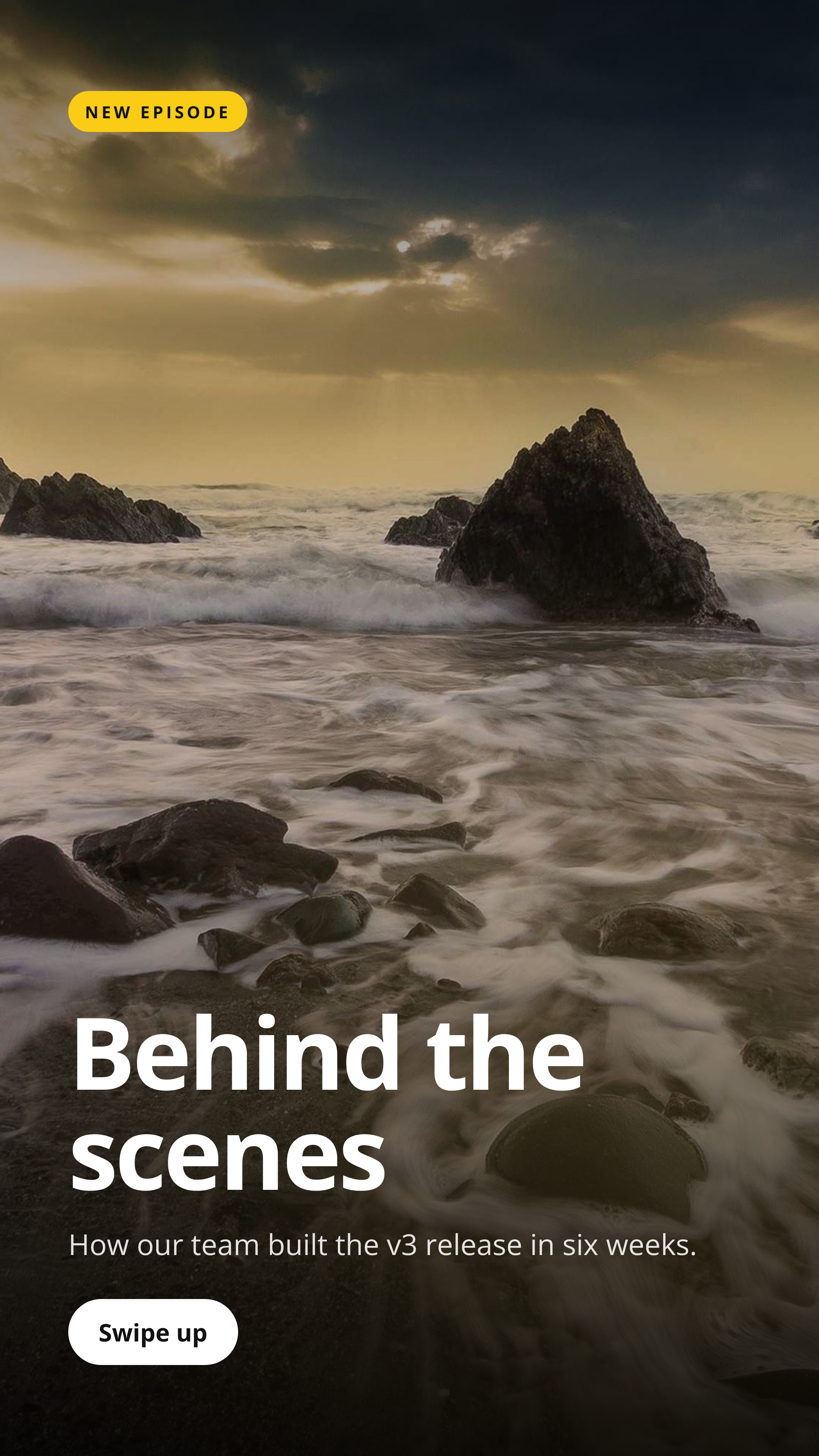
Instagram Story template preview, a social image generated by the HTML to Image API

Brand teams and short-form video producers use the Instagram Story image generator API to ship 9:16 vertical covers for Stories, Reels covers, and TikTok holding cards. The 1080x1920 output respects Instagram's safe zones, with the title placed inside the central area that survives both the top profile bubble and the bottom sticker tray. You post the title, optional eyebrow, optional CTA, and brand inputs as JSON, and the response holds a PNG ready to publish via the Graph API or schedule with Buffer.

API reference

View the Instagram Story API reference

Inputs, defaults, error responses and cURL, PHP, Node and Python code samples.

Read the docs →

Use cases

E-commerce auto-generating Story art from product launches

Stores launching a new SKU benefit from a Story cover that drops on launch day, alongside the feed post. Render with the product name, price, and a CTA to swipe up, schedule via Meta Business Suite, and the launch reaches both feed and Stories surfaces with consistent branding. Riverside Bakery launches 3 to 4 product Stories per month through this template.

Events posting countdown reminders

Communities running monthly events post Story countdowns in the days before each date. Render with "3 days to go", the event title, and the venue or join link, post on the calendar dates, and the Story keeps the event present without flooding the feed. The Type Conference posts countdown Stories for 7 days before the event using this template.

Podcasts promoting new episodes

Show producers post a Story per episode to push subscribers to the new drop. Render with the episode number, title, and a CTA, post on the morning of the release, and the Story keeps the show top-of-mind for the 24 hours it stays visible. Halberd Software's podcast publishes one Story per Tuesday episode and gets 200 to 400 swipe-ups per launch.

News outlets publishing breaking story cards

News teams use Stories to surface breaking news quickly. Render with the headline and a "Tap for more" CTA, post the moment a story breaks, and the audience sees the news in their Story tray within minutes. Linden & Co's regional news clients run this pattern across 11 stations for breaking-news coverage.

Internal tools posting team updates to a private Story

Companies with a private team Instagram account post updates to a Story that stays visible for 24 hours. Render with the update title, accent_color from your brand kit, and post via the Graph API. Wren Analytics uses this for "Friday wins" Stories that surface team accomplishments without flooding the public feed.

Output specifications

Dimensions
1080x1920
Color space
sRGB
Transparency
Not supported
File size range
120 KB to 350 KB

Matches the spec at Instagram Stories format and safe zones.

How it works

1

Send a JSON payload

POST to the template endpoint with the values you want rendered. Authenticate with your API key.

2

We render the image

The template is rendered server-side as a 1080x1920 PNG.

3

You get back a URL

Cache it, embed it in your page, attach it to an email.

Quick example

A single cURL call to render a Instagram Story as a PNG:

curl -X POST https://app.html2img.com/api/v1/templates/instagram-story \
  -H "X-API-Key: YOUR_API_KEY" \
  -H "Content-Type: application/json" \
  -d '{"title":"Behind the scenes","subtitle":"How our team built the v3 release in six weeks.","eyebrow":"NEW EPISODE","cta":"Swipe up","background_image_url":"https://picsum.photos/seed/insta-story/1080/1920","background_color":"#0F0F1A","accent_color":"#FACC15"}'

For the full PHP, Node and Python equivalents, plus every input the template accepts, see the Instagram Story API reference. Setting up your key is covered in the authentication guide.

Common pitfalls

UI overlays cover the top and bottom 250 pixels

Instagram places the profile bubble in the top 250 pixels and reaction stickers in the bottom 250 pixels. Important content placed in those zones gets covered. Keep the focal area between y=250 and y=1670 so the title and brand mark survive the UI overlays.

Link stickers can cover added content

When you add a link sticker via Instagram's editor, it lands wherever the user drops it and may cover content. Reserve a clean area in the lower third of the safe zone where the link sticker can land without obscuring the title.

Swipe-up artwork blocks lower-third content

A "Swipe up" CTA in the bottom band conflicts with Instagram's native swipe indicator. Either rely on Instagram's native CTA and remove your custom one, or position the custom CTA above the bottom 300 pixels.

Inputs at a glance

A quick summary of what the Instagram Story template accepts. The full reference, with example values and array shapes, is in the docs.

Name Type Required
title string Required
subtitle string Optional
eyebrow string Optional
cta string Optional
background_image_url url Optional
logo_url url Optional
background_color string Optional
accent_color string Optional

See the full inputs reference for descriptions, examples and validation rules.

Related templates

Other templates in the social media category.

Browse by category

A starting point from each of the other two template categories.

Content and marketing

See the full template gallery for every design grouped by category.

Related guides

FAQ

Try it free

25 renders a month on the free tier. See the pricing page for higher-volume plans.