How to Migrate from htmlcsstoimage to HTML to Image
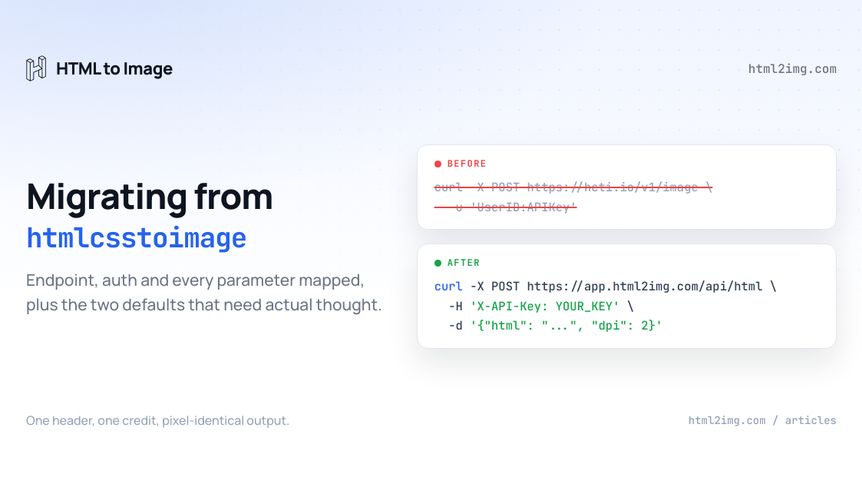
Somewhere in your codebase there is a request that authenticates with two credentials and looks like this:
curl -X POST https://hcti.io/v1/image \
  -u 'UserID:APIKey' \
  --data-urlencode html="<div class='card'>Hello</div>" \
  --data-urlencode css=".card { width: 400px; }"
Running this in production? Get an API key with 50 free credits, no card needed.
This guide takes that call apart and rebuilds it against our HTML to image API: the endpoint, the authentication, every parameter, the sizing model and the cutover. If you are still deciding whether to move at all, the htmlcsstoimage comparison covers pricing and capability side by side, and the buyer's guide covers how to evaluate the category. This article assumes you have decided, or want to see exactly what the move involves before you do.
The short version: these are the two most similar services in the category, so the migration is mostly renames. The two changes that need actual thought are a resolution default and a sizing model, and both are covered in full below.
Two APIs closer than most migrations
htmlcsstoimage and HTML to Image are structural cousins. Both take a POST with a JSON body carrying html, css or url. Both render in a real Chrome instance on the provider's infrastructure, so your CSS support does not change: grid, custom fonts and JavaScript work identically on both sides. Both respond with a hosted image URL rather than bytes, so there is no storage pipeline to build or dismantle. Even ms_delay keeps its name and its unit, which anyone who has ported delay seconds into a milliseconds field will appreciate. That was the trap in the ApiFlash migration; it does not exist here.
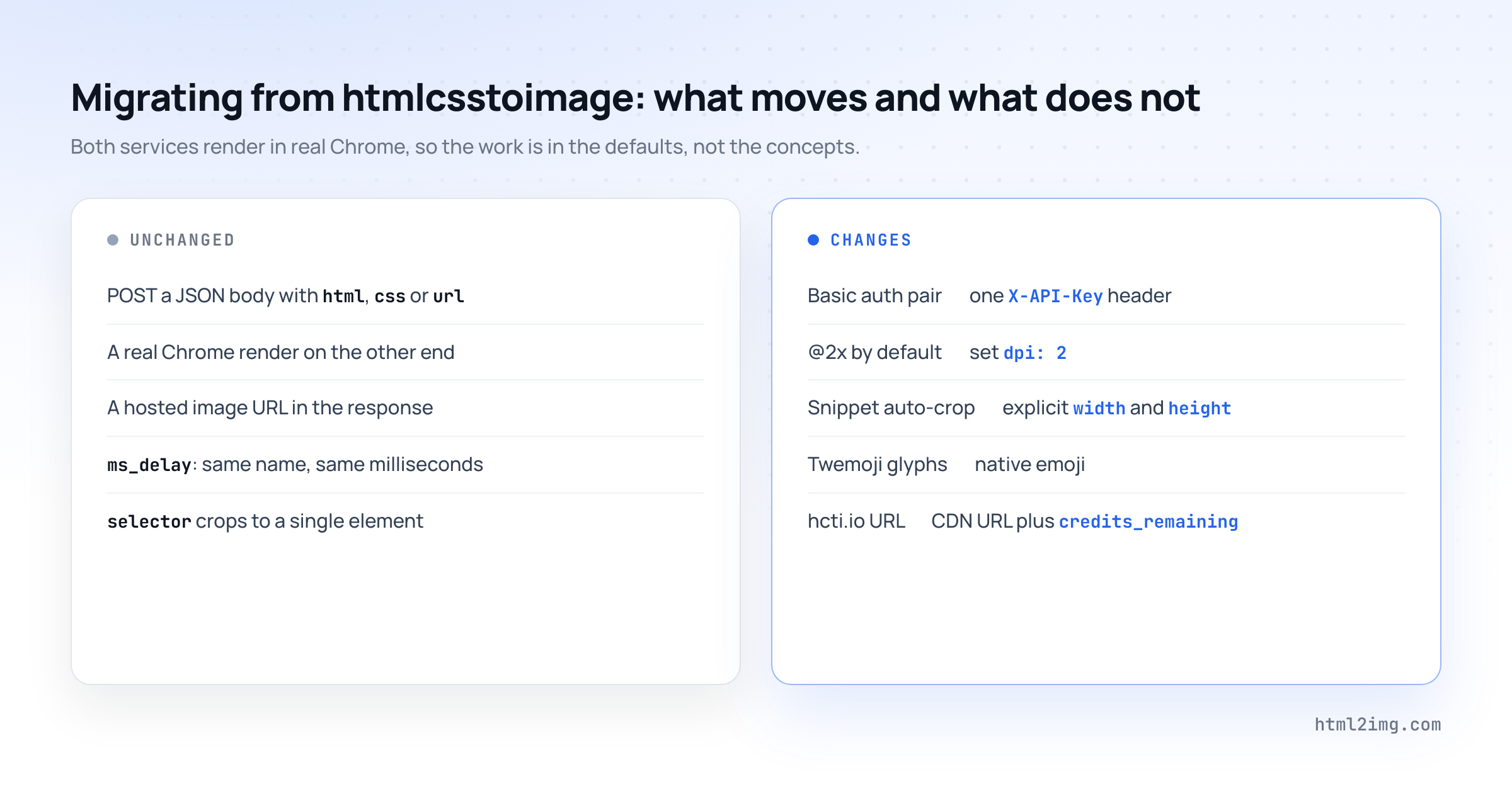
What changes is a handful of defaults. Defaults are the dangerous part of any migration precisely because they never appear in your code, so the sections below spend their time there.
One endpoint becomes two, and two credentials become one
htmlcsstoimage routes everything through hcti.io/v1/image and decides what to do based on whether you sent html or url. Here the two jobs have their own endpoints: markup goes to /api/html, live page captures go to /api/screenshot. Same body shape, different path.
Authentication drops from a pair to a single secret. Basic auth with a User ID and an API Key becomes one X-API-Key header:
# htmlcsstoimage
curl -X POST https://hcti.io/v1/image \
  -u 'UserID:APIKey' \
  --data-urlencode html="<div class='card'>Hello</div>"
# HTML to Image
curl -X POST https://app.html2img.com/api/html \
-H 'X-API-Key: YOUR_KEY' \
-H 'Content-Type: application/json' \
-d '{"html": "<div class=\"card\">Hello</div>", "width": 400, "height": 200}'One secret instead of two means one environment variable, one rotation procedure and one thing to scrub from a leaked log. The width and height in that second request are not decoration, and the next two sections explain why they are there.
The @2x default is the mapping that will bite
htmlcsstoimage renders at 2x device scale by default. Ask it for a 400px card and the PNG that comes back is 800px wide, sized for retina screens without you asking. HTML to Image renders at 1x by default and puts resolution behind an explicit dpi parameter.
Port a call without knowing that and everything works, no errors, and every image arrives at half the pixel dimensions your layouts expect. It is this migration's version of the silent unit change: invisible in code review, obvious in production.
The fix is one line. Add "dpi": 2 to every migrated request and output is pixel-for-pixel the size you had before. Decide deliberately if you want anything else: dpi: 1 halves your file sizes if the retina headroom was never used, and dpi: 3 is there for print-adjacent work. Speaking of which, htmlcsstoimage's print documentation tells you to halve the usual pixels-from-DPI arithmetic to account for its 2x doubling. Here the CSS size is the output size at dpi: 1, so drop the halving and size your markup to the full target dimensions.
Auto-crop becomes explicit dimensions
The second default worth respect. When you send htmlcsstoimage an HTML snippet, it crops the output to the outermost element, so a div styled width: 400px; height: 200px comes back as exactly that card. Send a full page or a URL and it renders in a 1920×1080 viewport instead, adjustable with viewport_width and viewport_height.
HTML to Image does not size the canvas from your markup. You state the viewport with width and height on every request, and the default is 1440×900 if you say nothing. Two consequences for the port:
For snippet renders, the dimensions you need already exist in your own CSS. The outermost element that htmlcsstoimage was measuring is the source of truth, so copy its width and height into the request body and the output matches. If a template's size genuinely varies with content, render the page and pass a selector targeting the outermost element instead, which crops to that element the way the auto-crop did.
For URL and full-page captures, nothing was ever auto-cropped, but the default viewports differ: their 1920×1080 against our 1440×900. Any call that leaned on the default will render narrower after the move, so set width and height explicitly on those requests and the variable disappears.
The full parameter map
Every commonly used htmlcsstoimage parameter and where it lands. The rows that need more than a sentence get their own section.
htmlcsstoimage | HTML to Image | Notes |
|---|---|---|
Basic auth |
| One credential instead of two. |
|
| Same name. Add |
|
| Public URLs only on both. See the url docs. |
|
| Injected before capture on both sides. |
|
| Their default is 2x. Ours is 1x. Set it. |
|
| Explicit on every request here. |
|
| Same behaviour, one word. |
| Same name, same milliseconds. | |
|
| A cap becomes a condition. Covered below. |
|
|
|
|
| Same name, same element cropping. |
| Load fonts in your markup | A real browser fetches |
|
| A vector PDF for the same single credit. |
| No flag | Test the CSS route during the parallel run before relying on it. |
|
| Recipe below. |
| Default behaviour | Native emoji here, always. |
The consent banner recipe, for URL captures that used block_consent_banners:
{
  "url": "https://example.com",
  "css": ".cookie-banner, #onetrust-consent-sdk, #CybotCookiebotDialog { display: none !important; }"
}
Less automatic than their parameter, since you name the frameworks you meet rather than relying on built-in detection, but it covers the common ones and you can extend the selector list as you find stragglers.
render_when_ready becomes wait_for_selector
htmlcsstoimage gives JavaScript-heavy pages two tools: max_wait_ms caps how long the renderer waits, and render_when_ready hands control to your page, which calls ScreenshotReady() when it has finished drawing.
The equivalent here is one mechanism, wait_for_selector, which holds capture until a CSS selector exists in the DOM. Migrating render_when_ready is mechanical: wherever your page called ScreenshotReady(), append a marker element instead.
// Before: tell htmlcsstoimage the page is ready
ScreenshotReady();

// After: create the element wait_for_selector is watching
document.body.insertAdjacentHTML('beforeend', '<i id="capture-ready"></i>');
Then pass "wait_for_selector": "#capture-ready" on the request. Calls that used max_wait_ms as a safety cap usually port to a selector pointing at the last element to render, which states the intent directly: capture when the chart exists, rather than capture after a period of hoping.
Emoji will change shape on cutover
htmlcsstoimage renders emoji through Twemoji by default, so every emoji in your output is the flat Twitter-style glyph set unless you passed disable_twemoji. HTML to Image renders native emoji.
This is the one visual difference the parallel run will definitely surface, and it is not a bug on either side. If you had disable_twemoji: true, nothing changes for you. If you did not, your emoji swap glyph sets on cutover: same characters, different drawings. Look at a sample, decide you are happy and move on, rather than discovering it when a colleague asks why the party popper looks different on the new invoices.
Retrieval-time resizing stays behind
htmlcsstoimage lets you reshape an image after rendering it, straight from the URL: ?width=400 scales it down, aspect_ratio=1_1 recrops it square, x_1 and crop_width cut arbitrary regions, dl=1 forces a download, ?dpi=300 stamps print metadata. One render, many derived variants.
There is no equivalent here. A render produces the file you asked for, at the size you asked for, and that is what the CDN serves. The migration recipe is to render at the dimensions you actually serve: if a card genuinely ships at 1200px and 600px, that is two renders, and the render-once economics still hold because each URL then serves free forever. Element crops that used the query-string region maths usually collapse into a selector at render time anyway, which is tidier than coordinates.
Be honest with yourself on this one. If a single rendered image fanning out into many URL-derived variants is a load-bearing pattern in your system, that is a genuine reason to stay, and it belongs in the section below rather than in a workaround.
Parameters without an equivalent
HTML to Image has no counterpart for headers, additional_header_origins, proxy_id, timezone, color_scheme, media_type, the viewport_mobile, viewport_touch and viewport_landscape emulation flags, jumbo images, storage_destination_id or jpg and webp output. The batch creation and deletion endpoints also have no twin; a loop does the job, and the webhook covered below does it without holding connections open.
Most of these matter less than they look. Output format is the one to check first: everything here is PNG or PDF, so if a downstream system strictly requires WebP or JPEG, conversion belongs in your image pipeline or stays a reason not to move. The page-access group is the harder constraint, same as it was for ApiFlash: captures that depend on custom headers, proxies or timezone spoofing to reach the page correctly cannot be expressed here. If that is a slice of your traffic, migrate the rest and leave that slice where it is. Nothing forces a single vendor for both.
The response, the credits and the URLs that do not come with you
A successful render on either service returns JSON with a hosted URL. The envelope here carries more:
{
  "success": true,
  "credits_remaining": 950,
  "id": "abc123",
  "url": "https://i.html2img.com/abc123.png"
}
credits_remaining arrives in every response, so quota monitoring is a comparison in code you already have rather than a separate call to an account usage endpoint. Low-credit alerts become one if statement in your existing wrapper.
The larger job is inventory. htmlcsstoimage's own documentation states that image URLs are permanent for as long as your account is active, which is the standard deal with any hosted render API and the operational heart of this migration: every hcti.io/v1/image/... URL sitting in your pages, og:image tags, emails and database rows stops resolving when the old account closes. Grep for the string, list what you find, re-render each one through the new API as you touch it and store the returned URL in its place. Keep the old account alive until the grep comes back clean. Files rendered here on a paid plan are hosted permanently, so the replacement URLs are the last ones you will paste.
The same call in Node and PHP
The pattern is identical everywhere: JSON body, key in a header, read url from the response. Node, before and after:
// Before: htmlcsstoimage with Basic auth
const res = await fetch('https://hcti.io/v1/image', {
  method: 'POST',
  headers: {
    Authorization: 'Basic ' + Buffer.from(`${process.env.HCTI_USER_ID}:${process.env.HCTI_API_KEY}`).toString('base64'),
    'Content-Type': 'application/json',
  },
  body: JSON.stringify({ html: cardHtml, css: cardCss }),
});
const { url } = await res.json();
// After: HTML to Image with one key
const res = await fetch('https://app.html2img.com/api/html', {
method: 'POST',
headers: {
'X-API-Key': process.env.HTML2IMG_KEY,
'Content-Type': 'application/json',
},
body: JSON.stringify({ html: cardHtml, css: cardCss, width: 1200, height: 630, dpi: 2 }),
});
const { url, credits_remaining } = await res.json();PHP, for the Guzzle and cURL crowd:
$ch = curl_init('https://app.html2img.com/api/html');
curl_setopt_array($ch, [
    CURLOPT_POST => true,
    CURLOPT_RETURNTRANSFER => true,
    CURLOPT_HTTPHEADER => [
        'X-API-Key: ' . getenv('HTML2IMG_KEY'),
        'Content-Type: application/json',
    ],
    CURLOPT_POSTFIELDS => json_encode([
        'html'   => $cardHtml,
        'css'    => $cardCss,
        'width'  => 1200,
        'height' => 630,
        'dpi'    => 2,
    ]),
]);

$body = json_decode(curl_exec($ch), true);
curl_close($ch);

$imageUrl = $body['url'];
Idiomatic versions for Laravel, JavaScript, Python and Rails live in the usage docs.
Errors, and the webhook you gain
htmlcsstoimage signals a bad request with a 400 and a message, and a spent plan with a 429 telling you how far over you are. Here, validation failures return 422 with a details object naming the offending field, which makes the port's teething problems quick to diagnose: a misspelt parameter tells you it is misspelt instead of being silently ignored. Renders that exceed the 30 second synchronous budget return 504 with a reference id, and genuine service failures return 500 with an id to quote to support.
The structural upgrade is asynchronous rendering, which htmlcsstoimage does not offer. Pass a webhook_url and the finished image URL is POSTed to your endpoint when the render completes, instead of a worker holding a connection open. Bulk jobs, the regenerate-everything migration pass included, are the reason this exists.
What the move buys you
Beyond the mechanics, three things change in your favour.
PDFs become a first-class output. htmlcsstoimage produces PDFs by appending .pdf to an image URL with pdf_options steering it; here "format": "pdf" on either endpoint returns a vector PDF with selectable text for the same single credit as a PNG, page-break CSS is honoured and scale to fit handles content that overshoots the page. If invoices or certificates are anywhere on your roadmap, the PDF side of the product is the half you have not been using.
Templates move into your codebase. If you were composing markup by hand for hcti.io, named templates store the design once and take a JSON payload of variables per render, and twenty-five ready-made templates ship on every plan, the free tier included.
And the bill goes down. At every published tier the equivalent plan here costs less, from $9 against $14 at a thousand renders a month to $300 against $375 at a hundred thousand:
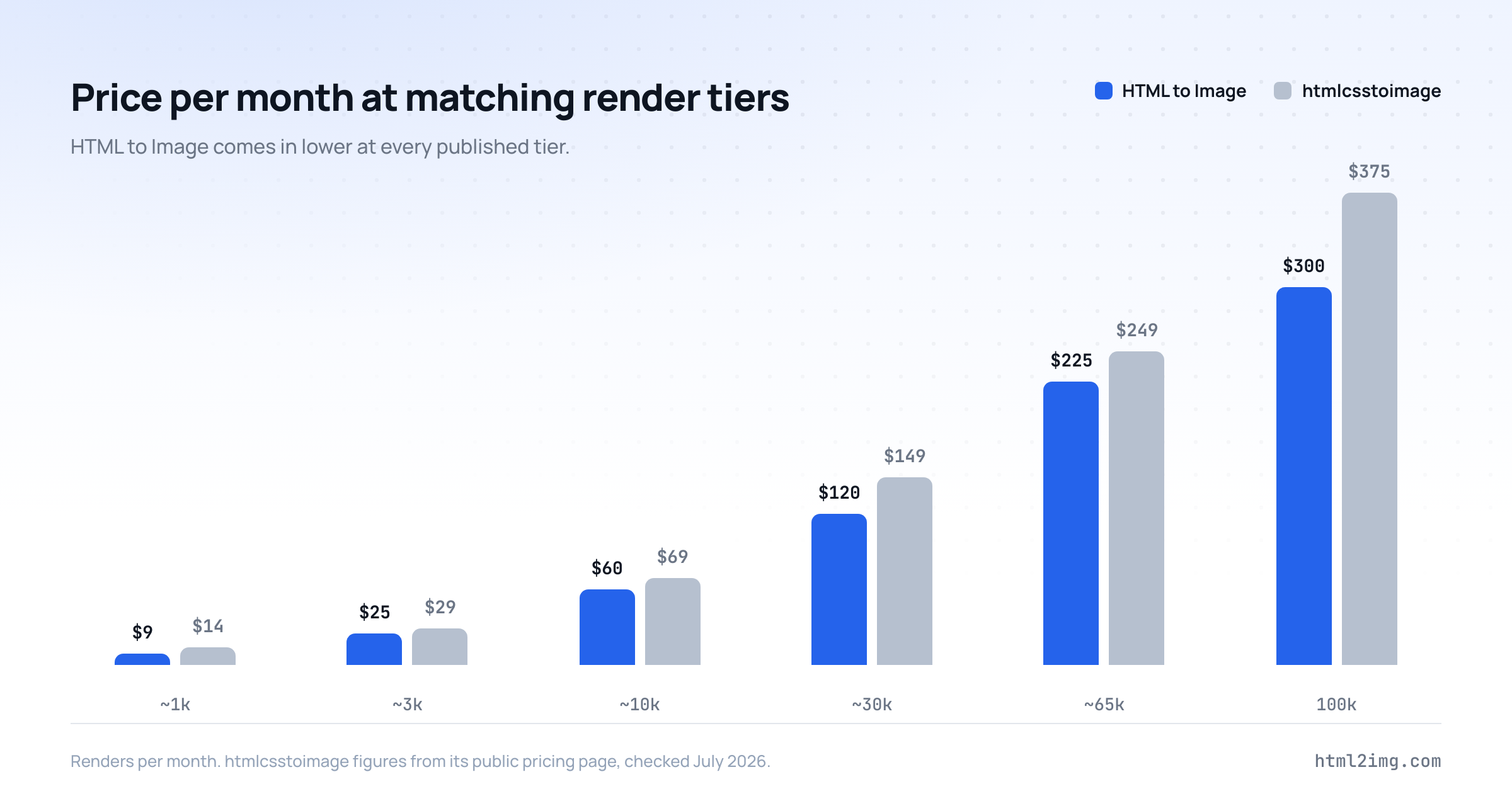
Those figures come from both public pricing pages and the comparison page keeps them current, so check there rather than here if you are reading this long after publication.
When staying on htmlcsstoimage is the right call
An honest migration guide needs this section, and this one has real entries.
If your images are built in their visual template editor, your templates live in that editor and there is no export path into raw markup; moving means rebuilding each design as HTML, which is a project, not a port. If your integration is a Zapier, Make or n8n workflow rather than code, their no-code connectors have no counterpart here. If your captures depend on the page-access parameters, proxies, custom headers or timezone control, those stay. And if one render fanning out into many URL-derived crops and sizes is central to how you serve images, the retrieval-time parameters are a genuine capability you would be giving up.
None of those describe the common case, which is a codebase POSTing HTML and embedding the URL that comes back. For that case the move is the parameter table above plus one dpi key.
A cutover that cannot strand you
Create a free account, which needs no card and comes with 50 credits, and take a key from the dashboard. Pull every hcti.io call behind one function if it is not already there; migrating one call site is an afternoon. Add the new implementation behind a flag and run both against the same sample of production payloads, with "dpi": 2 on from the first request. Diff the pairs: dimensions should match exactly once dpi is set, fonts should match because both sides render web fonts in Chrome, and emoji will differ by design, as covered above. Then repoint consumers to the new url field, grep everything you store and render for hcti.io/v1/image, replace those URLs as you touch them and only close the old account when the grep comes back empty.
Moving a codebase off htmlcsstoimage, or deciding whether to? Browse the templates gallery to see the output side by side, or read the docs and run the parallel test on the free tier.

Written by
Mike Griffiths
Mike has spent the last 20 years crafting software solutions for all kinds of amazing businesses. He specializes in building digital products and APIs that make a real difference. As an expert in Laravel and a voting member on the PHP language, Mike helps shape the future of web development.