Why `@vercel/og` fails on emoji (and how to fix it)
The 30-second answer
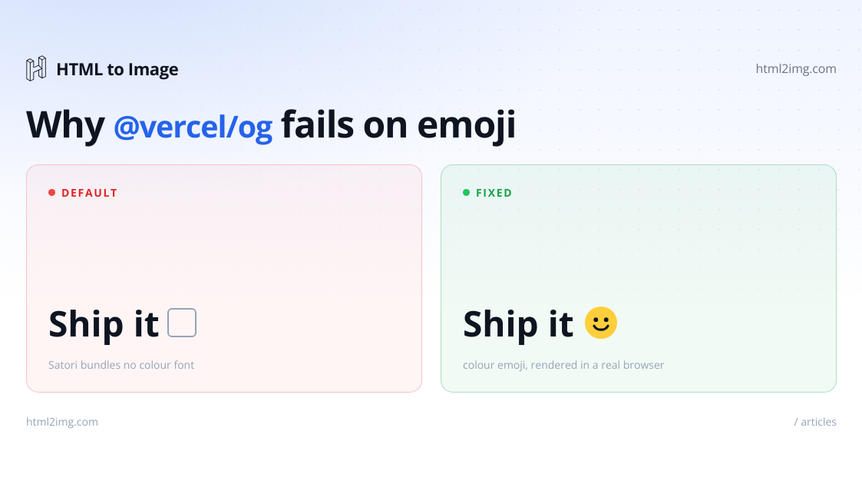
@vercel/og uses Satori under the hood. Satori does not ship with a color emoji font. When your HTML contains an emoji, Satori tries to render it using whatever Latin font you supplied, fails to find the glyph, and falls back to a tofu box.
Three fixes exist: configure the built-in emoji image source (the emoji option), bundle a font that includes color glyphs, or render the page with Chrome instead of Satori.
If you're already on Vercel and your emoji usage is straightforward, set emoji: 'twemoji' and move on. If you're hitting other Satori limitations alongside the emoji issue, switch to a Chrome-rendered approach. Read on for the code and the trade-offs.
Reproducing the bug
Here's the minimal broken case. A Next.js route handler that returns an OG image with a rocket emoji:
// app/api/og/route.tsx (broken)
import { ImageResponse } from '@vercel/og'

export async function GET() {
  return new ImageResponse(
    (
      <div style={{ fontSize: 96, display: 'flex' }}>
        Ship it 🚀
      </div>
    ),
    { width: 1200, height: 630 }
  )
}
Running this in production? Get an API key with 50 free credits, no card needed.
This compiles cleanly, runs in dev, and produces a PNG where the rocket is a square box. If you're testing locally and the image looks fine in your dev tooling preview, deploy it and check the actual <img> output. The bug only manifests in the rendered PNG.
Why this happens
Satori is a JSX-to-SVG renderer built for serverless OG image generation. It rasterises text using fonts you supply at runtime. That works well for Latin glyphs and most non-emoji Unicode, where a single font file contains everything Satori needs.
Color emoji are a separate problem. Browsers render them from COLR/CPAL tables (Chrome, Firefox), CBDT/CBLC (Android), or embedded PNG/SVG glyph data (Apple). Satori does not implement any of these table formats. Even if you load a font that contains color emoji data, older versions of Satori would simply ignore the color tables and render the monochrome outlines, or nothing at all.
Vercel's workaround was an emoji option that maps Unicode codepoints to image URLs from a CDN. The default value is 'twemoji', which fetches Twitter's open source emoji set. Two gotchas: behaviour around the option has shifted between versions of @vercel/og, and the public Twemoji CDN has rate limits and occasional outages that cause renders to silently drop the emoji entirely.
Fix 1: Configure the emoji option correctly
The simplest fix is to pass emoji: 'twemoji' (or another supported set) explicitly:
// app/api/og/route.tsx (working with Twemoji)
import { ImageResponse } from '@vercel/og'

export async function GET() {
  return new ImageResponse(
    (
      <div style={{ fontSize: 96, display: 'flex' }}>
        Ship it 🚀
      </div>
    ),
    {
      width: 1200,
      height: 630,
      emoji: 'twemoji',
    }
  )
}
@vercel/ogsupports 'twemoji', 'openmoji', 'blobmoji', 'noto'`, and a few others. Pick the visual style that matches your brand.
The production reality: the public Twemoji CDN occasionally returns 429s under load, and Apple's emoji set is not licensed for redistribution. If you're rendering more than a few hundred OG images per hour, self-host the Twemoji SVGs from the official GitHub repository and point your emoji loader at your own CDN. The loadAdditionalAsset callback in ImageResponse lets you override the default fetcher, which is the hook you want for self-hosted assets.
One limitation worth flagging: emoji modifiers and ZWJ sequences (skin tone variations like 👍🏽, family emoji like 👨👩👧) match by codepoint sequence in Chrome but not always reliably in Satori's emoji lookup. The result is that "👍🏽" can degrade to "👍" with no skin tone applied. For most marketing copy this is fine. For user-generated content with a wide emoji surface area, it isn't.
Fix 2: Use a font with color glyphs
The other route is to load a color emoji font directly and let Satori handle it as text:
import { ImageResponse } from '@vercel/og'

const emojiFontData = await fetch(
  new URL('./NotoColorEmoji-subset.ttf', import.meta.url)
).then(r => r.arrayBuffer())

export async function GET() {
  return new ImageResponse(
    <div style={{ fontSize: 96, display: 'flex' }}>Ship it 🚀</div>,
    {
      width: 1200,
      height: 630,
      fonts: [{ name: 'NotoColorEmoji', data: emojiFontData, style: 'normal' }],
    }
  )
}
Trade-offs to weigh up.
The full Noto Color Emoji font is roughly 10 MB, which matters for serverless cold starts. Subset it with pyftsubset (part of fonttools) to include only the codepoints you actually use, and the bundle drops to a fraction of that. For an OG image template covering a fixed marketing vocabulary, you might ship 50 KB of emoji.
Satori's font handling has evolved across versions. COLRv0 fonts have had support for a while; COLRv1 (which Noto Color Emoji uses for its newer glyphs) landed later and varies in completeness. Verify against the version you're running before assuming a given font will render correctly.
Licensing matters too. Noto Color Emoji is SIL Open Font License, which is fine to bundle. Apple's font is not.
Fix 3: Render the page with Chrome instead
If you've hit emoji issues, you'll likely hit other rendering issues with Satori too. Custom CSS that uses mask-image, certain flexbox edge cases, anything with clip-path or filters all behave differently from a real browser. At some point the right answer is to stop fighting Satori and render in Chrome.
That can mean rolling your own Puppeteer-on-Lambda setup, or using an API that does it for you. Here's the latter, calling HTML to Image's open-graph-image template:
// app/api/og/route.tsx (Chrome-rendered via API)
export async function GET(request: Request) {
  const { searchParams } = new URL(request.url)
  const title = searchParams.get('title') ?? 'Ship it 🚀'

  const response = await fetch('https://app.html2img.com/api/v1/templates/open-graph-image', {
    method: 'POST',
    headers: {
      'X-API-Key': process.env.HTML_TO_IMAGE_KEY!,
      'Content-Type': 'application/json',
    },
    body: JSON.stringify({ title, accent_color: '#0F766E' }),
  })

  const { url } = await response.json()
  return Response.redirect(url, 302)
}
The trade-off, plainly: Satori is faster cold (no external HTTP call) and free if your render volume fits inside your existing Vercel plan. The Chrome-rendered approach adds a network hop per uncached render, but you get real browser semantics. Emoji work. Modern CSS works. Web fonts load the way you'd expect. The HTML to Image free tier covers 25 renders per month, which is enough to evaluate without committing.
The open-graph-image template takes a JSON payload and returns a 1200x630 PNG. There are also Node.js examples covering caching, retries, and webhook delivery for batch jobs.
Choosing between the three fixes
Stay with @vercel/og plus emoji: 'twemoji' if you're already on Vercel, your emoji needs are simple (no skin tones, no family ZWJ sequences), and you want zero added infrastructure. Once you cross a few hundred renders per hour, self-host the Twemoji SVGs to dodge the public CDN's rate limit. This path is the fastest to a working result and costs you nothing extra.
Switch to a Chrome-rendered approach if you're hitting more than just emoji issues, your design uses CSS that Satori handles imperfectly, or you've got OG images plus other image generation needs (invoices, social cards, code screenshots) that are easier to solve with one service than three. The open-graph-image template is the obvious starting point if you go this route.
FAQ
Does Vercel know about this issue?
Yes. The 'twemoji' default exists specifically because of it. The remaining gaps are the rate limit on the public Twemoji CDN and the inconsistent handling of ZWJ and modifier sequences. Both have open issues on GitHub.
Will the emoji work if I just use a different font like Inter or Roboto?
No. Inter and Roboto don't contain color emoji glyphs at all. The emoji slot in those fonts is either missing or monochrome. You need a font that explicitly bundles color emoji (Noto Color Emoji, Twemoji Mozilla) or you need the codepoint-to-image lookup that Satori's emoji option provides.
Can I use Apple's emoji set?
Apple does not license its emoji font for redistribution. Twemoji (Twitter's open source set) and OpenMoji are the realistic choices. Google's Noto Color Emoji is also available under SIL Open Font License.
What happens to ZWJ sequences like family or skin-tone emoji?
Satori's emoji image lookup matches by codepoint sequence. For common ZWJ sequences (👨👩👧, 👍🏽) the matching often works but not always, and behaviour varies between @vercel/og versions. If you need guaranteed correct rendering for compound emoji, render with Chrome.
Wrapping up
Emoji rendering is a leaky abstraction across the whole OG image stack, and "fix the emoji" eventually becomes "render in Chrome" for most teams once they hit the second or third Satori edge case. If you'd rather skip the rendering rabbit hole entirely, the open-graph-image template at HTML to Image takes a JSON payload and returns a 1200x630 PNG with proper emoji rendering. See pricing.

Written by
Mike Griffiths
Mike has spent the last 20 years crafting software solutions for all kinds of amazing businesses. He specializes in building digital products and APIs that make a real difference. As an expert in Laravel and a voting member on the PHP language, Mike helps shape the future of web development.