How to Screenshot Every Page of a Website in Bulk
The site is being rebuilt, and before the DNS switches someone needs a picture of every page as it stands today. Or a client wants to sign off 140 pages of copy, or legal wants a dated record of what the pricing and terms pages said. Doing it by hand means opening each URL, waiting for the lazy images, closing the cookie banner and saving the file under a name you will still understand next month. At two minutes a page, a 200-page site eats most of a working day, and no two captures match: one at laptop width, the next with the chat bubble open.
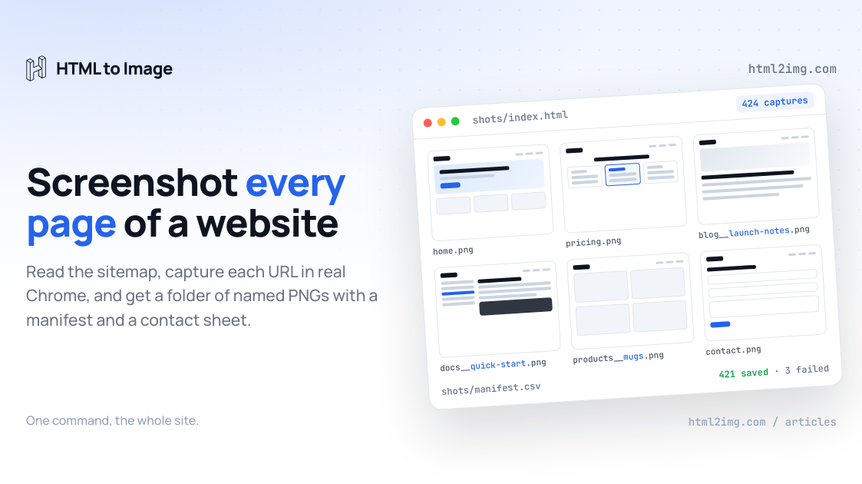
This guide does the whole site in one command. It reads every URL from the sitemap, captures each page in a real Chrome browser through the Screenshot API, and saves a folder of named PNGs with a manifest you can open in a spreadsheet and a contact sheet you can send to a client. It handles sitemap indexes, gzipped sitemaps, cookie banners, retries and a credit check before anything is spent.
"Every page" here means every URL on a site. If you need one long page captured from top to bottom, that is a full-page screenshot, covered in how to capture full-page screenshots of any website. This guide runs that capture against every URL in the sitemap.
What a run produces
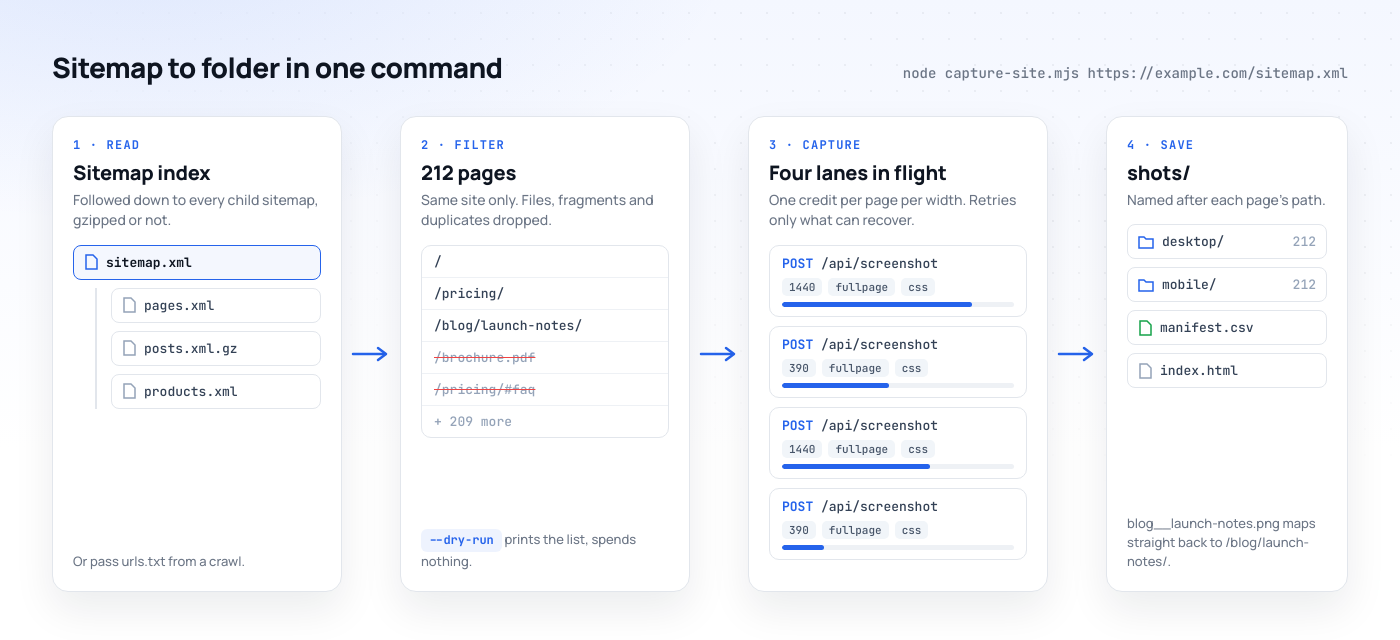
Point the script at a sitemap and it leaves three things in a shots folder:
desktop/andmobile/, one PNG per page in each, named after the page's path, so/blog/launch-notes/becomesblog__launch-notes.pngand the home page becomeshome.pngmanifest.csv, one row per capture with the page URL, variant, status, local file, CDN URL and the error code for anything that failedindex.html, a contact sheet of every capture that opens in any browser with no server
Step 1: Get every URL from the sitemap
Most sites publish a sitemap, and it is the fastest honest inventory you will get. Check robots.txt first, because sites declare their sitemaps there:
curl -s https://example.com/robots.txt | grep -i '^sitemap:'Running this in production? Get an API key with 50 free credits, no card needed.
If nothing comes back, try the usual locations:
/sitemap.xml, the default for most frameworks, static site generators and Shopify/sitemap_index.xml, used by the Yoast SEO and Rank Math plugins on WordPress/wp-sitemap.xml, the sitemap WordPress core has generated since version 5.5
Larger sites split their sitemaps. The top-level file is a sitemap index that lists child sitemaps (posts, pages, products), each capped at 50,000 URLs by the sitemap protocol, and some are served gzipped as .xml.gz. The script below follows indexes and decompresses gzipped files, so you only ever pass it the top-level URL.
A sitemap is the list the CMS chooses to publish, which is not the same as every page on the site. Orphaned landing pages, campaign pages set to noindex and anything a plugin was not configured to include will be missing. For a migration archive, where a missing page is a missing record, cross-check against a crawl. Screaming Frog's SEO Spider crawls up to 500 URLs on its free version; export the Address column to a text file and the script accepts that file in place of a sitemap.
Filter the list before you spend anything
Sitemaps include pages nobody needs a picture of: tag and author archives, paginated listings like /page/7/, attachment pages. Run the script with --dry-run first. It prints the URLs it would capture, needs no API key and spends nothing:
node capture-site.mjs https://example.com/sitemap.xml --dry-run \
  | grep -v -E '/(tag|author|page)/' > urls.txt

wc -l urls.txt
Then run it against urls.txt instead of the sitemap. For a design archive of a large shop, one product page per template tells the story as well as 5,000 of them. For a legal or content record you want all of them.
Step 2: Decide what each capture should look like
Every capture is one request to POST https://app.html2img.com/api/screenshot. This is the payload the script sends for each page:
{
  "url": "https://example.com/pricing/",
  "width": 1440,
  "fullpage": true,
  "css": "#onetrust-banner-sdk, #CybotCookiebotDialog { display: none !important; }"
}
Settle these five things before a bulk run, because changing your mind afterwards means paying for the run twice:
Viewport width.
1440for desktop and390for a phone. Each width is a separate render and a separate credit, so desktop plus mobile doubles the cost of the run.Full page.
fullpage: truecaptures the entire scroll height in one image instead of stopping at the fold. Full-page captures render at a device pixel ratio of 1; if one region needs to be sharp, capture that element on its own.Overlays. The renderer arrives as a first-time visitor with no cookies, so every capture gets the consent banner. The
cssparameter injects styles before the shot, and the script hides the banners from OneTrust, Cookiebot, Quantcast, Osano and Cookie Law Info plus two common chat widgets. If the site uses something else, open one page, find the banner's ID in dev tools and add it to the list. For sticky headers, useposition: static !importantrather thandisplay: none, which can collapse the layout.Late content. Lazy images and client-rendered sections can still be loading when the page fires its load event.
wait_for_selectorholds the capture until an element exists, and pointing it at something near the bottom of the page, such as the footer, gives everything above it time to arrive.ms_delayadds a fixed pause of 1 to 5,000 milliseconds. Leave it out rather than sending0, which fails validation.PNG or PDF. Set
formattopdfand each page comes back as an A4 document with a real text layer instead of a picture of the screen. That is usually what a compliance record wants, because the words are searchable. It costs the same single credit, and the API ignoreswidthandfullpagein PDF mode. The URL to PDF API page covers that output in more detail.
Try the settings on three representative pages first: the home page, a long article and a page with a form. The free website screenshot tool runs the same renderer in a browser, or send a single request with cURL as shown in generating a screenshot using cURL.
The quick version: a list of URLs and a few lines of bash
If you have a few dozen URLs in a text file and want PNGs in a folder, you do not need anything beyond curl and jq. Save this as capture.sh:
#!/usr/bin/env bash
# capture.sh URL -> shots/<slug>.png
page="$1"
slug=$(printf '%s' "$page" | sed -E 's#^https?://##; s#[^A-Za-z0-9]+#-#g; s#^-|-$##g')
payload=$(jq -n --arg url "$page" '{url: $url, width: 1440, fullpage: true}')

response=$(curl -sS https://app.html2img.com/api/screenshot \
  -H "X-API-Key: $HTML2IMG_API_KEY" \
  -H "Content-Type: application/json" \
  -d "$payload")

image=$(jq -r '.url // empty' <<<"$response" 2>/dev/null)
if [ -n "$image" ]; then
  curl -sS -o "shots/$slug.png" "$image" && echo "ok    $page"
else
  echo "fail  $page  $(jq -r '.code // .error' <<<"$response" 2>/dev/null)"
fi
Then fan it out four at a time with xargs:
chmod +x capture.sh
mkdir -p shots
xargs -n 1 -P 4 ./capture.sh < urls.txt
Each line prints ok or fail with the API's error code, such as url_not_found for a dead link. There are no retries, no mobile variant and no manifest. That is fine for 30 URLs. For a whole site, use the script.
The full script: sitemap to folder in one command
You need Node.js 18 or newer and the official JavaScript client, which has no dependencies of its own:
npm install @html2img/client
export HTML2IMG_API_KEY=your_api_key
Save this as capture-site.mjs:
// capture-site.mjs
// node capture-site.mjs https://example.com/sitemap.xml [--dry-run]
// node capture-site.mjs urls.txt
import { mkdir, readFile, writeFile } from 'node:fs/promises';
import { gunzipSync } from 'node:zlib';
import {
  Html2img,
  InsufficientCreditsError,
  TimeoutError,
  ServerError,
  ConnectionError,
} from '@html2img/client';

const SOURCE = process.argv[2];
const DRY_RUN = process.argv.includes('--dry-run');
const OUT = 'shots';
const CONCURRENCY = 4;
const MAX_ATTEMPTS = 3;

// One credit per page per variant.
const VARIANTS = [
  { name: 'desktop', width: 1440 },
  { name: 'mobile', width: 390 },
  // { name: 'pdf', format: 'pdf' }, // A4 document with a real text layer
];

// Sent with every capture.
const CAPTURE = {
  fullpage: true,
  css: `#onetrust-banner-sdk, .onetrust-pc-dark-filter, #CybotCookiebotDialog,
        .qc-cmp2-container, .osano-cm-window, #cookie-law-info-bar,
        .intercom-frame, #crisp-chatbox { display: none !important; }`,
};

const SKIP = /\.(pdf|jpe?g|png|gif|webp|svg|zip|mp4|xml)$/i;
const apiKey = process.env.HTML2IMG_API_KEY;
const client = DRY_RUN ? null : new Html2img(apiKey);

// 1. Every <loc> in a sitemap, following sitemap indexes and .gz files.
async function readSitemap(url, seen = new Set()) {
  if (seen.has(url)) return [];
  seen.add(url);
  const res = await fetch(url);
  if (!res.ok) throw new Error(`${url} returned ${res.status}`);
  let body = Buffer.from(await res.arrayBuffer());
  if (body[0] === 0x1f && body[1] === 0x8b) body = gunzipSync(body);
  const xml = body.toString('utf8');
  const locs = [...xml.matchAll(/<loc>\s*(?:<!\[CDATA\[)?(.*?)(?:\]\]>)?\s*<\/loc>/gs)]
    .map((m) => m[1].replace(/&(amp|apos|quot|lt|gt);/g, (_, e) =>
      ({ amp: '&', apos: "'", quot: '"', lt: '<', gt: '>' })[e]));
  if (!/<sitemapindex[\s>]/.test(xml)) return locs;
  const children = await Promise.all(locs.map((loc) => readSitemap(loc, seen)));
  return children.flat();
}

// 2. Same site only, no files, no duplicates.
const bare = (host) => host.replace(/^www\./, '');
function toPages(urls, onlyHost) {
  const pages = new Set();
  for (const raw of urls) {
    let u;
    try { u = new URL(raw.trim()); } catch { continue; } // header rows, blanks
    if (onlyHost && bare(u.hostname) !== bare(onlyHost)) continue;
    if (SKIP.test(u.pathname)) continue;
    u.hash = '';
    pages.add(u.href);
  }
  return [...pages];
}

// "/blog/launch-notes/" -> "blog__launch-notes"
let multiSite = false;
function fileName(page) {
  const { hostname, pathname, search } = new URL(page);
  const slug = (pathname + search)
    .replace(/^\/+|\/+$/g, '')
    .split('/')
    .map((part) => part.replace(/[^a-z0-9]+/gi, '-').replace(/^-|-$/g, ''))
    .join('__')
    .toLowerCase()
    .slice(0, 150) || 'home';
  return multiSite ? `${bare(hostname)}__${slug}` : slug;
}

async function creditsLeft() {
  const res = await fetch('https://app.html2img.com/api/me', {
    headers: { 'X-API-Key': apiKey },
  });
  if (!res.ok) throw new Error(`Key check failed with ${res.status}`);
  return (await res.json()).credits_remaining;
}

const retryable = (err) =>
  err instanceof TimeoutError ||
  err instanceof ServerError ||
  err instanceof ConnectionError ||
  err.errorCode === 'page_load_timeout';

// 3. One capture, retried on errors that are worth a second attempt.
async function capture({ page, variant }) {
  const { name, ...options } = variant;
  const ext = options.format === 'pdf' ? 'pdf' : 'png';
  const row = { page, variant: name, status: 'failed', file: '', image_url: '', error: '' };
  for (let attempt = 1; attempt <= MAX_ATTEMPTS; attempt++) {
    try {
      const shot = await client.screenshot({ url: page, ...CAPTURE, ...options });
      row.image_url = shot.url;
      const img = await fetch(shot.url);
      if (!img.ok) throw new Error(`download returned ${img.status}`);
      row.file = `${name}/${fileName(page)}.${ext}`;
      await writeFile(`${OUT}/${row.file}`, Buffer.from(await img.arrayBuffer()));
      return { ...row, status: 'ok', error: '' };
    } catch (err) {
      if (err instanceof InsufficientCreditsError) throw err;
      row.error = err.errorCode ?? err.message;
      if (!retryable(err) || attempt === MAX_ATTEMPTS) return row;
      await new Promise((resolve) => setTimeout(resolve, 3000 * attempt));
    }
  }
}

// 4. A fixed number of captures in flight at once.
async function runAll(jobs) {
  const rows = [];
  let next = 0;
  let stopped = false;
  async function lane() {
    while (!stopped && next < jobs.length) {
      const job = jobs[next++];
      try {
        const row = await capture(job);
        rows.push(row);
        console.log(`${rows.length}/${jobs.length} ${row.status} ${row.variant} ${job.page}`);
      } catch (err) {
        if (!stopped) console.error(`Stopping early: ${err.message}`);
        stopped = true;
      }
    }
  }
  await Promise.all(Array.from({ length: CONCURRENCY }, lane));
  return rows;
}

// 5. A manifest for spreadsheets and an index.html for people.
async function writeReports(rows) {
  const cols = ['page', 'variant', 'status', 'file', 'image_url', 'error'];
  const cell = (v) => `"${String(v).replaceAll('"', '""')}"`;
  const csv = [cols, ...rows.map((r) => cols.map((c) => r[c]))]
    .map((line) => line.map(cell).join(','))
    .join('\n');
  await writeFile(`${OUT}/manifest.csv`, csv);

  const esc = (s) => s.replace(/[&<>"]/g, (c) => `&#${c.charCodeAt(0)};`);
  const cards = rows
    .filter((r) => r.status === 'ok' && r.file.endsWith('.png'))
    .map((r) => `<a href="${esc(r.file)}"><img src="${esc(r.file)}" loading="lazy"><span>${r.variant} · ${esc(r.page)}</span></a>`)
    .join('\n');
  await writeFile(`${OUT}/index.html`, `<!doctype html><meta charset="utf-8"><title>Site capture</title>
<style>body{font:14px system-ui;margin:24px;display:grid;grid-template-columns:repeat(auto-fill,minmax(240px,1fr));gap:20px}
a{color:#334155;text-decoration:none}img{width:100%;height:320px;object-fit:cover;object-position:top;border:1px solid #e2e6ec;border-radius:8px}
span{display:block;margin-top:6px;word-break:break-all}</style>\n${cards}`);
}

const fromSitemap = /^https?:\/\//.test(SOURCE);
const urls = fromSitemap
  ? await readSitemap(SOURCE)
  : (await readFile(SOURCE, 'utf8')).split(/\r?\n/);
const pages = toPages(urls, fromSitemap ? new URL(SOURCE).hostname : null);
multiSite = new Set(pages.map((page) => bare(new URL(page).hostname))).size > 1;

if (DRY_RUN) {
  console.log(pages.join('\n'));
  process.exit(0);
}

const jobs = pages.flatMap((page) => VARIANTS.map((variant) => ({ page, variant })));
const credits = await creditsLeft();
console.log(`${pages.length} pages x ${VARIANTS.length} variants = ${jobs.length} credits. Balance: ${credits}.`);
if (credits < jobs.length) {
  console.error('Not enough credits for the whole run. Trim the list or top up first.');
  process.exit(1);
}

for (const { name } of VARIANTS) await mkdir(`${OUT}/${name}`, { recursive: true });
const rows = await runAll(jobs);
await writeReports(rows);

const failed = rows.filter((r) => r.status !== 'ok').length;
const skipped = jobs.length - rows.length;
console.log(`Saved ${rows.length - failed}, failed ${failed}, skipped ${skipped}. Open ${OUT}/index.html`);
Run it against a sitemap or a text file of URLs:
node capture-site.mjs https://example.com/sitemap.xml
node capture-site.mjs urls.txt
Here is a real run against this site's free tools, filtered out of the sitemap with a dry run first:
node capture-site.mjs https://html2img.com/sitemap.xml --dry-run | grep '/tools/' > urls.txt
node capture-site.mjs urls.txt
It prints the plan before it starts, then a line per capture:
19 pages x 2 variants = 38 credits. Balance: 100.
1/38 ok desktop https://html2img.com/docs/mcp/tools/
2/38 ok mobile https://html2img.com/docs/mcp/tools/
3/38 ok desktop https://html2img.com/tools/
4/38 ok mobile https://html2img.com/tools/
...
38/38 ok desktop https://html2img.com/tools/youtube-thumbnail/
Saved 38, failed 0, skipped 0. Open shots/index.html
All 38 full-page captures finished in 35 seconds. The desktop images came back 1,440 pixels wide and between 3,737 and 10,016 pixels tall. Notice the first line: the grep also matched /docs/mcp/tools/, a page nobody meant to include. That is exactly what the dry run is for, and grep '^https://html2img.com/tools/' would have excluded it.
How the script behaves on a real site
It checks the balance before spending a credit
GET /api/me returns your remaining credits without consuming one. The script multiplies pages by variants and refuses to start if the balance cannot cover the run, because an archive that dies at page 300 of 400 is worse than one that never started. If a 402 arrives anyway, say because another job is spending from the same key, every lane stops, the manifest is still written, and the summary reports how many captures were skipped.
Four captures in flight, never more
There is no batch endpoint and you do not need one. Each request is independent, so the script keeps four in flight and starts the next as soon as one finishes. Four is deliberate rather than timid: every capture is a real page load against the origin, which is often a client's production server or someone else's site entirely. Raise CONCURRENCY for your own infrastructure and keep it low for anyone else's.
It retries only what a retry can fix
The error codes tell you whether a second attempt has any chance of working:
Response | What happened | What the script does |
|---|---|---|
| The render ran past the 30 second synchronous budget | Retries after 3s, then 6s |
| A fault in the renderer | Retries |
| The site was slow to respond | Retries |
Connection error | The request never got a response | Retries |
| DNS failure, an SSL or redirect problem, or a site blocking automated visitors | Records the code and moves on |
| The account has run out | Stops the run |
Each retry is a fresh render request, so leave a little headroom in your balance. Anything that still fails lands in manifest.csv with its error code. To re-run just the failures, pull them out of the manifest and run them in a fresh folder so the first run's reports stay intact:
awk -F'","' '$3 == "failed" { print substr($1, 2) }' shots/manifest.csv | sort -u > retry.txt
mkdir retry && cd retry && node ../capture-site.mjs ../retry.txt
Files are named after their path
/blog/launch-notes/ saves as blog__launch-notes.png, the double underscore standing in for the slash so the name maps straight back to the URL. Query strings are kept in the name. When a URL list spans more than one site, as a competitor audit does, each file is prefixed with its host so pricing.png from two sites cannot overwrite each other.
The images are downloaded as each capture finishes. Downloads from the CDN never cost a credit, and on a paid plan the hosted copy stays live permanently, but free-tier renders expire after seven days, so the local folder is your archive either way.
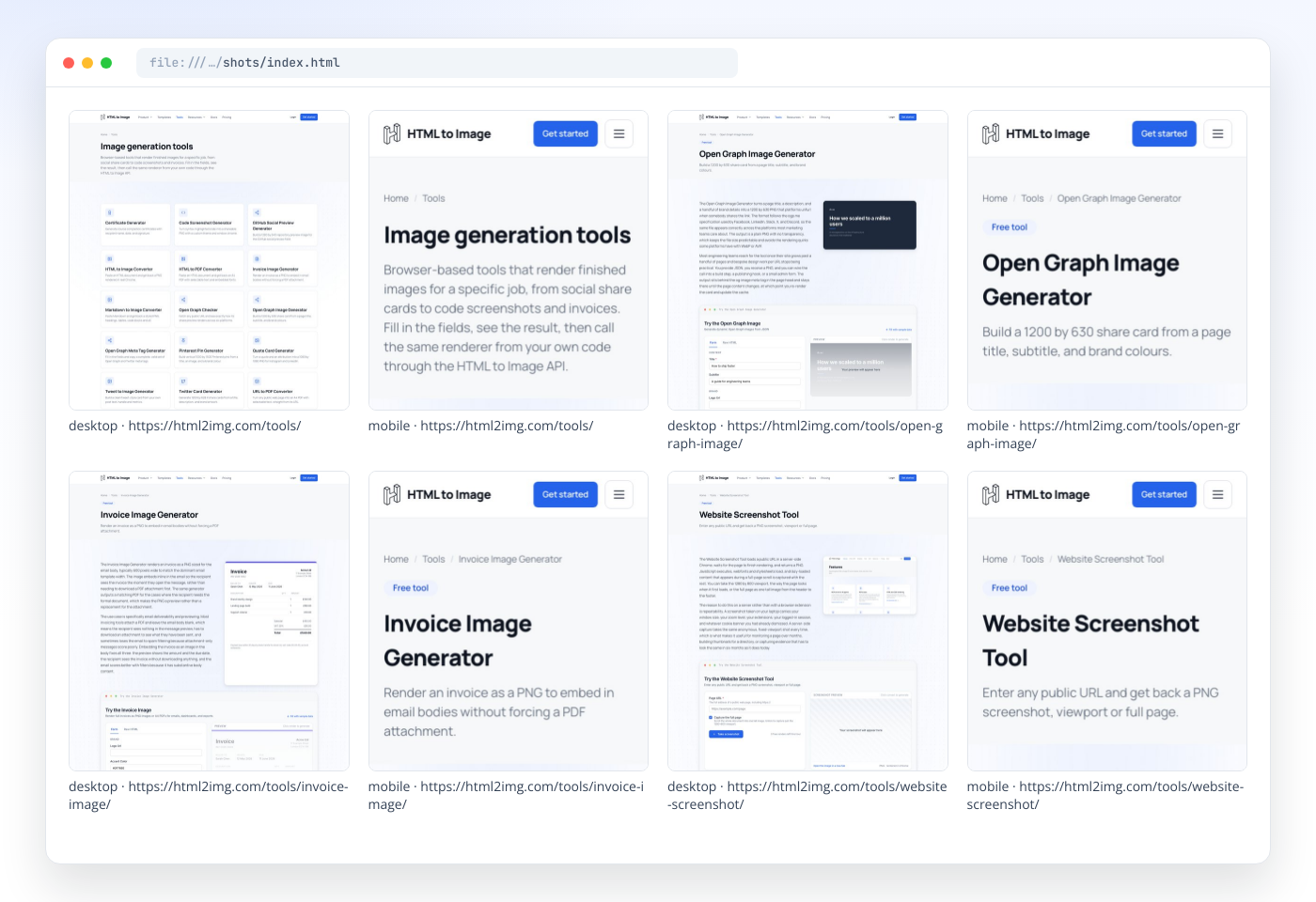
This is the contact sheet from the run above. Each card is cropped to the top of its capture, which is how index.html shows them:
Big sites: let a webhook carry the result
The script holds each request open until the render finishes, inside the 30 second synchronous budget. That suits most sites. Very long pages and slow origins can blow past it, and a retry of a page that took 40 seconds will usually take 40 seconds again.
For those, pass a webhook_url. The API answers immediately with status: "processing" and an id, keeps rendering in the background, and POSTs { status, url, log_id } to your endpoint when the capture is done. The log_id matches the id from the first response, which is how you tie the result back to the page. Two details shape the receiver: delivery is attempted once, and no custom headers are sent, so acknowledge quickly and put the shared secret in the URL. A receiver that logs every result to a file:
// webhook.mjs: runs on a public host and logs every finished capture
import http from 'node:http';
import { appendFile } from 'node:fs/promises';

const TOKEN = process.env.HOOK_TOKEN;

http.createServer(async (req, res) => {
  const { pathname, searchParams } = new URL(req.url, 'http://localhost');
  if (req.method !== 'POST' || pathname !== '/hooks/html2img' || searchParams.get('token') !== TOKEN) {
    res.writeHead(404).end();
    return;
  }
  let body = '';
  for await (const chunk of req) body += chunk;
  res.writeHead(200).end(); // acknowledge first: delivery is attempted once
  try {
    const { status, url, log_id, error_code, error } = JSON.parse(body);
    await appendFile('results.jsonl', JSON.stringify({ log_id, status, url, error: error_code ?? error }) + '\n');
  } catch (err) {
    console.error('Unreadable webhook body:', err.message);
  }
}).listen(3000);
In capture-site.mjs, add the webhook to the request and record the id instead of downloading:
const shot = await client.screenshot({
  url: page,
  ...CAPTURE,
  ...options,
  webhookUrl: `https://hooks.example.com/hooks/html2img?token=${process.env.HOOK_TOKEN}`,
});
return { ...row, status: 'queued', error: '', id: shot.id };
Add 'id' to the manifest columns, and when the run finishes, join manifest.csv to results.jsonl on id and log_id and download the URLs that came back. If your endpoint was down for part of the run, you have not lost the renders: re-run the pages with no matching log_id.
Why not loop over the URLs with Puppeteer?
You can, and on a laptop for fifty pages it works. A site-wide job is where it starts to cost you. Chrome's memory climbs with every heavy page, one crashed browser takes the rest of the run with it, the machine needs the right fonts installed or text renders as boxes, and none of it fits comfortably on serverless, as Puppeteer on AWS Lambda explains. The script above has no browser in it at all. The Puppeteer comparison sets out where running it yourself still wins.
Where a bulk capture earns its keep
Before a redesign or migration. Capture the old site before launch day. After launch, swap the domain in
urls.txtand run the list against the new site; a URL that fails withurl_not_foundor lands on a 404 page is a redirect someone forgot.Content and design sign-off. Zip the
shotsfolder and send it. Reviewers scroll one contact sheet instead of clicking through 200 links, and the file names tell them which URL to comment on.Compliance records. Turn on the PDF variant and write each run to a dated folder, such as
shots-2026-10-17, for a searchable record of what the terms, pricing and claims said on a given day.Visual checks after a deploy. Run the list in CI and diff the PNGs against the last run with a tool like
pixelmatch. The API has no built-in scheduling or diffing; your job runner owns those. Generating images in GitHub Actions shows the CI side.Competitor and market audits. Feed in public pages from several sites. Keep the concurrency low and stay within each site's terms.
What a full-site capture costs
One credit per page per variant, whether the output is a PNG or a PDF:
Site | Pages | Variants | Credits |
|---|---|---|---|
Brochure site | 40 | Desktop | 40 |
Agency client site | 250 | Desktop and mobile | 500 |
Content site archive | 1,200 | Desktop and PDF | 2,400 |
The free tier covers a test run on a handful of pages. The $9 plan includes 1,000 credits a month, enough for the agency site above twice over, and $25 buys 3,000. For a one-off look at a very small site, Microlink's free bulk tool captures 25 URLs a day, which the Microlink comparison covers alongside its paid plans. If you need capture options this API does not have, such as login-walled pages, geo-targeted capture or delivery straight into your own S3 bucket, Urlbox and ScreenshotOne are the services to look at, and each comparison page says so plainly.
Limits to plan around
Public pages only. The renderer is an anonymous browser with no cookies, and there is no cookie or header injection today, so pages behind a login capture as the sign-in screen. For pages in your own app, render the markup through the HTML endpoint instead, which never needs a public URL.
PNG or PDF. There is no JPEG or WebP output, so convert locally if your archive needs a different format.
Infinite scroll has no bottom. Cap the feed with injected CSS, for example
main.feed { max-height: 12000px; overflow: hidden; }, or capture the viewport only for those URLs.Closed content stays closed. Nobody clicks during a capture, so tabs and accordions appear as they first paint. If the hidden panels matter, open them with CSS such as
.accordion-panel { display: block !important; }.
Archiving a site this week, or capturing pages on every deploy? Browse the templates gallery to see what else one API key renders, or read the docs and send your first screenshot request in a couple of minutes.

Written by
Mike Griffiths
Mike has spent the last 20 years crafting software solutions for all kinds of amazing businesses. He specializes in building digital products and APIs that make a real difference. As an expert in Laravel and a voting member on the PHP language, Mike helps shape the future of web development.