The Best HTML to PDF APIs in 2026, Tested Against the Same Invoice
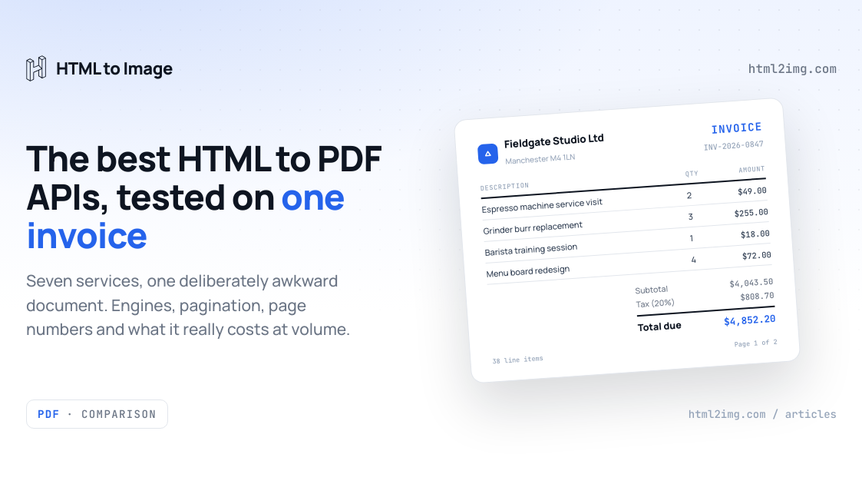
Every "best HTML to PDF API" list you will find is written by a vendor. This one is too. The difference is that we say so in the second sentence, and we judge every service, ours included, against the same fixed document instead of a feature grid copied from marketing pages.
"Best" is the wrong question anyway. The right question is: best for *which document, at which volume*? A one-page receipt and a 40-page annual report with running headers are different jobs, and the service that wins one loses the other. So we built one deliberately awkward invoice, established exactly what it demands from a rendering engine, and put seven services in front of it: HTML to Image, DocRaptor, PDFShift, Api2Pdf, PDFCrowd, PDFMonkey, and self-hosted Gotenberg as the benchmark for doing it yourself.
The invoice that does the judging
The test document is a two-page supplier invoice: 38 line items, a totals block, small print. Ordinary on the surface, and booby-trapped underneath. Every feature in it was chosen because at least one engine in this market handles it badly.
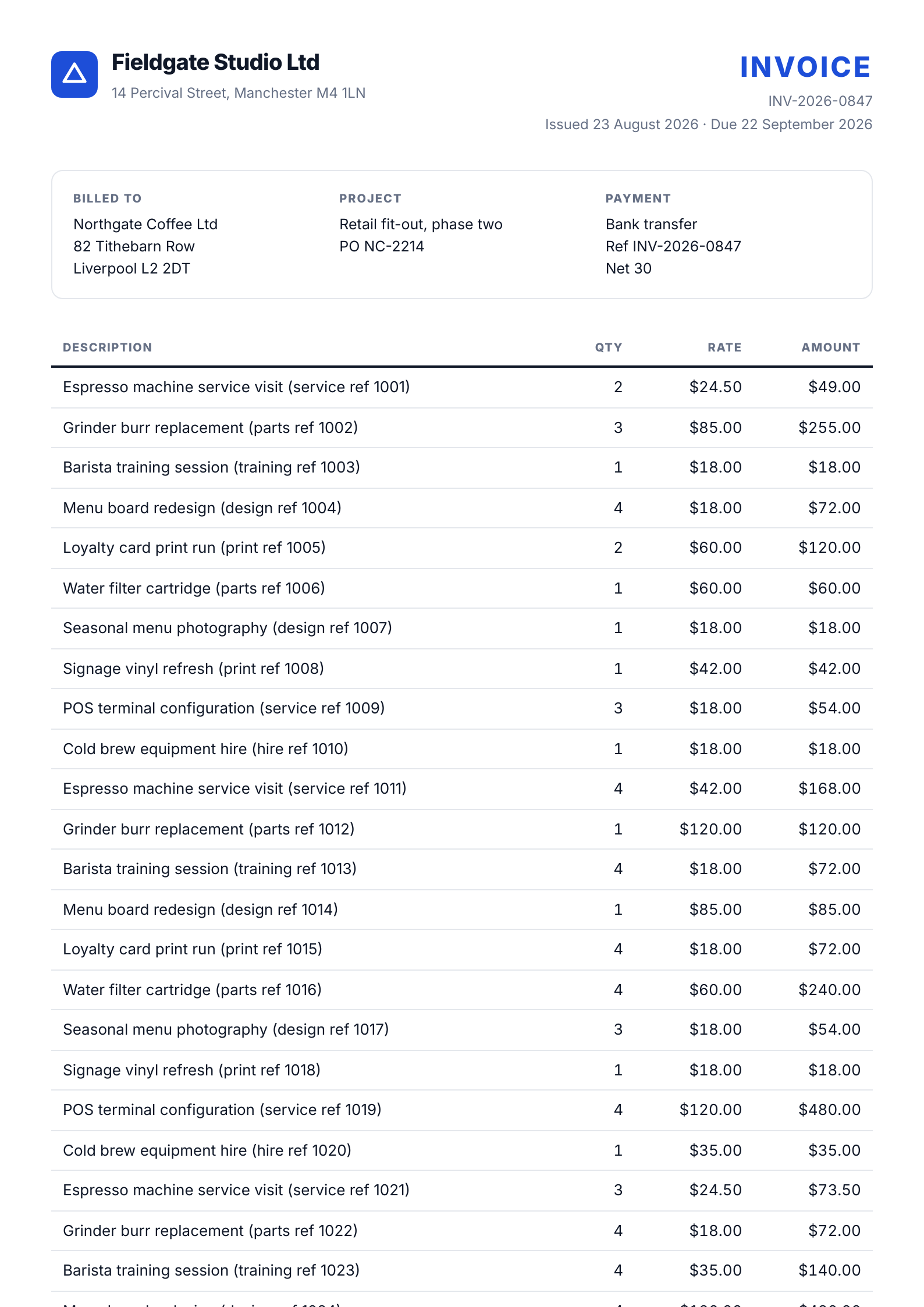
Here is what it quietly demands:
A webfont. The whole document is set in Inter, loaded from Google Fonts. The engine has to fetch it, render with it, and embed it in the PDF, or the text layer falls back to something ugly.
Flexbox. The header is a flex row. Trivial in a browser, fatal in anything built on 2015-era WebKit.
CSS Grid. The billing block is a three-column grid. This one matters because one major commercial engine still does not support Grid at all. More on that below.
Custom properties. Brand colours live in
:rootvariables. Legacy engines resolve none of it.A table that crosses the page boundary. 38 rows will not fit on one A4 page, so pagination behaviour is on show, including whether
<thead>repeats on page two.break-inside: avoid. Rows and the totals block must not split across pages. This is the fragmentation problem we covered in depth in our guide to page breaks in HTML to PDF output.Page numbers via
@pagemargin boxes. The stylesheet asks for"Page " counter(page) " of " counter(pages)in the bottom-right margin of every page. Historically this separated the CSS Paged Media engines from the browser engines. In 2026 the answer is more interesting than that.JavaScript. The subtotal, tax and total are computed by a script at render time. An engine that does not execute JavaScript prints an invoice with dashes where the money should be.
The trap CSS, in full:
@page {
  size: A4;
  margin: 18mm 16mm 22mm 16mm;
  @bottom-right { content: "Page " counter(page) " of " counter(pages); }
  @bottom-left  { content: "Fieldgate Studio Ltd · INV-2026-0847"; }
}

tbody tr { break-inside: avoid; }

.totals  { break-inside: avoid; }
Running this in production? Get an API key with 50 free credits, no card needed.
If a service renders this invoice correctly, it will handle the overwhelming majority of transactional documents: receipts, statements, packing slips, certificates, simple reports. If it fails, you now know exactly where.
How the judging works
Full disclosure of method, because this is where vendor lists usually go quiet.
We ran the invoice through our own API and inspected the output with pdfinfo, pdffonts and pdftotext. Those results are reported below as tested facts. For the other six services, we did not create six accounts and pretend to run a neutral lab. Instead, each service is judged on the engine it runs, that engine's documented CSS support, and its published pricing, all checked in August 2026. Engines are honest in a way marketing pages are not: if a service renders with Prince, Prince's documented behaviour is its behaviour. If it renders with Chromium, the invoice behaves the way it behaves in Chrome. Our CSS support matrix across HTML to PDF engines covers those engine differences feature by feature.
One tested finding is worth pulling out before the scorecard, because most advice online has not caught up with it. The classic rule was that Chromium-based PDF generation cannot do CSS page numbers, and that you needed Prince, WeasyPrint, or a vendor's header and footer templates to get them. That rule died in November 2024: Chromium 131 shipped support for @page margin boxes, including counter(page) and counter(pages), and the Chrome 131 release notes document it. Our test render came back stamped Skia/PDF m131, and both pages carried a correct "Page 1 of 2" and "Page 2 of 2" in the bottom margin, from plain CSS, with no vendor-specific footer syntax. Whether *your* provider gives you this depends entirely on which Chromium build it has pinned. It is now a question worth asking every vendor on this list.
The scorecard
Service | Engine | Flexbox + Grid | CSS page numbers | Runs JS | Starting price |
|---|---|---|---|---|---|
HTML to Image | Current Chrome | Yes | Yes, tested | Yes | $9/mo, 1,000 renders |
DocRaptor | Prince | Flexbox yes, Grid no | Yes, full Paged Media | Limited | $15/mo, 125 docs |
PDFShift | Chromium | Yes | Via header/footer templates | Yes | $24/mo, 2,500 credits |
Api2Pdf | Chrome, wkhtmltopdf or LibreOffice | Yes on the Chrome route | Via header/footer options | Yes on the Chrome route | $1/mo + usage |
PDFCrowd | Chromium-based converters | Yes | Via header/footer parameters | Yes | $23/mo, 1,000 credits |
PDFMonkey | Chromium | Yes | Template-driven workflow | Yes, on paid plans | €5/mo, 300 docs |
Gotenberg (self-hosted) | Chromium + LibreOffice | Yes | Via header/footer files | Yes | Free, plus your server |
The rest of this article is each service against the invoice, strengths and failures both.
HTML to Image
That is us, so read this section with the scepticism it deserves. Here is what the HTML to PDF endpoint did with the test document, verified rather than claimed.
The invoice came back as a two-page A4 vector PDF, 230KB, with Inter embedded as subsetted fonts and a real text layer throughout: every line item, and the JavaScript-computed totals, are selectable and searchable in the output. The break-inside rules held, so no row split across the boundary and the totals block arrived intact on page two. The @page margin boxes rendered, which honestly surprised us too, because our own comparison pages have been telling people we do not do page numbers. The renderer is current Chrome, Chrome is now past 131, so counter(page) simply works.
Two failures, stated plainly. First, the <thead> did not repeat on page two; the 38-row table just continues. That is a known Chromium PDF behaviour and the fix is the repeated-header technique from the page breaks guide, not a parameter. Second, the scope is deliberately narrow: A4 portrait only, no US Letter, no landscape, no watermarking, no encryption, no merging, and your @media print styles are ignored because rendering uses screen CSS. The whole PDF surface is one format parameter on the same endpoint that renders PNGs.
What you get in exchange for that narrowness: one credit per render regardless of document size, output hosted on a CDN URL that stays live on paid plans, the same API key rendering both images and PDFs, and pricing that starts at $9 for 1,000 renders and reaches 100,000 for $300. If your documents are transactional and A4, this is the cheap, boring option. If they are not, one of the next five services is your answer, which is why those comparison pages exist.
DocRaptor
DocRaptor is the only service here that does not render with a browser engine, and that single fact decides everything about it. It runs Prince, the commercial CSS Paged Media engine, and Prince remains the best print typographer in the business: real headers and footers, page counters, footnotes, cross-references, PDF bookmarks, mixed page sizes within one document, and tagged, accessible output meeting WCAG 2.0, Section 508 and ISO-14289. DocRaptor holds SOC2 and HIPAA compliance on top. For a regulated 60-page financial statement, nothing else on this list is a serious rival.
Against our invoice, though, Prince trips on trap number three. Prince's own documentation is upfront that it does not support CSS Grid, so the three-column billing block would need rewriting as flexbox or floats before this invoice renders correctly. JavaScript support exists but is Prince's own engine rather than a browser, so scripts that lean on browser APIs need testing rather than trusting. If your templates were written for Chrome, budget for a porting pass.
Two more honest observations. DocRaptor's trial policy is the best in the market: test documents are watermarked but unlimited and free forever, so you can develop against it indefinitely without paying. And its pricing is the steepest here by a distance: $15 a month covers 125 documents, $149 covers 5,000, and 40,000 costs $1,000. You are paying for Prince, and for many document types Prince is worth it. Our DocRaptor comparison goes deeper on where that line sits.
PDFShift
PDFShift is the straightforward one: a French-run, Chromium-based converter that has been doing exactly this job for years without trying to become a platform. The invoice renders correctly because current Chromium renders it correctly, and PDFShift layers on the page-level controls we deliberately do not offer: page sizes including Letter and custom dimensions, landscape, encryption, watermarks, custom headers and footers with page numbers, and delivery straight to your own S3 bucket. Asynchronous mode and parallel processing are there for batch work.
The pricing model needs one careful read: credits are metered by output size, one credit per 5MB, so a 14MB catalogue costs three credits while our 230KB invoice costs one. The free tier is a genuine 50 conversions a month, the published Boost plan is $24 for 2,500 credits with overage at $0.03, and the ladder above that is not published, so high-volume teams are quoting rather than reading a price list. For a team that wants Chromium fidelity plus real PDF options at a sane price, PDFShift is the safe default in the middle of this market, and our PDFShift comparison maps exactly where it beats us.
Api2Pdf
Api2Pdf does something rare: it tells you precisely what it runs. Headless Chrome, wkhtmltopdf and LibreOffice are all surfaced as explicit choices, alongside merging, barcodes and thumbnails. That candour cuts both ways. The Chrome route renders our invoice as well as any Chromium service here. The wkhtmltopdf route fails it comprehensively, because wkhtmltopdf is an archived project rendering with a WebKit build that predates flexbox-era CSS; we wrote up why wkhtmltopdf is dead and what replaces it, and the fact that it is still offered is for legacy compatibility, not for new work. Pick the Chrome engine and never look back.
The LibreOffice engine is the genuinely differentiating piece: Api2Pdf converts Word, Excel and PowerPoint files to PDF, which nothing else on this list attempts. And the pricing is pay-as-you-go taken seriously: $1 a month base, $0.001 per MB of bandwidth, $0.00019551 per second of compute. At our invoice's real weight of 230KB and roughly two seconds of render time, 2,500 invoices a month costs about $2.60. That is not a typo, and it makes Api2Pdf the cheapest metered option in the market by an order of magnitude. The trade is forecastability and the absence of a hosting layer: you get bytes back, and storage is your problem. Our Api2Pdf comparison covers the rest.
PDFCrowd
PDFCrowd has been converting HTML since 2009 and its API reads like it: over one hundred configuration parameters covering page size, margins, headers and footers with page numbers, page break control, watermarking and password protection, with official SDKs for Python, PHP, Node.js, Java, .NET, Ruby and Go. The current converter versions are Chromium-based, so the invoice's layout, fonts, custom properties and JavaScript all render correctly, and the header and footer parameters supply the page numbers.
The things to check before committing are operational rather than rendering. Credits are metered at one per 0.5MB of output, the tightest size metering here, so a 2MB report costs four credits and plan capacity is smaller than the document counts suggest. Plans carry per-minute rate limits and concurrency allowances that step up with price, which matters for bursty invoice runs on billing day. Published pricing starts at $23 for 1,000 credits and $61 covers 10,000. If you want maximum knobs from a vendor that has outlived most of its competitors, this is that vendor; the trade-offs against a one-parameter API are exactly the subject of our PDFCrowd comparison.
PDFMonkey
PDFMonkey is shaped differently from everything above, and comparing it fairly means saying so. You do not POST HTML per render. Templates live in PDFMonkey's dashboard, written in HTML and CSS with Liquid placeholders, and each API call sends the JSON data to merge into one. For an invoice pipeline where the accounts team occasionally edits the template and developers only ever send {"invoice_number": "INV-2026-0847", ...}, that split is genuinely the right architecture, and it is why PDFMonkey keeps winning small SaaS teams.
The engine is Chromium, so our invoice's CSS and JavaScript are safe, with one asterisk: the free plan cannot load external images, fonts or scripts at all, so trap number one, the Google-hosted webfont, fails until you pay. Pricing is the friendliest entry point on this list, €5 a month for 300 documents and €15 for 3,000, but read the retention column before storing invoice URLs anywhere: documents are deleted after one day on Starter and seven days on Pro, with unlimited retention only from the €60 Pro+ plan. If your app links to the PDF later, that detail is a production incident waiting in the pricing table.
Gotenberg, if you would rather run it yourself
Every managed service above competes with one alternative: a Docker container on your own infrastructure. Gotenberg is the best version of that idea, an MIT-licensed API wrapping Chromium and LibreOffice, so the invoice renders exactly as it does on any current-Chromium service, header and footer files included, for a licence cost of nothing.
The cost is not nothing, it has just moved. You now own a browser in production: memory limits, zombie processes, concurrency under a billing-day burst, and the Chromium upgrade treadmill, which, as the margin-box story above shows, is also how you receive new CSS features. We priced this trade in detail in the real cost of generating PDFs yourself, and the short version is that a small VM at $20 to $40 a month is the visible line item while the engineer who answers when rendering falls over at 2am is the real one. Gotenberg is the right choice when data genuinely cannot leave your infrastructure, and a self-imposed operations tax the rest of the time.
What the same invoice costs at three volumes
Monthly prices for rendering our 230KB invoice, at published August 2026 rates. Api2Pdf figures are estimates from its published per-MB and per-second rates at the invoice's measured weight and a two-second render; size-metered services assume the document stays under their credit threshold, which at 230KB it comfortably does.
Volume per month | 250 invoices | 2,500 invoices | 25,000 invoices |
|---|---|---|---|
HTML to Image | $9 | $25 | $120 |
DocRaptor | $29 | $149 | $1,000 |
PDFShift | $24 | $24 | Not published |
Api2Pdf | ~$1.20 | ~$2.60 | ~$17 |
PDFCrowd | $23 | $61 | Not published |
PDFMonkey | €5 | €15 | €180–300 |
Gotenberg | Your server | Your server | Your server, plus real ops work |
Three things jump out of that table. Api2Pdf's metered model is untouchable on raw price if you can live with usage billing and bring your own storage. DocRaptor costs ten to forty times the Chromium services at every volume, which is the price of Prince and worth paying only when you need what only Prince does. And two of seven vendors stop publishing prices exactly where volume gets interesting, which tells you something about how those negotiations go.
Which one should you pick
Match the service to the document, not to the adjectives.
Transactional A4 documents at volume, images from the same key: HTML to Image. The invoice above is the demonstration, one credit each, hosted URLs, $9 to start.
Print-grade typography, accessibility tagging, or compliance requirements: DocRaptor, and rewrite your Grid layouts first. Nothing else here produces tagged PDFs.
Chromium fidelity plus page-level control, Letter and landscape, watermarks, encryption: PDFShift for the cleaner API, PDFCrowd for the deepest parameter surface and official SDKs.
Office documents in the pipeline, or the lowest possible bill: Api2Pdf on its Chrome engine, with your own storage behind it.
Templates edited by non-developers, data merged by API: PDFMonkey, on a paid plan, with the retention column read twice.
Data that cannot leave your infrastructure: Gotenberg, priced honestly to include the engineer.
And whatever this or any other vendor's list says: every service here has a free tier, free test documents or a trial. The only test that outranks ours is your own document through two or three of them. Ours takes about a minute to run, and if it renders your invoice the way it rendered this one, you will know within that minute.
Rendering invoices, certificates or reports from HTML without running a browser yourself? Browse the templates gallery or read the docs to get started, with 50 free renders and no card.

Written by
Mike Griffiths
Mike has spent the last 20 years crafting software solutions for all kinds of amazing businesses. He specializes in building digital products and APIs that make a real difference. As an expert in Laravel and a voting member on the PHP language, Mike helps shape the future of web development.