Can I use it in a PDF? CSS support across HTML to PDF engines
Your invoice template is pixel perfect in the browser. You point your PDF pipeline at the same HTML and the grid collapses into one column, the footer disappears and counter(page) prints nothing at all. Your CSS is fine. The problem is that "HTML to PDF" is not one renderer. It is at least four different engines with four different ideas about which parts of CSS exist.
Browsers have caniuse.com. PDF engines have scattered changelogs, forum threads and folklore. This is the support table that should already exist: what works, what fails and what fails silently across Chrome headless, wkhtmltopdf, WeasyPrint and Prince, checked against current releases in August 2026.
The four engines behind almost every converter
Whatever library or service you use, the actual rendering is nearly always done by one of these.
Chrome headless. Puppeteer, Playwright, Browsershot, Gotenberg and most hosted services, including our own HTML to PDF API, drive Chromium's print pipeline. You get the CSS support of current Chrome, which since version 131 (November 2024) finally includes native @page margin boxes for headers, footers and page numbers. If you run a pinned older Chromium through Puppeteer, check the version before relying on the newer rows below.
wkhtmltopdf. A command line wrapper around Qt WebKit, an engine that stopped receiving updates around 2012. The project was archived on GitHub in January 2023, the last release (0.12.6) shipped in June 2020 and it carries an unpatched SSRF vulnerability rated 9.8 (CVE-2022-35583). It is still everywhere in legacy codebases, which is the only reason it earns a column here. If that includes yours, we have a migration guide off wkhtmltopdf.
WeasyPrint. A layout engine written in Python, built for pagination rather than ported from a browser. It never runs JavaScript, and in exchange it implements the paged media parts of CSS far more completely than Chromium does. Pinned here at v69, the current line.
Prince. The commercial reference implementation for print CSS. Its own engine, its own JavaScript implementation and the deepest coverage of the paged media and generated content specs. Priced per server, aimed at publishing and regulated documents.
Paged.js sits slightly outside the table: a JavaScript polyfill that adds the missing print features on top of Chromium, which makes it a useful escape hatch we will come back to. PDFreactor and Antenna House play in the same commercial tier as Prince with broadly similar coverage.
The support matrix
Checked against Chrome 131 or later, wkhtmltopdf 0.12.6, WeasyPrint 69 and Prince 16.
Feature | Chrome headless | wkhtmltopdf | WeasyPrint | Prince |
|---|---|---|---|---|
Flexbox | Yes | Broken (2009 draft syntax) | Yes | Yes |
Grid | Yes | No | Yes, gaps remain | Partial, no fragmentation |
Custom properties | Yes | No | Yes | Yes |
| Yes | Unreliable | Yes, added 2025 | Yes |
| Yes | CLI flags instead | Yes | Yes |
| Yes, since 131 | No, CLI headers | Yes | Yes |
| Margin boxes only | No, | Yes | Yes |
Named pages ( | Yes | No | Yes | Yes |
| Yes | Legacy | Yes | Yes |
Named strings ( | No | No | Yes | Yes |
| No | No | Yes | Yes |
| No | No | Yes | Yes |
Footnotes ( | No | No | Yes | Yes |
Runs JavaScript | Yes, full V8 | 2012-era engine | No | Own engine |
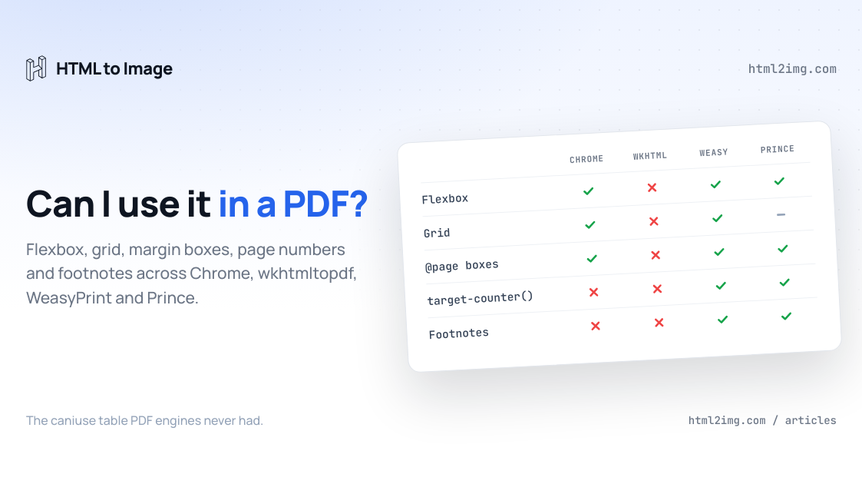
Three patterns jump out. Chromium wins everything a browser cares about and loses everything print specific beyond margin boxes. wkhtmltopdf loses everything, full stop. And the two dedicated print engines are the only ones implementing the generated content features that long documents actually need: string-set, target-counter(), leader() and footnotes.
The rest of this guide walks through each cluster with the code, because half of these features fail silently and "supported" needs qualifying.
Modern layout: flexbox and grid
Chromium renders flexbox and grid in a PDF exactly as on screen, which is the single biggest reason it became the default engine: you can reuse your product's CSS without maintaining a parallel print stylesheet.
wkhtmltopdf predates both. Its WebKit only understands the abandoned 2009 display: -webkit-box draft, so modern display: flex markup renders as stacked blocks, usually with no warning. Grid does nothing at all.
WeasyPrint added grid in v62 (April 2024) and has kept filling holes since, including page breaks inside grid rows in v69. Flexbox handles typical invoice and report layouts, but the maintainers themselves still list "solid flexbox and complete grid" as sponsorable work, so test deeply nested flex trees rather than assuming. calc() only arrived in the 2025 releases, which catches out anyone following older tutorials on an older install.
Prince gained flexbox back in version 12 and initial grid support in version 16, with one large caveat: a grid cannot yet fragment across pages. Use grid for components, not for page-spanning layout.
Page setup: size, margins and named pages
All four engines can produce an A4 page. Only three let CSS decide:
@page {
  size: A4;
  margin: 25mm 20mm;
}

@page cover {
  margin: 0;
}

.cover {
  page: cover;
}
Running this in production? Get an API key with 50 free credits, no card needed.
Named pages, the page: cover part, let a cover or a landscape appendix use different geometry from the body. Chrome, WeasyPrint and Prince all handle this. wkhtmltopdf largely ignores @page and expects CLI flags (-s A4, -T 25mm) instead, so your page geometry lives outside your stylesheet.
Running headers, footers and page numbers
This is the row that changed most recently. Until late 2024 Chromium ignored @page margin boxes entirely, which is why every Puppeteer tutorial reaches for headerTemplate and footerTemplate, a clunky parallel HTML system with its own font quirks. From Chrome 131 you can do it in CSS, in all 16 margin regions:
@page {
  @top-center {
    content: "Northgate Coffee · Statement";
    font-size: 9pt;
    color: #64748b;
  }
  @bottom-right {
    content: "Page " counter(page) " of " counter(pages);
    font-size: 9pt;
  }
}
WeasyPrint and Prince have supported this for years. One Chromium subtlety: counter(page) only resolves inside margin boxes. Drop it into body content and you get nothing, where WeasyPrint and Prince will render it anywhere.
What Chromium still cannot do is pull document content into the header. The classic "current chapter title in the running head" pattern needs named strings:
h2 {
  string-set: chapter content();
}

@page {
  @top-right {
    content: string(chapter);
  }
}
That works in WeasyPrint and Prince and nowhere else. Prince additionally supports running elements via position: running(), which lift a whole styled element into the margin rather than a text string.
Tables of contents and cross references
The other cluster Chromium simply does not have. A print table of contents needs the page number of a target element, plus the dotted line leading to it:
.toc a::after {
  content: leader(".") target-counter(attr(href), page);
}
target-counter() resolves "which page did #section-3 land on" and leader() draws the dot fill. Both work in WeasyPrint and Prince, both are ignored by Chromium and wkhtmltopdf. The same mechanism powers "see page 14" cross references. WeasyPrint also builds PDF bookmarks from your heading levels automatically, which readers see as the sidebar outline.
If you are locked into Chromium and need these, Paged.js is the polyfill route: it chunks the document in the browser and implements string-set, target-counter() and friends in JavaScript before printing. It works, at the cost of a heavier render and another dependency.
Page breaks and fragmentation
Every engine breaks pages. Controlling where is what separates them:
table, figure, .line-item {
  break-inside: avoid;
}

h2 {
  break-after: avoid;
}
Chrome, WeasyPrint and Prince support the modern break-* properties, repeat thead on every page of a long table and honour orphans and widows. wkhtmltopdf only understands the legacy page-break-* spellings, and even then its table splitting is notoriously fragile. Fragmentation is where most real-world PDF bugs live, so we covered the common page break failures and their fixes separately.
JavaScript in the template
If your document includes a Chart.js graph or anything rendered client side, the engine choice is made for you: Chromium is the only option with a real browser runtime. WeasyPrint never executes scripts, by design. wkhtmltopdf technically runs 2012-era JavaScript, which modern libraries no longer target. Prince ships its own JavaScript implementation, genuinely useful for templating logic, but it is not V8 and heavy visualisation libraries are a gamble.
The portable pattern for chart-heavy documents on any engine: render the chart to SVG or a static image first, then feed static markup into the PDF step.
Choosing in practice
For invoices, statements, receipts and reports, the documents most products actually generate, Chromium is now the right default: modern CSS, JavaScript when you need it, and since Chrome 131 proper CSS headers and page numbers. Run it yourself (our Puppeteer PDFs on serverless guide covers the operational side) or use a hosted API and skip the browser fleet.
For books, theses and contracts with cross references, or anything needing a real table of contents, WeasyPrint gives you the full generated content toolkit for free, and Prince adds footnotes, running elements and the deepest spec coverage when there is budget. Python shops weighing this route should read our notes on where WeasyPrint fits and where it does not.
And if you are still on wkhtmltopdf, the table above is the migration argument in one screen: an archived engine, a 9.8 CVE and a decade of missing CSS.
The fastest way to see how your own markup fares is to paste it into our free HTML to PDF converter, which runs the same Chromium pipeline as the API. Check what comes out against the rows above for anything print specific you still need.
Need PDFs, OG images, certificates or invoices rendered from HTML without running a browser yourself? Browse the templates gallery or read the docs to get started.

Written by
Mike Griffiths
Mike has spent the last 20 years crafting software solutions for all kinds of amazing businesses. He specializes in building digital products and APIs that make a real difference. As an expert in Laravel and a voting member on the PHP language, Mike helps shape the future of web development.