WeasyPrint vs Playwright vs xhtml2pdf vs pdfkit: Python HTML to PDF Tested on One Invoice
You need PDFs out of a Python app: invoices from Django, statements from a Celery job, a report a customer downloads from a Flask route. Search for how and you get the same four library names in a list, each with a ten-line hello world and no evidence that any of them can print your actual template.
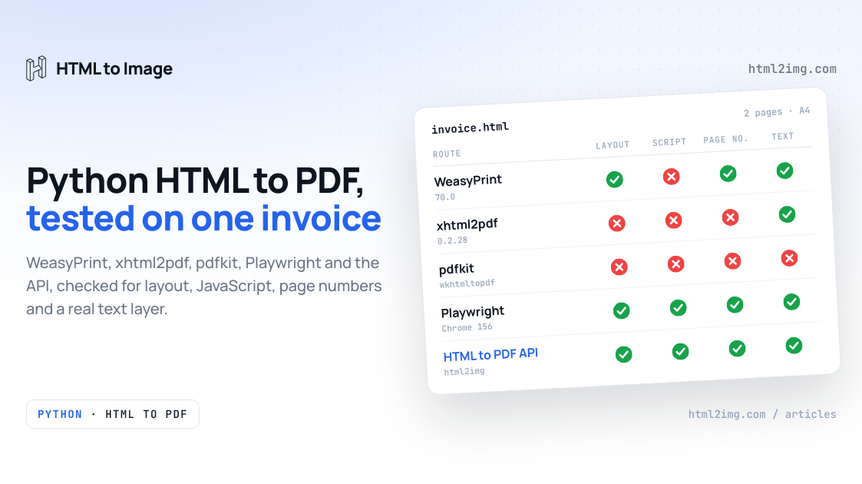
The differences only show up on a real document, and usually in production: a total that prints as a dash, a two-page invoice that comes out at three, a PDF whose text nobody can search. So I ran one realistic invoice through WeasyPrint, xhtml2pdf, pdfkit, Playwright and the HTML to PDF API, checked every file with poppler's command line tools and wrote down what each one got wrong.
The short answer
WeasyPrint prints static documents best. It was the only engine without a browser inside it that laid this invoice out correctly, with CSS page numbers and the smallest file. It does not run JavaScript.
Playwright prints anything Chrome can display, script output included, and puts a browser in your deployment to do it.
The HTML to PDF API gives you Chrome's output with nothing to install, for a network round trip and one credit per PDF.
xhtml2pdf and pdfkit both failed. Use them only for templates written around their limits.
The invoice, and what it asks of a renderer
The test document is a two-page A4 service invoice from a fictional engineering firm to Northgate Coffee: a header, three columns of billing details, 32 line items and a totals block. Every part of it tests something:
A webfont. Inter, loaded from Google Fonts with a
<link>tag. I removed the system copy of Inter from the test machine, so each engine had to fetch and embed it.Modern layout. Flexbox with
gapfor the header, CSS grid for the billing details, custom properties for the brand colours.A table that crosses the page break, with
break-inside: avoidon rows and totals, and a<thead>that should repeat on page two.Page numbers from CSS, in
@pagemargin boxes.A script. The subtotal, VAT and total are summed in JavaScript and formatted with
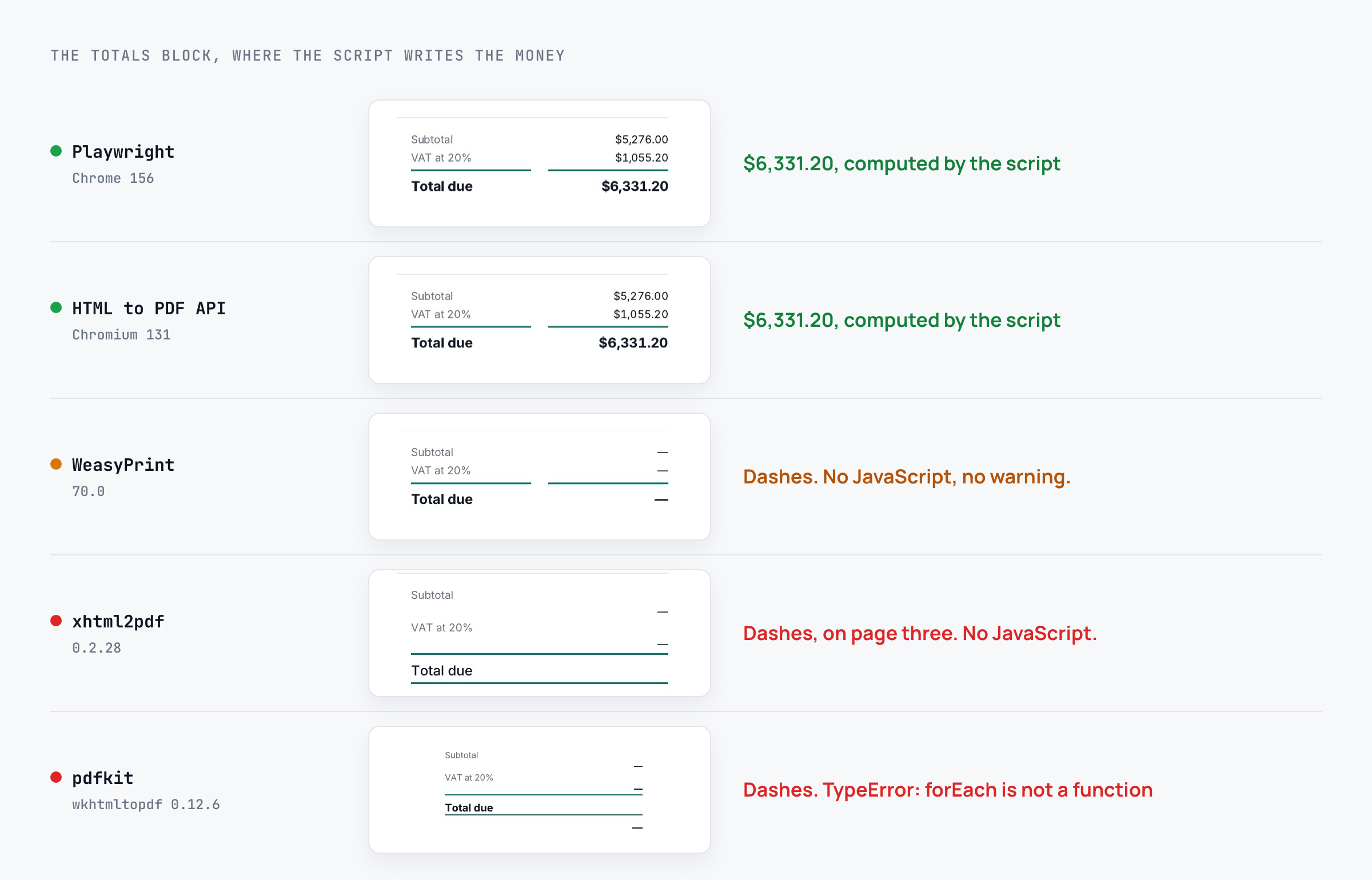
Intl.NumberFormat. In a Python pipeline you would do this sum in the template, and I come back to that, but it stands in for anything a page draws client-side: a chart, a formatted figure, a component. The correct total is $6,331.20.
The print rules, in full:
@page {
  size: A4;
  margin: 16mm 14mm 20mm 14mm;
  @bottom-left  { content: "Kestrel Engineering Ltd \00B7 KES-2026-1187"; }
  @bottom-right { content: "Page " counter(page) " of " counter(pages); }
}
tbody tr, .totals { break-inside: avoid; }
Running this in production? Get an API key with 50 free credits, no card needed.
And the script:
var fmt = new Intl.NumberFormat('en-US', { style: 'currency', currency: 'USD' });
var sub = 0;
document.querySelectorAll('tbody tr').forEach(function (r) { sub += Number(r.getAttribute('data-amount')); });
document.getElementById('total').textContent = fmt.format(sub * 1.2);
document.body.setAttribute('data-ready', 'true');
Every route ran on Ubuntu 24.04 with Python 3.13, each library in its own clean virtual environment. Times are the median of three renders. Every output went through pdfinfo, pdffonts and pdftotext, the three-command check for any PDF.
WeasyPrint 70: right layout, no script
from weasyprint import HTML

HTML(string=html, base_url=".").write_pdf("invoice.pdf")
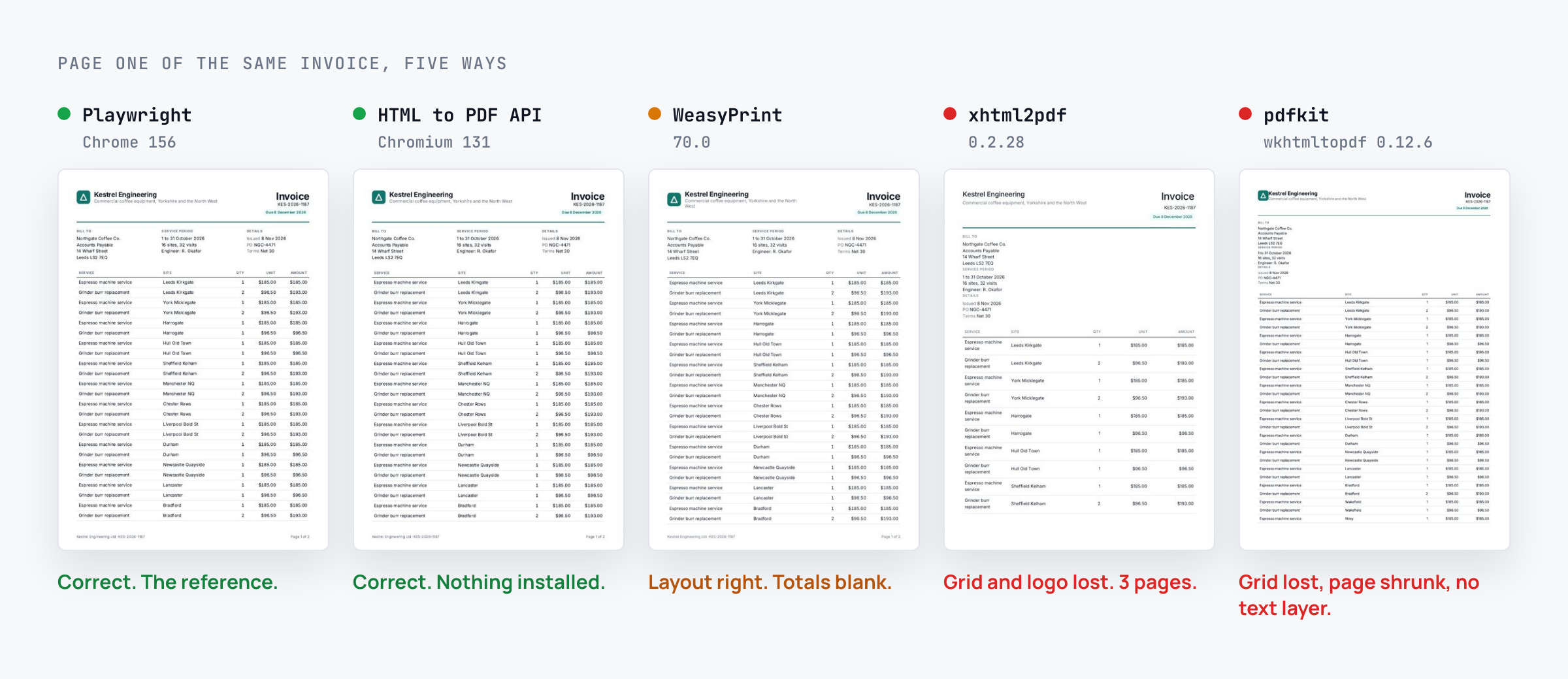
If your picture of WeasyPrint is a few years old, version 70 will surprise you. The grid, the flex gap and the custom properties came out as they do in Chrome, with one line of the header wrapping a little earlier. The margin boxes printed "Page 1 of 2" and "Page 2 of 2". The table header repeated on page two with its rule intact, which neither Chrome build in this test managed. Inter was subset and embedded in three weights, the text layer was clean, and the file was 21.6 KB, a fifth the size of Chrome's.
A render took 1.58 seconds, and more than half of that is fetching Inter from Google Fonts, which WeasyPrint does again on every call. With Inter installed on the machine instead, a render took 0.73 seconds, so ship your fonts with the app.
Then the totals: three dashes. WeasyPrint does not execute JavaScript, and it does not warn you. The PDF is valid and wrong.
For an invoice that is a small problem, because the sum belongs in Python anyway:
subtotal = sum(line.amount for line in lines)
html = template.render(lines=lines, subtotal=subtotal, vat=subtotal * Decimal("0.2"))
It becomes a real problem when the template is shared with your web app or draws a chart in the browser. The WeasyPrint alternative guide covers that case, and rendering Chart.js server-side from Python shows the chart side.
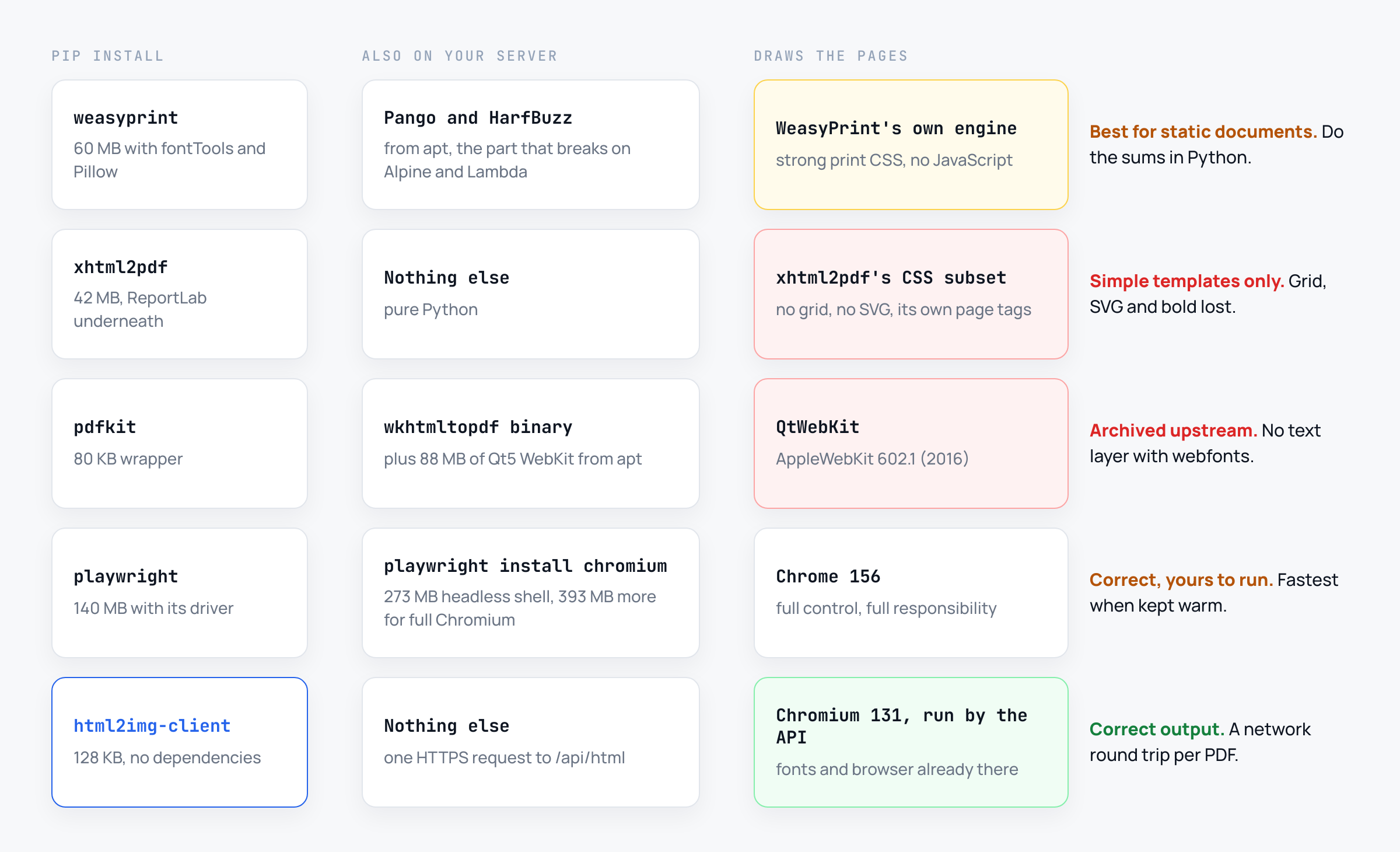
The install is 60 MB of wheels, mostly fontTools and Pillow, plus Pango and HarfBuzz from your system package manager. On a Debian or Ubuntu image that is one apt-get line. On Alpine, distroless or Lambda it is the part that breaks builds.
xhtml2pdf: a CSS subset with its own rules
from xhtml2pdf import pisa

with open("invoice.pdf", "wb") as f:
    result = pisa.CreatePDF(html, dest=f)
print(result.err)  # 0
xhtml2pdf sits on top of ReportLab and implements its own small slice of CSS. It reported zero errors and logged this:
Ignoring CSS properties xhtml2pdf does not implement: border-collapse, box-sizing, font-variant-numeric, grid-template-columnsSo the billing grid became one stacked column, and the inline SVG logo vanished. The @font-face rules use numeric weights, which it does not parse (unknown value font-weight '400'), so every bold heading came out regular. Its table sizing wrapped each service name onto two lines, every row grew taller and the invoice ran to three pages. There were no page numbers, because xhtml2pdf uses its own <pdf:pagenumber> tag instead of CSS counters, and no totals.
It was the fastest route at 0.34 seconds, and it is pure Python with 42 MB of dependencies. That is the case for it: templates written for xhtml2pdf from day one, built from tables, floats and its @frame syntax. It is not a renderer for HTML designed in a browser.
pdfkit: a 2016 browser that draws text as shapes
import pdfkit

pdfkit.from_string(html, "invoice.pdf", options={"page-size": "A4", "quiet": ""})
pdfkit wraps the wkhtmltopdf binary. Its last release was 1.0.0, in November 2021, and it was still downloaded nearly 3 million times last month according to PyPI download stats. I used Ubuntu's apt install wkhtmltopdf, version 0.12.6, which identifies itself as AppleWebKit 602.1: the engine Safari 10 shipped in 2016.
That engine knows neither CSS grid nor flex gap, so the billing details stacked and the logo touched the company name. Its default smart shrinking scaled the whole page down, and the table header did not repeat. The totals printed dashes too, but here the script did run. It threw:
TypeError: document.querySelectorAll('tbody tr').forEach is not a function.NodeList.forEach has shipped in Chrome, Firefox and Safari since 2016, but not in this QtWebKit. The error only appears with --debug-javascript; pdfkit returned normally.
Page numbers failed twice. wkhtmltopdf ignores @page margin boxes, and this build refuses its own footer flag with "The switch --footer-right, is not support using unpatched qt, and will be ignored." The official 0.12.6.1 build has the patched Qt that footers need, but its WebKit is older still, from 2011.
The worst failure stays hidden until someone tries to copy an invoice number. pdffonts listed no fonts and pdftotext returned nothing. wkhtmltopdf drew every webfont glyph as a vector outline, so the PDF has no text layer at all, and it weighs 970 KB, 45 times WeasyPrint's file. Drop the Google Fonts link and the text comes back, in whatever font the server has. The project is archived upstream, so this is the engine you keep.
Playwright: the reference, and the bill for it
from playwright.sync_api import sync_playwright

with sync_playwright() as p:
    browser = p.chromium.launch()
    page = browser.new_page()
    page.set_content(html, wait_until="networkidle")
    page.wait_for_selector("body[data-ready]")
    page.pdf(path="invoice.pdf", format="A4", print_background=True)
    browser.close()
Playwright 1.64.1 drives Chrome 156, and the invoice came out right: the layout, the $6,331.20 total, page numbers from the margin boxes, a repeated header on page two (minus its bottom rule), and Inter embedded and searchable, in 108 KB. Leave out print_background=True and the tinted pill and payment note print without their backgrounds.
Launching a browser per PDF took 1.56 seconds. One browser kept open, with a fresh page per document, took 0.97 seconds, the fastest correct route here.
The bill is the browser. pip install playwright is 140 MB. playwright install chromium --only-shell added a 273 MB headless shell, and without --only-shell you also get the full 393 MB Chromium. Then --with-deps for system libraries, a browser process per worker, its memory, and an upgrade every few weeks. On Lambda the same browser brings its own list of failures, and the Playwright comparison sets out where running it yourself stops paying.
The HTML to PDF API: Chrome's output without Chrome on your server
from pathlib import Path
from html2img import Html2img

client = Html2img()  # reads HTML2IMG_API_KEY

html = Path("invoice.html").read_text()
response = client.html(html, format="pdf", wait_for_selector="body[data-ready]")
client.save(response, "invoice.pdf")
print(response.url)  # the hosted copy
The html2img-client package is 128 KB with no dependencies. The PDF came back with the correct layout, the script's totals, both page numbers and a searchable text layer with Inter embedded, in 205 KB. A render took 2.9 seconds including the round trip and the file download, the slowest correct route, and costs one credit, the same as an image.
Two differences from Playwright, stated plainly. The file is stamped Skia/PDF m131, so the renderer is Chromium 131, not 156, and that build did not repeat the table header on page two; repeating it yourself takes a few lines of template code. And output is A4 portrait rendered with screen CSS, so @media print rules are ignored. The format parameter reference lists what PDF mode accepts, and the Python integration guide covers the async client for FastAPI and Celery.
The five routes side by side
WeasyPrint | xhtml2pdf | pdfkit | Playwright | HTML to PDF API | |
|---|---|---|---|---|---|
Version tested | 70.0 | 0.2.28 | 1.0.0, wkhtmltopdf 0.12.6 | 1.64.1, Chrome 156 | Chromium 131 |
Grid and flex layout | Yes | No | No | Yes | Yes |
Ran the script | No | No | Threw an error | Yes | Yes |
CSS page numbers | Yes | No | No | Yes | Yes |
Header repeated on page 2 | Yes | Yes | No | Yes, minus its rule | No |
Searchable text | Yes | Yes, bold lost | No text layer | Yes | Yes |
Pages | 2 | 3 | 2 | 2 | 2 |
File size | 21.6 KB | 28.6 KB | 970 KB | 108 KB | 205 KB |
Time per PDF | 1.58 s | 0.34 s | 1.58 s | 1.56 s cold, 0.97 s warm | 2.9 s with network |
Which one to use
The deciding question is usually what you are prepared to install on the machine that makes the PDF:
Static documents from templates you control, on servers where you can install system packages: WeasyPrint. It handled the print features better than any other engine here and made the smallest files. Do the arithmetic in Python and ship the fonts with the app.
Templates that need a browser: Chrome, one way or another. If you already run browsers for end-to-end tests, or need the lowest latency at high volume, keep a warm Playwright browser. If the PDF comes from a container, a queue worker or a function you would rather not ship 400 MB of browser in, send the HTML to the HTML to PDF API and keep your dependencies to one small package.
xhtml2pdf only for templates already written for it. pdfkit for nothing new. Two more names you will see: ReportLab draws PDFs from Python calls rather than HTML, so it answers a different question, and pyppeteer has had no release since 2.0.0 in February 2024, so Playwright is its replacement.
Whichever you pick, test it on your real template rather than a hello world, and run pdftotext on the result before an accounts team does it for you. To see what Chrome makes of a template before writing any code, paste it into the HTML to PDF converter.
Generating invoices, statements or reports from Python and would rather not run a browser to do it? Browse the templates gallery or read the docs to get started.

Written by
Mike Griffiths
Mike has spent the last 20 years crafting software solutions for all kinds of amazing businesses. He specializes in building digital products and APIs that make a real difference. As an expert in Laravel and a voting member on the PHP language, Mike helps shape the future of web development.