HTML to Image in Python Without imgkit: Four Routes, Tested
You have a Python job that turns HTML into a PNG: a weekly report card, a certificate, a share image for every post. It probably calls imgkit.from_string(), and it worked when the template was a table and two fonts. Then someone added a CSS grid, or a chart drawn by a script, and the image came back wrong with no error anywhere.
That is not bad luck. imgkit does not render anything itself. It shells out to wkhtmltoimage, a frozen WebKit build from a project that has been archived. Even so, imgkit was downloaded about 400,000 times last month according to PyPI's download stats, and its last release was 1.2.3, in February 2023.
This article runs one realistic template through four Python routes: imgkit, html2image, Playwright and the HTML to Image API. Every image below is the actual output, and each section ends with the failure that route hides from you.
The template, and what it asks of a renderer
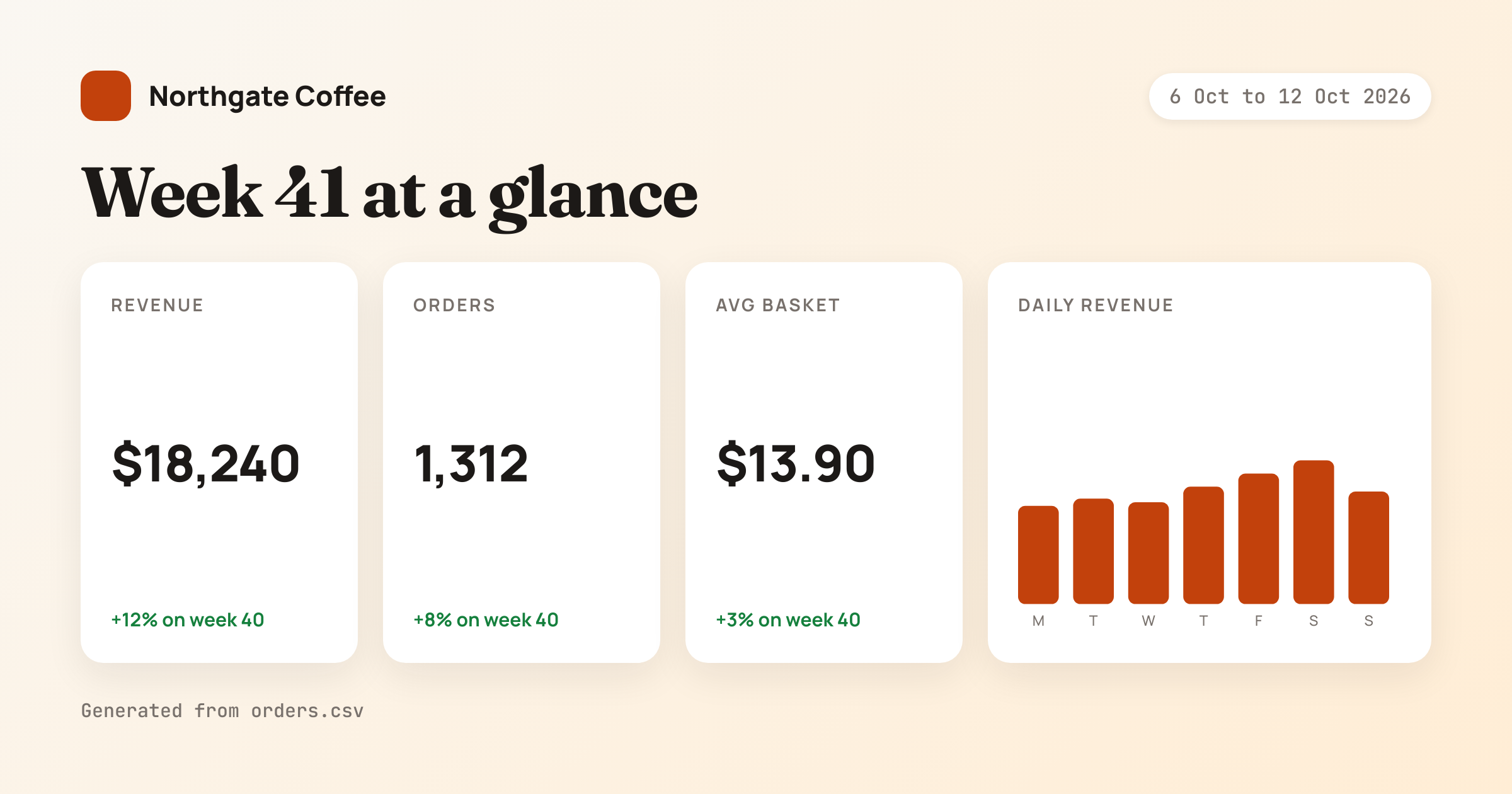
The test template is a 1200×630 weekly summary card for a coffee shop. Nothing in it is exotic. It uses three Google Fonts, CSS custom properties, flexbox with gap, a four-column CSS grid, and a short script that formats the money with Intl.NumberFormat and draws the bar chart:
<style>
  :root { --accent: #C2410C; --muted: #78716C; }
  body { display: flex; flex-direction: column; gap: 28px; }
  .grid { display: grid; grid-template-columns: 1fr 1fr 1fr 1.6fr; gap: 20px; }
  #bars rect { fill: var(--accent); }
</style>

<script>
const week = { revenue: 18240, orders: 1312, days: [2210, 2380, 2290, 2650, 2930, 3240, 2540] };
const usd = new Intl.NumberFormat('en-US', { style: 'currency', currency: 'USD', maximumFractionDigits: 0 });
document.getElementById('revenue').textContent = usd.format(week.revenue);
document.getElementById('basket').textContent = `$${(week.revenue / week.orders).toFixed(2)}`;
const max = Math.max(...week.days);
document.getElementById('bars').innerHTML = week.days.map((v, i) => {
  const h = Math.round(v / max * 120);
  return `<rect x="${i * 46}" y="${130 - h}" width="34" height="${h}" rx="6"/>`;
}).join('');
document.body.dataset.ready = 'true';
</script>
Running this in production? Get an API key with 50 free credits, no card needed.
The last line matters later. Once the chart is drawn, the template marks the page as ready, which gives a renderer something to wait for.
This is what the template should look like, rendered by the HTML to Image API:
Route 1: imgkit and the wkhtmltoimage underneath it
The imgkit call is as short as it gets:
import imgkit

with open("report_card.html") as f:
    html = f.read()

imgkit.from_string(html, "report_card.png", options={
    "width": 1200,
    "height": 630,
    "format": "png",
    "quiet": "",
})
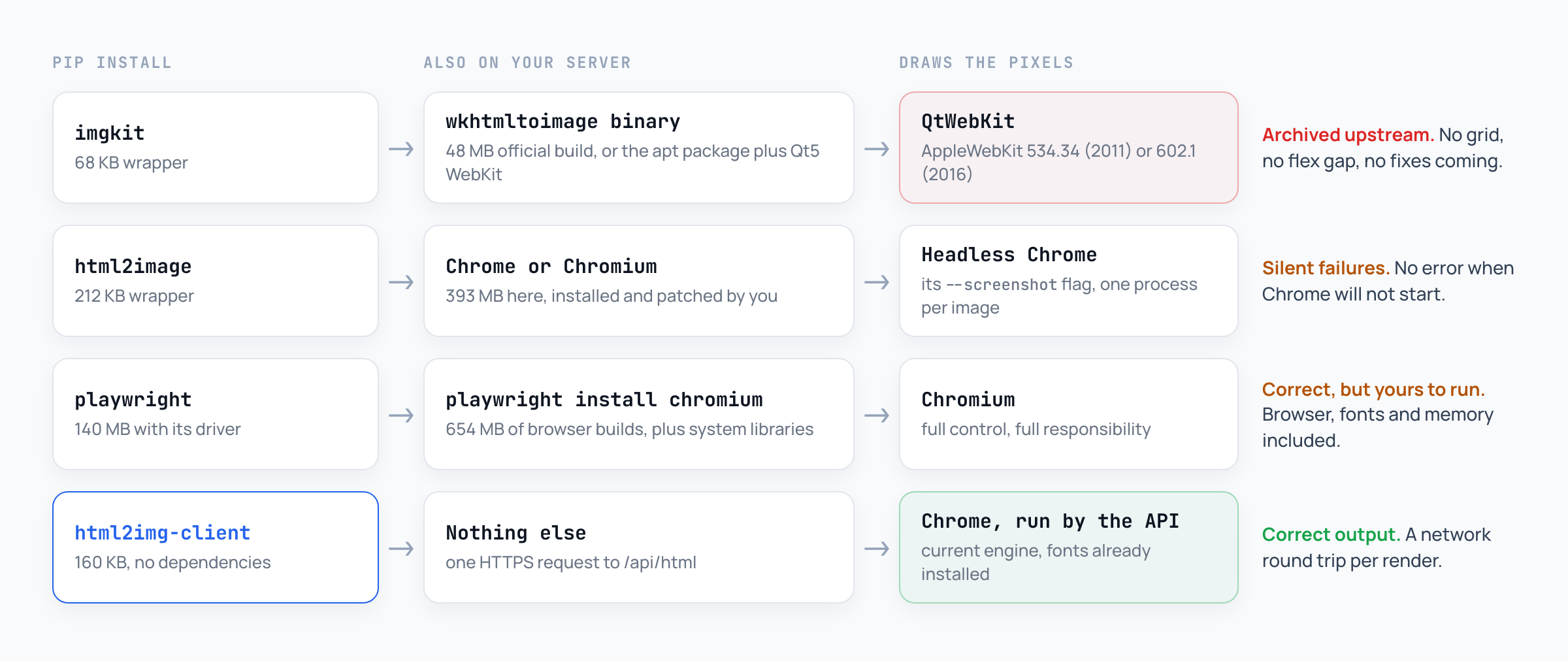
What comes back depends entirely on which wkhtmltoimage binary is on the machine, so I ran it against the two you are most likely to have. The first is Ubuntu 24.04's apt install wkhtmltopdf, version 0.12.6, which identifies itself as AppleWebKit 602.1: the engine Safari 10 shipped in 2016. The second is the official 0.12.6.1 "patched Qt" build that many Dockerfiles download from the project's releases. That one reports AppleWebKit 534.34, a WebKit from 2011.
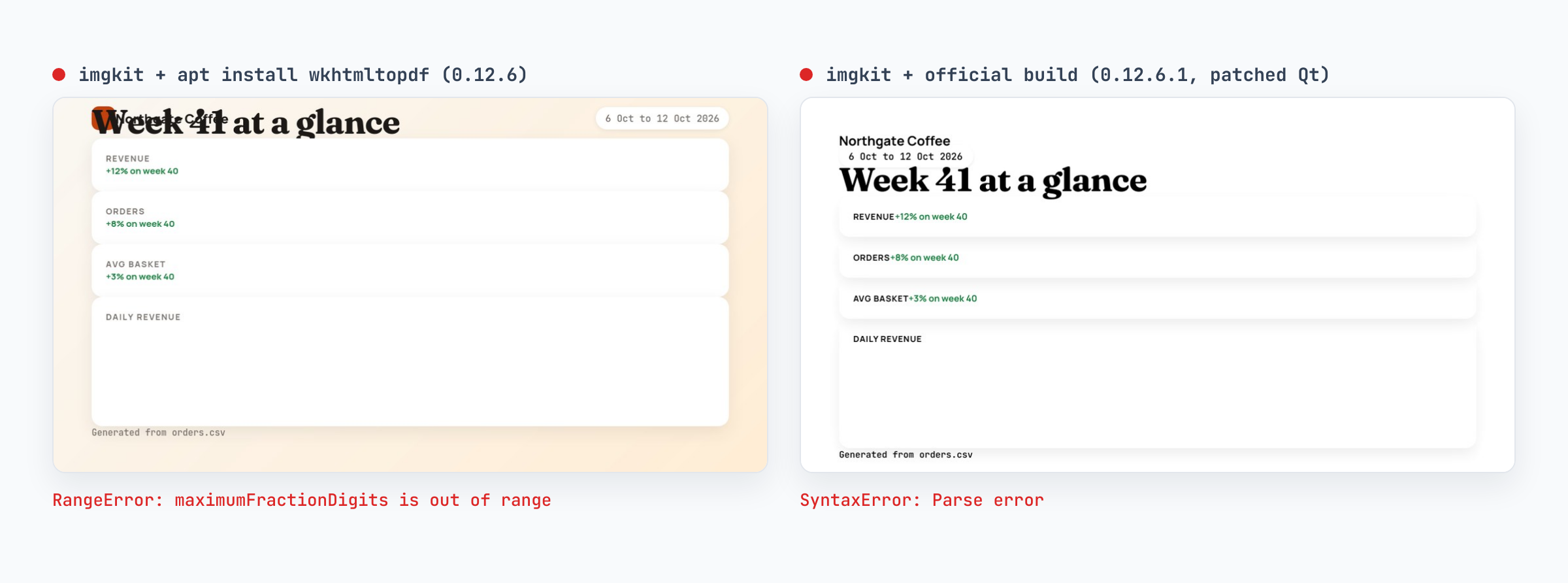
Neither engine supports CSS grid or gap in flexbox, so the four tiles collapse into full-width rows and the spacing disappears. The 2011 build also ignores CSS custom properties, which takes out the background, the accent colour and every muted grey, and it predates the modern flexbox syntax, so the header falls onto two lines.
The script fails in both, for different reasons. The 2016 engine parses it but throws on the currency formatter, because maximumFractionDigits: 0 is out of range for a currency in older Intl implementations. Every modern browser accepts it. The 2011 engine cannot parse a template literal, so the script never runs at all. Either way, the numbers and the chart never appear.
Here is the part that should worry you. imgkit returned normally both times and wrote a file. The only place either error shows up is wkhtmltoimage's own output, and only if you ask for it:
wkhtmltoimage --debug-javascript --width 1200 --height 630 report_card.html out.png
# Warning: file:///report_card.html:63 RangeError: maximumFractionDigits is out of range
Two smaller details from the same run: both builds wrote 3 MB PNGs, against 170 to 180 KB for the same pixels from Chrome, and neither is going to improve. The wkhtmltopdf project is archived, so the engine you have is the engine you keep. You can write ES5 and avoid grid and the card will come back right. That is the trade: you design every template for a browser from 2011.
Route 2: html2image
html2image takes the obvious next step. Instead of bundling an engine, it drives the headless mode of a Chrome, Chromium or Edge that is already installed, through the browser's own --screenshot flag:
from html2image import Html2Image

hti = Html2Image(
    size=(1200, 630),
    custom_flags=["--no-sandbox", "--hide-scrollbars"],
)
hti.screenshot(html_str=html, save_as="report_card.png")
Because it is Chrome doing the drawing, the output matched the reference, in about 1.7 seconds per image. The problems are all around the edges, and all three are quiet.
It needs a browser on the box. On a machine without one you get FileNotFoundError: Could not find a Chrome executable on this machine, please specify it yourself. That error at least is loud. In a slim Docker image the fix is installing Chromium, which took 393 MB here, plus the fonts your templates expect.
It does not tell you when Chrome fails to start. Docker runs as root by default, and Chrome refuses to run as root without --no-sandbox. Leave the flag out and html2image still returns the path it meant to write:
from pathlib import Path

paths = hti.screenshot(html_str=html, save_as="report_card.png")
print(paths)                    # ['/app/report_card.png']
print(Path(paths[0]).exists())  # False
No exception, no file. If you use html2image in production, check the file exists after every call.
It cannot wait for your content. Chrome's screenshot flag fires shortly after the page loads. To test that, I moved the chart and the numbers into a 600 ms setTimeout, which is roughly what a data fetch or an animated chart library does:
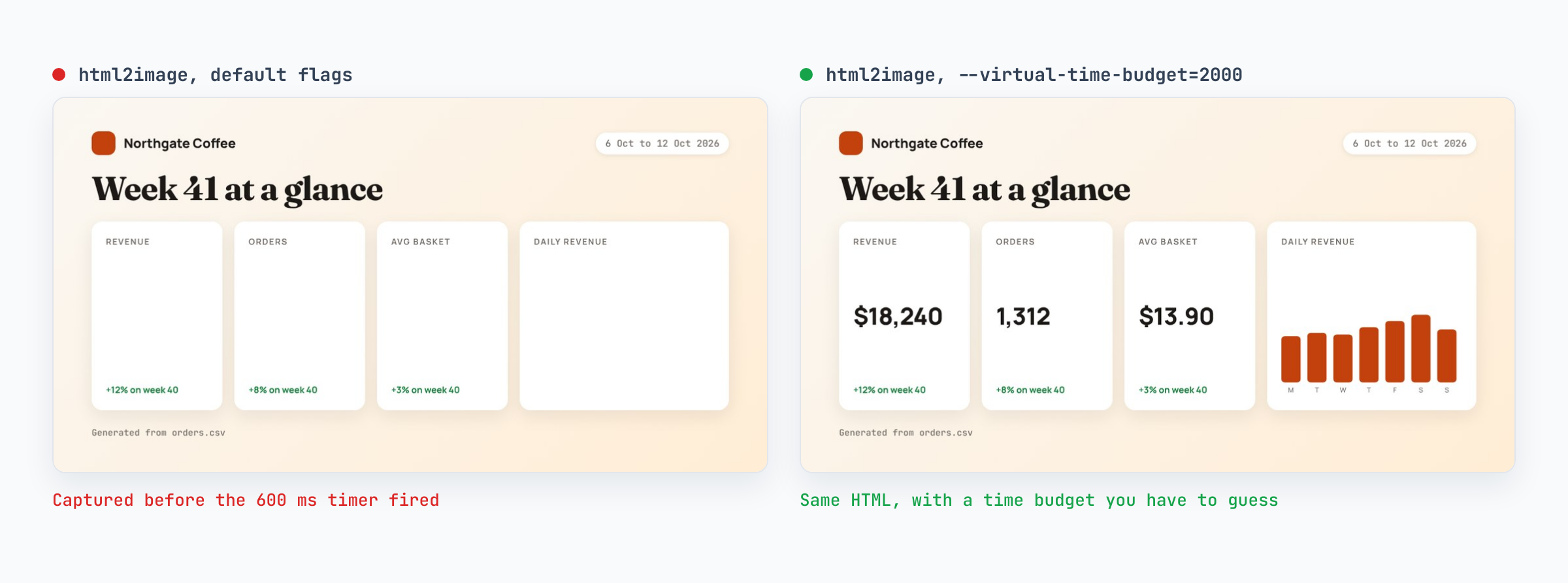
Passing --virtual-time-budget=2000 in custom_flags fixes it, but it is a number you pick by hand, and it either wastes time on every render or turns out to be too short on the day the data is slow.
Route 3: Playwright
Playwright gives you the browser itself, which means you can wait for exactly the thing you care about:
from playwright.sync_api import sync_playwright

with sync_playwright() as p:
    browser = p.chromium.launch()
    page = browser.new_page(viewport={"width": 1200, "height": 630})
    page.set_content(html, wait_until="networkidle")
    page.wait_for_selector("body[data-ready]")
    page.screenshot(path="report_card.png")
    browser.close()
The render was correct on the first try, the async version was correct too, and a missing selector raises a TimeoutError instead of saving half a card. A cold run, launching the browser each time, took 1.75 seconds. Keeping one browser open and opening a fresh page per render brought that to about a second, most of it spent waiting for the fonts and for the network to go quiet.
The cost is what you now run. pip install playwright is 140 MB with its Node driver, and the browsers playwright install chromium puts on disk took another 654 MB here: a 393 MB Chromium plus a 261 MB headless shell (--only-shell skips the first). Add --with-deps for the system libraries, then the fonts, then a browser process per worker, its memory, and an upgrade every few weeks. If you already run browsers for end-to-end tests, that is a cost you have paid. If you only wanted images, the Playwright comparison sets out where the line sits, and on Lambda the same browser has its own list of problems.
Route 4: the HTML to Image API from Python
The last route sends the same HTML to a Chrome that someone else keeps patched. The official client is a 160 KB package with no dependencies:
pip install html2img-client
export HTML2IMG_API_KEY=your-key
from html2img import Html2img
client = Html2img() # reads HTML2IMG_API_KEY
response = client.html(
html,
width=1200,
height=630,
wait_for_selector="body[data-ready]",
)
client.save(response, "report_card.png")
print(response.url) # the hosted copy on the CDNThat request produced the reference image at the top of this article. It came back at 2400×1260, because the HTML endpoint renders at a device pixel ratio of 2 by default; pass dpi=1 when you need exactly 1200×630. wait_for_selector does the same job as in Playwright, so the async version of the template rendered correctly without a guessed delay.
At dpi=1 a render took about 2.1 seconds, including the round trip from the test machine and downloading the file. That is slower than a warm local browser, and it is the only route here that adds nothing to your server image.
Failures arrive as exceptions you can catch, not as a missing file:
from html2img import Html2img, Html2imgError, InsufficientCreditsError

client = Html2img()

try:
    response = client.html(html, width=1200, height=630, dpi=1)
    client.save(response, "report_card.png")
except InsufficientCreditsError:
    notify_billing()        # top up, or pause the job
except Html2imgError as exc:
    log.error("render failed: %s", exc)
    raise
The package also ships a command line tool, which is handy in a cron job or a Makefile:
html2img html report_card.html --width 1200 --height 630 --dpi 1 --out report_card.pngThere is an AsyncHtml2img client for FastAPI and other asyncio code, and Django projects can use the html2img-django package to generate an Open Graph image for every model instance. The Python integration guide covers Flask, Celery and the rest of the client. If you want to check a template before writing any code, paste it into the HTML to Image Converter and see what a current Chrome makes of it.
The four routes side by side
The same template, the same machine, the median of three runs each:
imgkit | html2image | Playwright | HTML to Image API | |
|---|---|---|---|---|
Engine | QtWebKit from 2011 or 2016 | The Chrome you install | Chromium | Chrome, kept current for you |
Rendered this template | No | Yes | Yes | Yes |
Waits for late content |
| A guessed time budget | Any selector | Any selector |
Extra install | 48 MB binary or Qt5 WebKit | Chrome, 393 MB here | 654 MB of browsers plus system libraries | Nothing |
Rendering failures | Silent | Silent | Exceptions | Typed exceptions |
Time per render | 0.4 to 1.3 s | 1.7 s | 1.75 s cold, 1.0 s warm | 2.1 s including network |
Moving an imgkit call to the API
Most imgkit code maps across in a few lines. The three entry points become two methods:
imgkit | HTML to Image client |
|---|---|
|
|
|
|
|
|
|
|
|
|
|
|
|
|
| PNG by default, or |
One difference catches people out. wkhtmltoimage runs on your machine, so templates often point at local files with file:// paths or rely on --enable-local-file-access. A hosted renderer cannot read your disk. Inline small assets as data URIs, put fonts behind a Google Fonts @import, and serve images from a public URL. For URL captures, the Screenshot API takes the same key and covers full-page and single-element shots.
If the same job also produces PDFs through pdfkit, that is the same dead engine wearing a different name, and the WeasyPrint alternative guide walks through moving the PDF side over. For charts specifically, rendering Chart.js server-side from Python shows the same approach with a real charting library.
When the older routes are still fine
imgkit is still a reasonable choice for templates you fully control, laid out with tables and floats, with no scripts, on a machine that cannot make outbound requests. Pin the binary and treat it as finished software, because it is.
html2image is fine for a one-off script on a laptop that already has Chrome, where you will look at every image yourself.
Playwright is the right call if you already run browsers in CI, render at high volume, and want the lowest latency per image. A warm browser beat every other correct route in this test.
For everything that runs unattended in a web app, a queue worker, a container or a function, the deciding question is whether you want a browser in your deployment. If not, the API route is the one with nothing to install and nothing that fails quietly.
Need report cards, certificates or share images rendered from Python without a browser on your servers? Browse the templates gallery or read the docs to get started.

Written by
Mike Griffiths
Mike has spent the last 20 years crafting software solutions for all kinds of amazing businesses. He specializes in building digital products and APIs that make a real difference. As an expert in Laravel and a voting member on the PHP language, Mike helps shape the future of web development.