How to Turn a Tweet Into an Image (Without Screenshotting X)
A customer posts something generous about your product and you want it in the newsletter, on the pricing page, in the deck for Thursday. So you open the app on your phone, screenshot it, crop it, and paste it in. It looks like what it is: a phone screenshot. Wrong aspect ratio, JPEG artefacts from wherever it travelled, a sliver of the notification bar, and a theme that does not match the last one you pasted in.
There are three ways to get a clean image of a post instead. One of them stopped working, one works with strings attached, and one is deterministic. This walks through all three with real output, then covers the part most articles on this topic skip: when reproducing someone else's post is not yours to do.
Why the phone screenshot is the worst of the options
It is not snobbery about pixels. The screenshot fails on things you will actually notice.
Resolution is inconsistent. A screenshot from a phone comes out at whatever that device's pixel ratio is, which is not the size your newsletter template wants, so it gets scaled and softened on the way in. Compression compounds. The image goes through a messaging app or a Slack channel before it reaches you, and every hop re-encodes it.
Then there is the chrome. The reply box, the "Follow" button, part of the next post in the timeline, the back arrow. You crop it out and the crop is never the same twice, so a page with three testimonials has three different amounts of whitespace round the edge.
And it is not reproducible. Change the newsletter width, redesign the case-study page, or switch to a dark layout, and every screenshot has to be retaken by hand.
Route 1: screenshot the permalink (this no longer works)
The obvious move is to point a screenshot API at the post URL. The url parameter takes any publicly reachable page, so a status permalink should be fair game:
curl -X POST https://app.html2img.com/api/screenshot \
  -H "X-API-Key: $HTML2IMG_API_KEY" \
  -H "Content-Type: application/json" \
  -d '{
    "url": "https://x.com/example/status/1234567890123456789",
    "width": 1000,
    "height": 800,
    "ms_delay": 3000
  }'
Running this in production? Get an API key with 50 free credits, no card needed.
I ran exactly that while writing this. The request succeeded, a credit was spent, and the PNG that came back was a blank white rectangle. Not a login wall, not an error page. Nothing.
That is what X returns to an anonymous client now. The timeline is rendered client-side after an authenticated session is established, so a crawler with no session gets an empty shell, and a longer ms_delay does not help because there is nothing arriving to wait for. This is not specific to one screenshot service. Any renderer without a logged-in session sees the same empty page.
Worth knowing generally: a URL screenshot is still the right tool for pages that render for anonymous visitors, which is most of the web. Full-page capture and element cropping both work fine against normal sites. X is the exception, not the rule.
Route 2: render X's own embed widget
X still publishes the embed widget, and the widget does fetch the post. Render the blockquote plus widgets.js through the HTML endpoint and give the script time to swap in the real markup:
curl -X POST https://app.html2img.com/api/html \
  -H "X-API-Key: $HTML2IMG_API_KEY" \
  -H "Content-Type: application/json" \
  -d '{
    "html": "<blockquote class=\"twitter-tweet\"><a href=\"https://twitter.com/example/status/1234567890123456789\"></a></blockquote><script async src=\"https://platform.twitter.com/widgets.js\"></script>",
    "css": "body { margin: 0; padding: 16px; background: white; } .twitter-tweet { margin: 0 !important; }",
    "width": 550,
    "height": 321,
    "ms_delay": 4000
  }'
This one works. The widget renders the real post, avatar and metrics included, and you get a PNG of it. The Twitter embed example in the docs covers the same setup. The widget script exposes no stable selector to wait on, which is why this uses ms_delay rather than wait_for_selector.
Four honest limitations before you build on it.
The output is X's design, not yours. You get the Follow button, the "Read N replies" bar and the X logo, and you cannot restyle any of it, because the widget renders inside its own iframe. It will look like a tweet embed on your page because it is one.
It depends on a third-party script at render time. If platform.twitter.com is slow, or the widget changes, or the endpoint is withdrawn, your build breaks with a blank card and no error.
It breaks retroactively. If the author deletes the post, protects their account or is suspended, every future render fails. Images you already have are fine, but a build that re-renders will not be.
And the metrics are frozen at capture. That is arguably correct behaviour for an archive, but if you re-render six months later the numbers change under you.
Use this route when fidelity to the actual post matters more than design control: archiving, evidence, a link roundup where the embed look is the point.
Route 3: render the card from data
The third route drops the dependency entirely. Instead of fetching the post, you send its contents as JSON and get a card back. The tweet mockup card template takes the fields a post actually has and returns a 1200x800 PNG:
curl -X POST https://app.html2img.com/api/v1/templates/tweet-mockup-card \
  -H "X-API-Key: $HTML2IMG_API_KEY" \
  -H "Content-Type: application/json" \
  -d '{
    "display_name": "Priya Raman",
    "handle": "@priyabuilds",
    "body": "we swapped the screenshot step in our newsletter build for a render API\n\n40 minutes of manual cropping every Friday is now 90 seconds of CI",
    "avatar_url": "https://example.com/avatars/priya.png",
    "verified": "blue",
    "timestamp": "9:42 AM · Sep 4, 2026",
    "replies": "38",
    "retweets": "214",
    "likes": "1.9K",
    "views": "63K",
    "theme": "light"
  }'
That call produced this, and it is the actual render rather than a mockup of one:
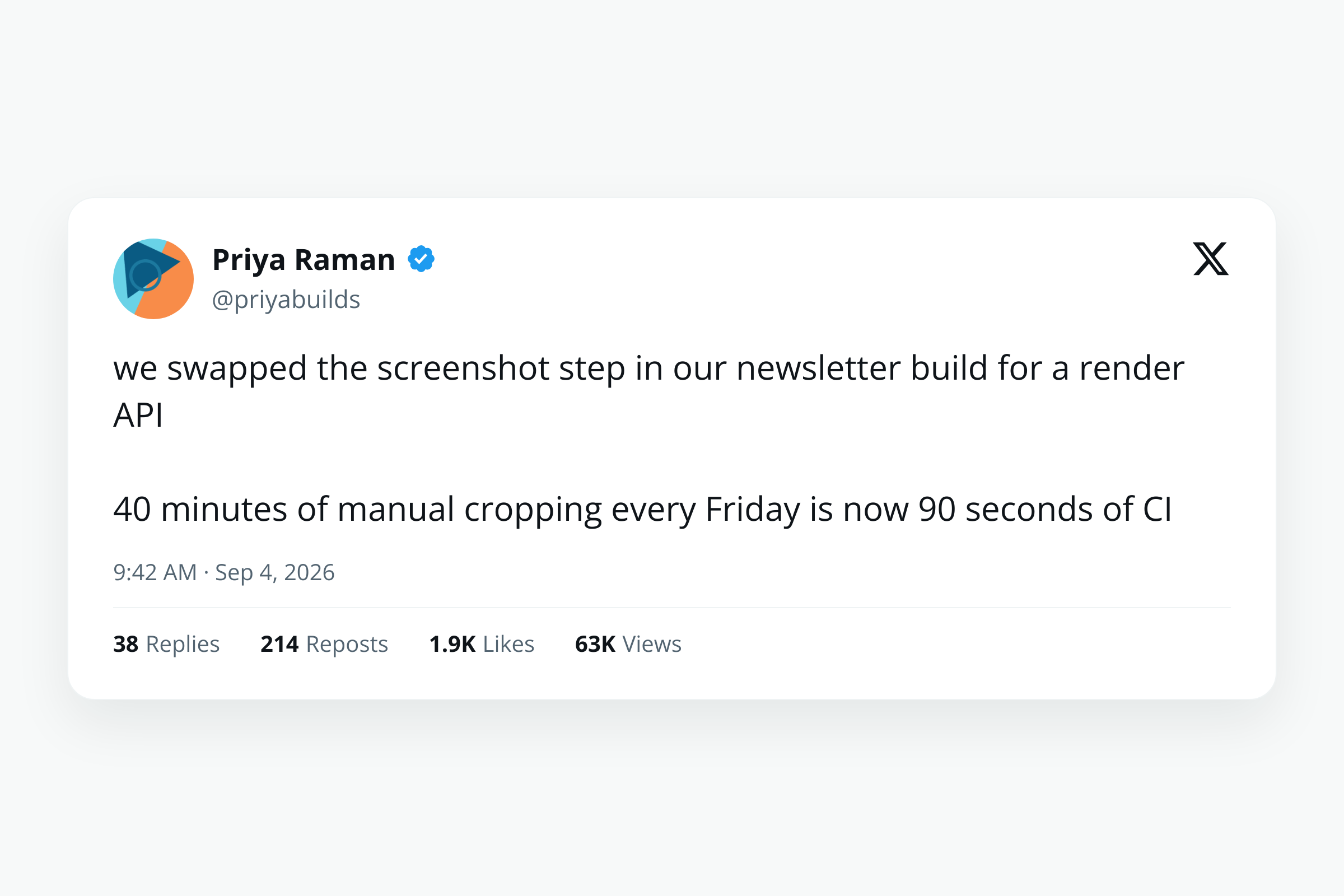
Only three inputs are required: display_name, handle and body. Everything else is optional and degrades sensibly. Leave the metrics out and the engagement row disappears rather than rendering zeros. Leave verified out and there is no check mark. verified takes none, blue or gold, so an organisation account gets the gold check rather than a blue one it does not have.
The body field respects line breaks, so a multi-paragraph post keeps its shape instead of collapsing into a wall. Counts are strings rather than numbers on purpose, which means you enter them exactly as X displays them, abbreviations and all, rather than reimplementing the rounding rules.
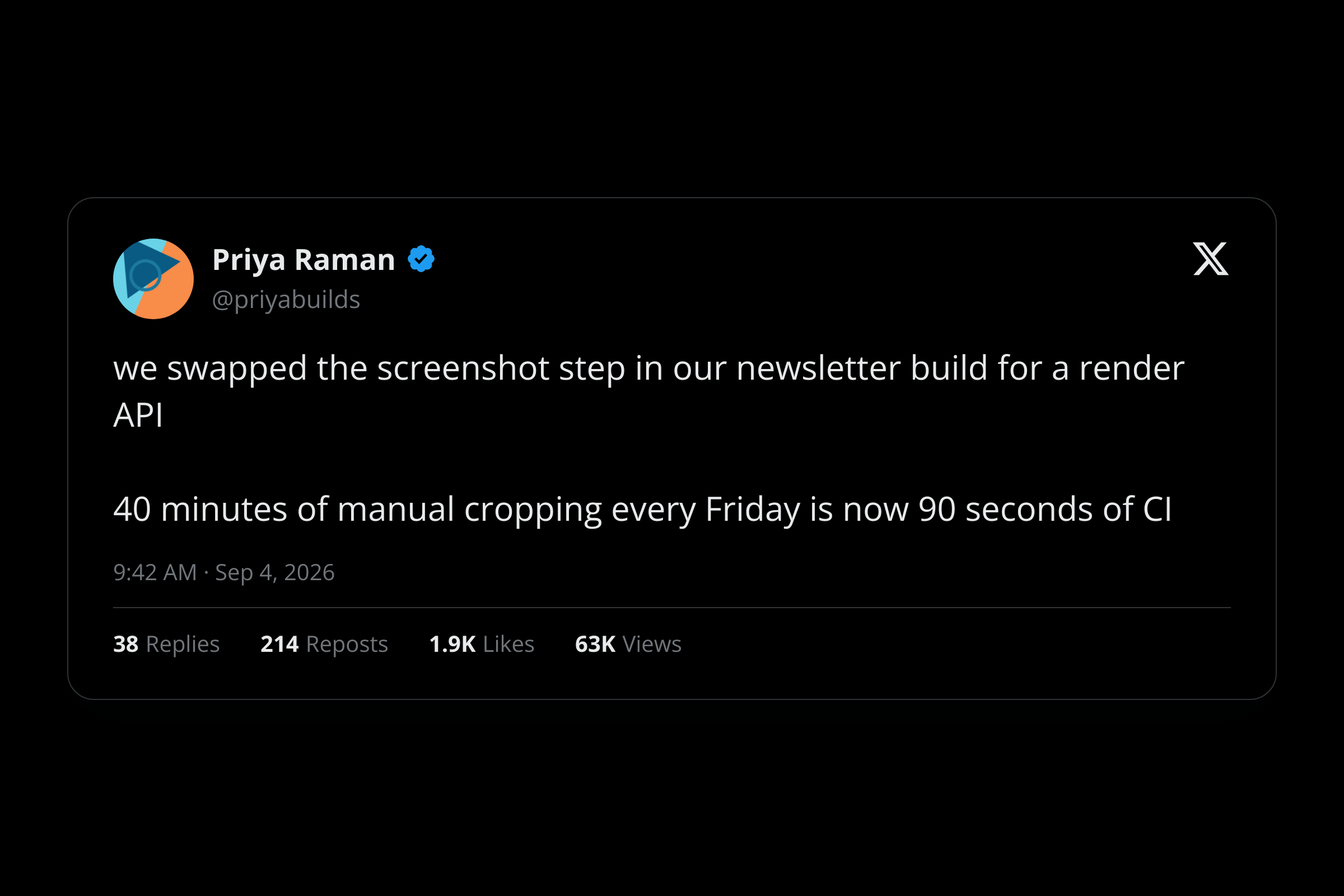
Switch theme to dim or dark and the same payload gives you a card that sits properly on a dark newsletter or slide:
Full input reference, defaults and error responses are in the tweet mockup card docs. Every template also takes format, so setting it to pdf gives you the same card as a document instead.
Wiring it into a build
The reason to do this in code rather than by hand is that testimonials change. A quotes table, a render step and a cache key covers it:
import crypto from 'node:crypto';

const ENDPOINT = 'https://app.html2img.com/api/v1/templates/tweet-mockup-card';

async function renderCard(quote, theme = 'light') {
  const payload = {
    display_name: quote.name,
    handle: quote.handle,
    body: quote.body,
    avatar_url: quote.avatarUrl,
    verified: quote.verified ?? 'none',
    timestamp: quote.postedAt,
    replies: quote.replies,
    retweets: quote.retweets,
    likes: quote.likes,
    theme,
  };

  // Hash the payload so an unchanged quote never re-renders.
  const key = crypto.createHash('sha256')
    .update(JSON.stringify(payload))
    .digest('hex')
    .slice(0, 16);

  const cached = await cache.get(key);
  if (cached) return cached;

  const response = await fetch(ENDPOINT, {
    method: 'POST',
    headers: {
      'X-API-Key': process.env.HTML2IMG_API_KEY,
      'Content-Type': 'application/json',
    },
    body: JSON.stringify(payload),
  });

  if (!response.ok) {
    throw new Error(`Render failed: ${response.status} ${await response.text()}`);
  }

  const { url } = await response.json();
  await cache.set(key, url);
  return url;
}
The hash covers the theme as well as the content, so a light and a dark version of the same quote are two cache entries and two renders rather than one that overwrites the other. Without the cache, a site that rebuilds on every deploy spends a credit per quote per build for images that never changed.
For a batch big enough to be slow, the webhook_url parameter lets you fire the renders off and store URLs as they land rather than blocking the build.
The line you should not cross
This is the part that matters more than any of the code above.
A tool that renders a post from data will happily render a post nobody made. Type any name, any handle, any words, add a blue check, and you have a convincing image of a thing that was never said. The tidier the render, the more convincing the fake, which means quality makes this worse rather than better.
So: reproduce your own posts freely. Reproduce a customer's post when you have their say-so, and keep the wording exactly as they wrote it. Use it to design a card layout before you have real content. Do not put words in a real person's mouth, and do not use it to manufacture social proof that does not exist. Fabricated screenshots do genuine damage to the people named in them, and "it was only a mockup" is not a defence once it is circulating.
If you want the quote without the impersonation risk, a quote card attributes plainly without dressing the words up as a platform post, and reads more honestly on a pricing page anyway.
Choosing between the three
Render from data when you control the content or have permission for it, you want it to match your brand, and you need the same output every time. That covers most newsletter, slide and landing-page work.
Use the embed widget when the point is that this specific post really exists on X, and you accept X's styling, X's script and the risk that the post goes away.
Do not use a URL screenshot for X at all. It comes back blank and costs you a credit to find out.
Do this in the browser instead
If this is a one-off and you have no pipeline to build, the Tweet to Image Generator is the same renderer behind a form. Fill in the name, handle, body, avatar, metrics and theme, and download the PNG. There is no API key to wire up and nothing to deploy. The Twitter card generator covers the neighbouring job of building the share card that appears when your own link is posted, which is a different thing that gets confused with this one constantly.
FAQ
Can I screenshot a tweet by URL at all?
Not on X. The page renders client-side behind an authenticated session, so an anonymous renderer receives an empty document and captures a blank image. Other social platforms vary. Test the specific URL before building anything on it.
Does the rendered card include the X logo?
The tweet mockup card includes a small platform mark in the corner so the card reads as what it represents. If you want a completely unbranded quote, use the quote card template instead.
What size are the images?
The template renders 1200x800 by default. That works as-is for a newsletter body or a slide. For a share image you usually want 1200x630 instead, and the OG image safe zone guide covers where each platform crops it.
How do I get the avatar in?
Point avatar_url at any publicly reachable image and the renderer fetches it server-side. Omit the field entirely and the card falls back to a placeholder avatar rather than failing, so check the output the first time you wire it up.
Can I do the same for code snippets?
Yes, and it is a separate template. The code screenshot guide covers themes, backgrounds and line numbers for sharing code the same way.
Rendering posts, quotes, invoices and certificates from data rather than screenshots keeps every asset the same size and the same style. Browse the templates gallery to see what ships ready to use, or read the docs to wire it into your own build.

Written by
Mike Griffiths
Mike has spent the last 20 years crafting software solutions for all kinds of amazing businesses. He specializes in building digital products and APIs that make a real difference. As an expert in Laravel and a voting member on the PHP language, Mike helps shape the future of web development.