Why Your Image Won't Update: How Gmail, Apple Mail, GitHub and Slack Cache Images
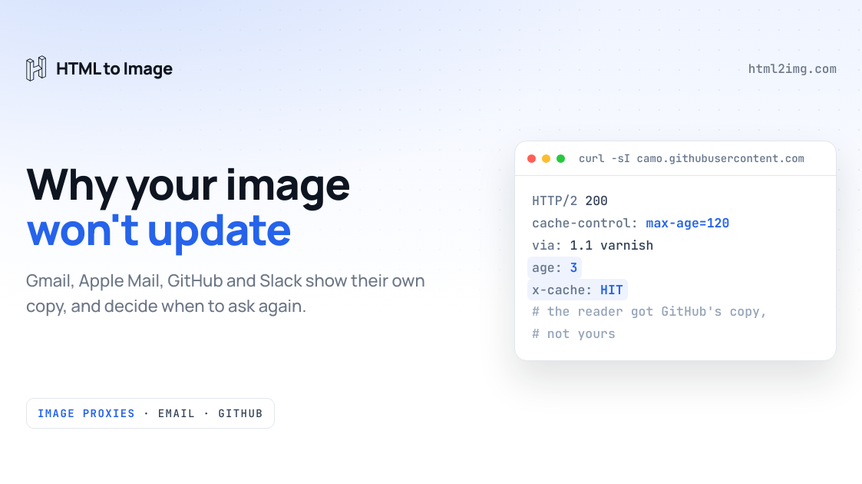
You replaced the image on your server. Your browser shows the new version. The README, the email sitting in your inbox, the Slack message and the LinkedIn preview all still show the old one, and a hard refresh changes nothing.
Your browser was never involved. When an image appears inside someone else's product, the reader almost never asks your server for it. A proxy run by Google, Apple, GitHub, Slack or Meta fetches it once and hands its copy to everyone who looks. The proxy decides when to ask you again, and several of them never read your Cache-Control header.
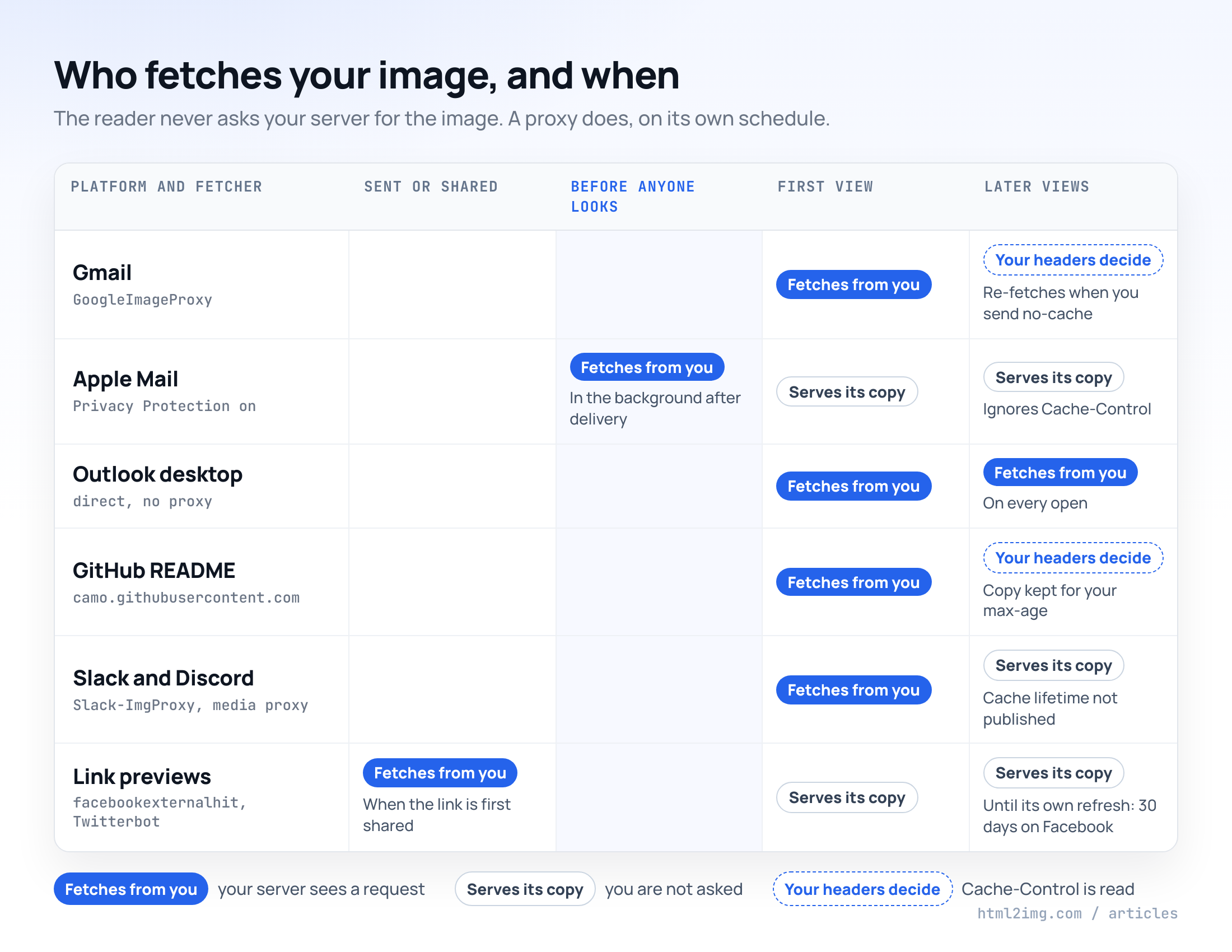
The cheat sheet
Each row comes from the platform's own documentation or a published test. The GitHub row was also checked with live requests on 28 October 2026. Where a platform publishes nothing, the table says so.
Where the image shows | Who fetches it | When | Reads your Cache-Control? | How to get a new image shown |
|---|---|---|---|---|
Gmail (web and apps) | Google's image proxy, user agent contains | When the email is opened | Yes, | Send |
Apple Mail with Mail Privacy Protection | Apple's proxy, user agent a bare | In the background after delivery, before any open | No | Nothing reaches an email already delivered |
Outlook desktop | The reader's own machine | On every open | Yes | Not needed |
Outlook.com | Microsoft's image proxy | On open | Not documented | New URL |
Yahoo Mail | Yahoo's caching proxy | On open | Not documented | New URL |
GitHub READMEs, issues, comments | Camo, | First view after its copy expires | Yes, your header is passed through | Short |
Slack messages and previews |
| When the message is shown | Not documented | New URL |
Discord embeds | Discord's media proxy (the embed's | Not documented | Not documented | New URL |
Facebook link previews |
| When the link is first shared | No, it refreshes every 30 days | Sharing Debugger, then a new image URL |
X cards |
| When the link is first shared | No, it re-indexes about every 7 days | New image URL |
LinkedIn previews |
| When the link is first shared | Not documented | Post Inspector |
Two minutes or thirty days
The spread is what catches people out.
The blue bars are clocks somebody chose. Shields.io sends max-age=120 on a badge that changes and max-age=432000 on one that never does, and GitHub's proxy honours both. The grey bars are clocks you cannot touch: Facebook refreshes on its own 30-day cycle, X on roughly seven days, and Apple Mail keeps whatever it prefetched for two to three days whatever headers you send.
That gives the rule for everything that follows. Where the platform reads your headers, set them. Where it does not, change the URL.
Email clients disagree with each other
Gmail fetches on open and listens to no-cache
Since December 2013, Gmail on the web and in its apps loads every remote image through Google's proxy. The image in the message points at a googleusercontent.com address with your original URL after a #, and the proxy only calls your server when someone opens the email. Filippo Valsorda's test from the week it launched also showed the proxy re-encoding the file. The image the reader saw had a different hash and size from the one he served. Google changes your bytes.
The first version told every client to keep each image for 24 hours, which froze countdown timers and live charts. Gmail changed that in March 2014: a no-cache response now makes it fetch again on the next open. Reelevant, which serves live images in email, sends this on every response:
Cache-Control: no-cache, no-store, max-age=0
Pragma: no-cache
Expires: -1
Running this in production? Get an API key with 50 free credits, no card needed.
The request comes from Google's address, not the reader's. Anything you vary by the requester's location, such as local weather or the nearest store, sees a Google data centre.
Apple Mail fetches before anyone opens the email
With Mail Privacy Protection on, Apple Mail downloads remote images in the background after a message arrives, through Apple's proxy, whether or not the person ever opens it. In FreshInbox's tests the download usually came about 20 minutes after delivery, sometimes hours later. Opening the email made no new request. The copy lasted two to three days, Cache-Control was ignored, and an image URL used in several emails was fetched once for all of them. Those tests ran on the iOS 15 beta in 2021, and Reelevant's current documentation still lists Apple as caching images soon after delivery despite no-cache headers.
So in Apple Mail a countdown timer shows the time left at delivery, and a "live" chart shows the numbers from when the email landed. Headers cannot change that. What you can do is make the frozen version true: draw the timestamp into the image ("Figures at 09:00 on Monday 2 November") and write the surrounding copy so it still reads correctly a day later. Give each send its own image URL as well, so last week's prefetched copy is never reused for this week's email.
Outlook and Yahoo
Outlook for desktop has no proxy, unless your organisation's security tooling adds one. It fetches from your server on every open and respects no-cache.
Outlook.com loads external images through a Microsoft proxy, and Yahoo Mail has served images from its own caching proxy since 2018. Neither publishes how long it keeps a copy. Reelevant reports that Outlook on the web sometimes returns a cached image and Yahoo often does. Treat both as caches you cannot clear.
For the design side of email images, the guide to images that render in every email client covers retina scaling and dark mode.
GitHub's Camo copies your headers
Every external image in GitHub Markdown, from READMEs to issue comments, is rewritten to a camo.githubusercontent.com address: an HMAC of the original URL, then the original URL in hex. The first viewer after a copy expires triggers a fetch, and everyone else gets the copy from GitHub's CDN.
Camo trusts your server. It keeps its copy for as long as your headers say, and here is a Shields.io commit-activity badge requested through Camo twice, three seconds apart, with the headers trimmed:
HTTP/2 200
cache-control: max-age=120, s-maxage=120
content-type: image/svg+xml;charset=utf-8
via: 1.1 varnish
age: 0
x-cache: MISS

HTTP/2 200
cache-control: max-age=120, s-maxage=120
via: 1.1 varnish
age: 3
x-cache: HIT
x-cache-hits: 1
That cache-control line is Shields.io's own. The same badge requested straight from img.shields.io returns max-age=120, and the GitHub Actions status badge returns max-age=60. Static badges go out with max-age=432000, five days, because nothing about them will change. A badge or stats card on a README stays current only as far as its server's max-age allows.
If your image server sends no Cache-Control header at all, GitHub's troubleshooting page tells you to add Cache-Control: no-cache. When a wrong image has to go immediately, right-click it on GitHub, copy the image address (that is the Camo URL) and purge it:
curl -X PURGE "https://camo.githubusercontent.com/<hmac>/<hex-encoded-url>"Camo replies with {"status": "ok", ...}. GitHub warns that a purge forces every viewer to re-request the image, so keep it for mistakes. Let max-age handle routine updates.
Assume Slack and Discord keep a copy
Slack fetches images through Slack-ImgProxy and link previews through Slackbot, and publishes no cache lifetime for either. The one documented rule concerns previews: a link shared in the same conversation within the past hour does not expand again. If you post through Block Kit, the image block takes an image_url of up to 3,000 characters pointing at a PNG, JPG or GIF. SVG is not on that list, so the SVG badge from your README is the wrong format for a Slack image block.
Discord's API describes each embed image's proxy_url as a proxied copy of the image, and documents nothing about how long that copy lives.
For both, a changed image needs a changed URL. Any difference counts, even a query string your server ignores (?v=2026-10-28), though the first pattern below does it properly.
Link previews hold on the longest
A link preview stacks two caches: the platform's copy of your page's og:image tag, and its copy of the image that tag points at.
Facebook is the slowest. Its crawler refreshes link metadata every 30 days. To force it sooner, run the page through the Sharing Debugger or call POST /?id={url}&scrape=true on the Graph API. Meta's own advice for a replaced image is to give it a different URL, so the cached file is not reused. X's crawler re-indexes card tags roughly every seven days and gives the same advice: add a parameter to the image URL. LinkedIn's Post Inspector fetches the page again on demand.
Caching is only one way a preview goes wrong. Relative og:image paths, missing dimensions, the wrong aspect ratio and tags added by JavaScript are covered in why your OG image isn't showing, and the Open Graph checker shows what a crawler sees on your page right now.
Two URL patterns that make the cache work for you
Every fix above is one of two moves.
New content, new URL
If the URL changes whenever the image changes, no proxy can show a stale version, because no proxy has seen the new URL yet. You can then cache as hard as you like, since the content behind any one URL never changes.
Derive the version from the inputs, so the same data always gives the same URL and any change gives a new one:
import { createHash } from 'node:crypto';

function versionedImageUrl(base, data) {
  const v = createHash('sha256')
    .update(JSON.stringify(data))
    .digest('hex')
    .slice(0, 12);
  return `${base}?v=${v}`;
}

versionedImageUrl('https://example.com/og/launch-week.png', { title: 'Launch week', stars: 1240 });
// https://example.com/og/launch-week.png?v=f4fb944a18e4

versionedImageUrl('https://example.com/og/launch-week.png', { title: 'Launch week', stars: 1241 });
// https://example.com/og/launch-week.png?v=d7b608bef371
Then serve each versioned URL with a long lifetime:
Cache-Control: public, max-age=31536000, immutableRendering APIs give you this pattern without the hashing. Every render from HTML to Image comes back at its own CDN address, so a redesigned email banner or a corrected certificate gets a URL no proxy has a copy of. A RenderChart chart URL carries its data in the query string (type=bar&x=Mon,Tue,Wed&y=4200,3900,5100), so next week's numbers are a different URL by construction, which is how a chart in a Monday email report shows the right figures in Gmail and Apple Mail alike.
The pattern needs you to control where the URL gets written: the email template, the message your bot posts, the meta tag on the page.
Same URL, short max-age
Sometimes you cannot change the URL. It is pasted into a README, a Notion page, a wiki or somebody's email signature, and it has to keep working there. Then the content behind the URL changes, and your only lever is a short max-age for the proxies that read it:
location /badges/ {
    add_header Cache-Control "public, max-age=300" always;
}
Pick the number by weighing how stale you can tolerate against how much traffic you want reaching your server. Shields.io uses 60 to 120 seconds for badges that change. RenderChart's live short URLs send max-age=300 for the same reason: the chart earlier on this page is one, and if its data were edited, the new version would show within about five minutes anywhere the proxy honours the header.
This pattern stops where the header stops being read. In Apple Mail and in link previews, a fixed URL shows whatever was fetched first.
Finding out what the proxy has
Before you blame a cache, check what the proxy actually holds.
Request the proxied URL rather than your own. Copy the image address from the place where it looks wrong, a Camo URL on GitHub or a googleusercontent.com URL in Gmail, and run curl -sI on it. The age, x-cache and cache-control headers show if you are looking at a copy, and how old it is.
Then log user agents on your image route. Each fetcher names itself: GoogleImageProxy, Slack-ImgProxy, Slackbot-LinkExpanding, facebookexternalhit, Twitterbot, LinkedInBot and Discordbot, with Apple Mail's requests arriving as a bare Mozilla/5.0. If opening the email in Gmail produces no request, Gmail is serving a copy it already has. An Apple request a few minutes after delivery tells you exactly when the frozen version was taken.
Need email banners and OG images rendered to a fresh URL every time the design changes? Browse the templates gallery or read the docs to get started.

Written by
Mike Griffiths
Mike has spent the last 20 years crafting software solutions for all kinds of amazing businesses. He specializes in building digital products and APIs that make a real difference. As an expert in Laravel and a voting member on the PHP language, Mike helps shape the future of web development.