Browsershot Alternatives: HTML to Image in Laravel Without Puppeteer
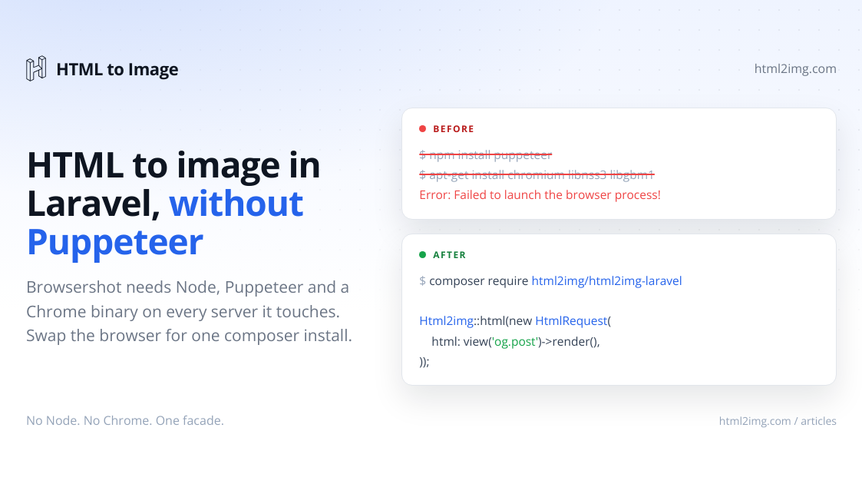
Browsershot is the package most Laravel developers reach for when they need to turn HTML into an image. It wraps Puppeteer, drives real Chrome and produces pixel-accurate output. On your machine it works first time. Then you deploy, and the first render throws Failed to launch the browser process!.
The problem is not Browsershot's code. The problem is what it demands from the machine it runs on.
Running Puppeteer in Laravel: what Browsershot asks of your server
Browsershot is a PHP package with a second runtime hiding inside it. To run it in production you need Node.js, the Puppeteer npm package, a Chrome or Chromium binary, the long tail of shared libraries Chrome links against (libnss3, libatk, libgbm and friends on a slim Debian image) and a font set wide enough to cover whatever your templates contain, emoji included.
That is manageable on a full VPS you control. It falls apart in the places Laravel apps increasingly run:
Laravel Vapor and serverless. The PHP Lambda runtime ships neither Node nor Chrome, and you cannot apt-get your way out of a Lambda. The Puppeteer on Lambda guide covers just how deep that particular hole goes.
Shared and managed hosting. No root, no system packages, no browser binary. Browsershot is simply off the table.
Slim Docker images.
php:8.3-fpm-alpinecarries none of Chrome's dependencies. Adding Chromium, its libraries and fonts costs a few hundred megabytes and a permanent maintenance line in your Dockerfile.CI pipelines, where every job downloads a browser before your test suite can touch a render.
The dependency does not stay contained either. Even Spatie's newer packages inherit it: spatie/laravel-og-image renders through laravel-screenshot, which drives Browsershot underneath, so the Node and Chrome requirement follows the whole family wherever it goes.
The usual workarounds
The first workaround is the fat container: bake Chromium, the shared libraries and a font stack into your image, pass the sandbox flags and accept the size. It works, but now every render boots a Chrome process on the same box that serves your requests. Chrome is hungry, so your memory headroom and your render concurrency are suddenly the same budget, and a traffic spike that triggers a burst of OG images can take PHP-FPM down with it.
The second is the sidecar: wnx/sidecar-browsershot ships Browsershot to a dedicated Node Lambda so your Vapor app can call it. Genuinely clever, and it solves the serverless case. It also means you now own a second deployment with its own IAM roles, layers, cold starts and a Node function that has to stay version-locked to your PHP code.
Both are real answers. Both also amount to operating a browser fleet so your app can produce a PNG.
The third option is to stop hosting the browser.
Rendering over an API instead
The official Laravel package for HTML to Image moves the Chrome part behind an API and leaves your app with a single HTTP call. It lives on GitHub and Packagist, and setup is the install plus a key:
composer require html2img/html2img-laravelRunning this in production? Get an API key with 50 free credits, no card needed.
HTML2IMG_API_KEY=your-api-keyPackage discovery registers the service provider and the Html2img facade, and php artisan html2img:test renders a small test image to confirm the key is live. Renders still run in real Chrome, just on the API side, so flexbox, grid, custom properties, web fonts and inline JavaScript behave exactly as they did under Browsershot. The output does not change. Where Chrome lives does.
Here is the classic case, a dynamic Open Graph image rendered from a Blade view:
use Html2img\Laravel\Facades\Html2img;
use Html2img\Request\HtmlRequest;

$response = Html2img::html(new HtmlRequest(
    html: view('og.post', ['post' => $post])->render(),
    width: 1200,
    height: 630,
    dpi: 2, // retina
));

return $response->url; // https://i.html2img.com/abc123def456.png
No Node on the box, no binary paths to configure, nothing browser-shaped in the Dockerfile. The same call renders whatever your Blade views can produce, and the invoice to image guide walks a complete billing example. The package guide covers the config file, the custom Guzzle client binding and every render option.
Swapping the call site
Migration is mostly mechanical because the shapes line up. A typical Browsershot call:
use Spatie\Browsershot\Browsershot;

Browsershot::html(view('og.post', ['post' => $post])->render())
    ->windowSize(1200, 630)
    ->save(storage_path("app/og/{$post->id}.png"));
becomes:
use Html2img\Laravel\Facades\Html2img;
use Html2img\Request\HtmlRequest;

$response = Html2img::html(new HtmlRequest(
    html: view('og.post', ['post' => $post])->render(),
    width: 1200,
    height: 630,
));

$path = Html2img::store($response, "og/{$post->id}.png");
store() downloads the render and writes it to any Laravel filesystem disk, local or S3, and hands back the path. If the CDN URL the API returns is all you need, skip the download entirely and serve that.
Screenshots are covered too
Browsershot's other job is capturing live URLs, and the swap is the same shape. selector crops the capture to one element and css is injected before capture, which is the polite way to remove cookie banners and chat widgets from the shot:
use Html2img\Laravel\Facades\Html2img;
use Html2img\Request\ScreenshotRequest;

$response = Html2img::screenshot(new ScreenshotRequest(
    url: 'https://example.com',
    selector: '#hero',
    css: '.cookie-banner, .intercom-launcher { display: none !important; }',
    dpi: 2,
));
The selector parameter docs cover the crop behaviour, and there is a full walkthrough on screenshotting a single element from a URL.
Failure handling you can actually catch
Browsershot failures surface as process exceptions, which leaves you matching on stderr strings to work out whether Chrome crashed, timed out or never launched. The package throws typed exceptions instead, with the status code and decoded response attached:
use Html2img\Laravel\Facades\Html2img;
use Html2img\Request\HtmlRequest;
use Html2img\Exception\RateLimitException;
use Html2img\Exception\Html2imgException;

try {
    $response = Html2img::html(new HtmlRequest(html: $document));
} catch (RateLimitException $e) {
    // 429: back off and release the job for retry
} catch (Html2imgException $e) {
    report($e); // status code, error code and payload all attached
}
That distinction matters most in queued jobs, where a render is a natural fit anyway. Type-hint Html2img\Laravel\Html2img in handle() and the container injects the configured manager, no facade required.
When Browsershot is still the right call
An API is not the answer to everything, and pretending otherwise would be selling.
If your compliance rules forbid sending markup to an external service, you need to own the browser, full stop. And if you render at sustained, very high volume with an ops team happy to feed a Chrome fleet, amortised infrastructure can beat per-render pricing. The Puppeteer comparison lays that trade-off out honestly.
One reason that used to sit in this list has gone. PDFs are covered now: the same API renders a Blade view to a paginated vector PDF through a single format parameter, and the dompdf alternatives guide walks that route end to end.
For everyone else, the browser on your server is a tax. You pay it in Dockerfile lines, in memory headroom, in the 2am page when a Chromium update breaks fonts, and in every environment where the binary cannot follow you. One composer package and an API key make it someone else's problem, and that someone runs Chrome for a living.
If the only thing keeping Chrome on your server is image rendering, browse the templates gallery or read the docs to get started.

Written by
Mike Griffiths
Mike has spent the last 20 years crafting software solutions for all kinds of amazing businesses. He specializes in building digital products and APIs that make a real difference. As an expert in Laravel and a voting member on the PHP language, Mike helps shape the future of web development.