I've written invoice PDFs with DomPDF. I've written them with wkhtmltopdf via Snappy. Both work. Neither produces output I'd want a customer to see if I cared about how the thing looked. DomPDF's CSS support is stuck somewhere around 2012, and Snappy hands you a wkhtmltopdf binary that renders fonts like it's still running on Windows XP.
The specific thing that pushed me off both of them was a client who wanted their invoices to match their brand guide. Inter font, a specific hex for the accent colour, rounded corners on the total row, a subtle shadow under the line items, and a small logo top-left. DomPDF rendered the Inter font as Times New Roman. Snappy got the font right but broke the border-radius. Neither supported CSS grid, so the two-column header with billing and shipping addresses side-by-side needed a float hack that I didn't want to write in 2026.
What I actually wanted was to render a Laravel Blade template the way Chrome renders it, and get a PNG I could email, embed in a dashboard, or drop into a PDF later. This article is how I got there without putting a headless browser on my own server.
Why the usual Laravel invoice libraries fall short
The state of PHP PDF libraries is, to put it politely, historical. DomPDF is actively maintained but its rendering engine is a subset of CSS 2.1 with partial CSS 3 support, which means no flexbox, no grid, unreliable webfonts, and shadow/filter properties that either ignore you or crash the renderer. It works for "here is a table of numbers" output. It doesn't work when your design team has opinions.
Snappy (via wkhtmltopdf) rendered more faithfully for a while, but wkhtmltopdf itself was archived in 2023. It still runs. It's not getting updates. And even at its peak, its font rendering was noticeably different from Chrome, which matters because your designer previewed the template in Chrome.
The modern-feeling option is to run Puppeteer or Playwright from PHP via an exec call, or a service like Browsershot. This works, but now you're maintaining a Node.js install alongside your Laravel app, a Chromium binary, and you're exec'ing into it from PHP which is a category of bug I don't love debugging. Browsershot in particular is great software, but it's infrastructure you have to install, update, and keep working on every environment including your CI and your production containers.
The approach that got me out of this was to stop trying to render the invoice on my own infrastructure. Let the Blade template render to HTML the way it normally would. Post that HTML to an API. Get a PNG back. The invoice design lives entirely in Blade and CSS, same as any other Laravel view, and nothing about my server has to change.
The setup
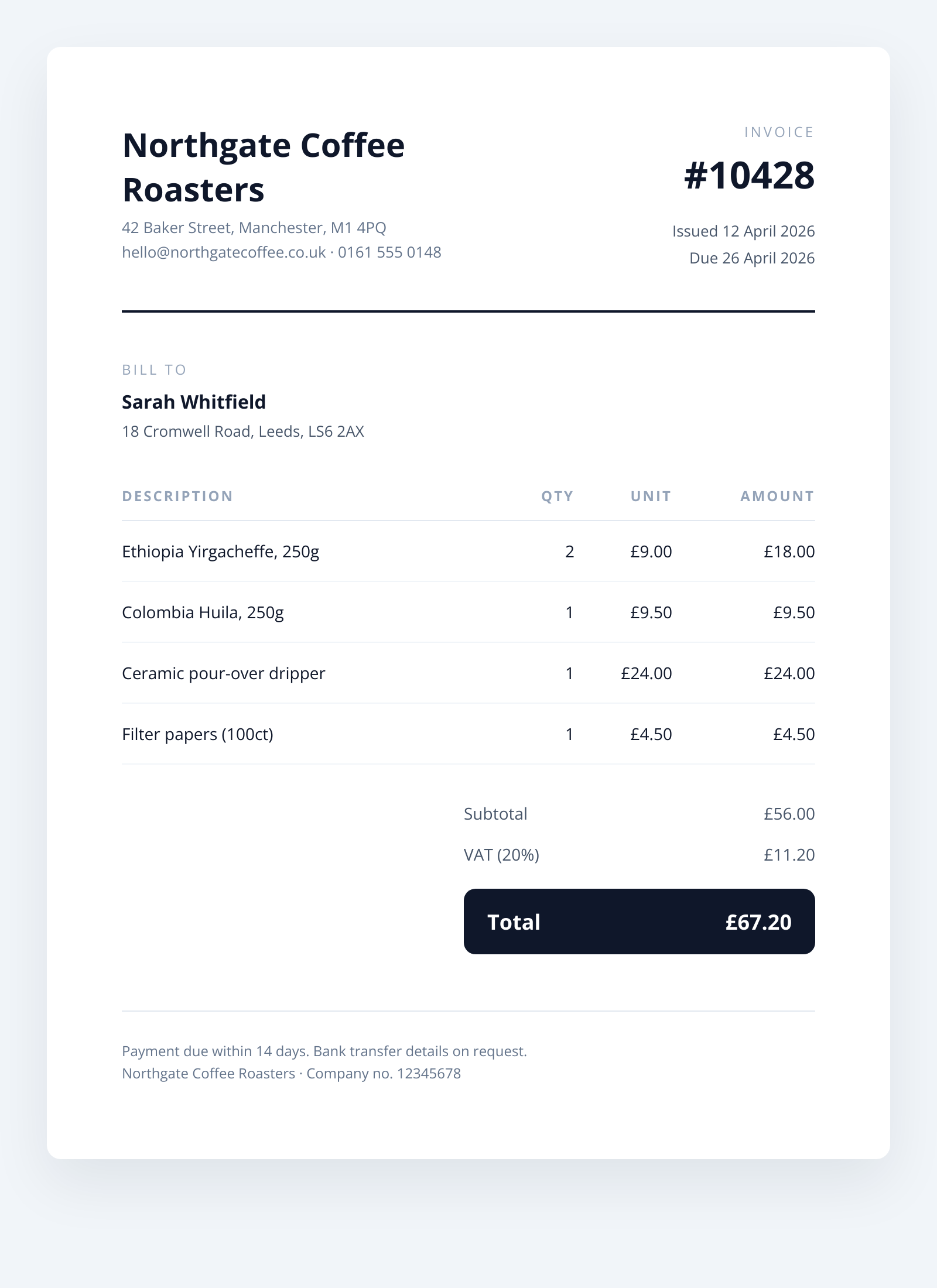
I'll walk through a working implementation for a billing system that generates a PNG invoice when an order is marked as paid. The invoice has a header with company details, a line item table, a totals block, and a footer with payment terms. Everything you'd expect.
Start with the Blade template at resources/views/invoices/image.blade.php:
<!DOCTYPE html>
<html>
<head>
    <meta charset="utf-8">
    <style>
        @import url('https://fonts.googleapis.com/css2?family=Inter:wght@400;500;600;800&display=swap');
        * { box-sizing: border-box; margin: 0; padding: 0; }
        body {
            width: 800px;
            font-family: 'Inter', system-ui, sans-serif;
            padding: 64px;
            color: #0f172a;
            background: white;
        }
        header {
            display: grid;
            grid-template-columns: 1fr 1fr;
            gap: 32px;
            padding-bottom: 32px;
            border-bottom: 2px solid #0f172a;
        }
        .brand h1 { font-size: 28px; font-weight: 800; margin-bottom: 4px; }
        .brand .addr { font-size: 13px; color: #64748b; line-height: 1.6; }
        .meta { text-align: right; }
        .meta .label { font-size: 12px; text-transform: uppercase; letter-spacing: 2px; color: #94a3b8; }
        .meta .invoice-no { font-size: 32px; font-weight: 800; margin: 6px 0 16px; }
        .meta .dates { font-size: 13px; color: #475569; line-height: 1.8; }
        .bill-to { margin: 40px 0 24px; }
        .bill-to .label { font-size: 12px; text-transform: uppercase; letter-spacing: 2px; color: #94a3b8; margin-bottom: 8px; }
        .bill-to .name { font-size: 16px; font-weight: 600; }
        .bill-to .addr { font-size: 13px; color: #475569; line-height: 1.6; margin-top: 4px; }
        table { width: 100%; border-collapse: collapse; margin-top: 16px; }
        th { text-align: left; font-size: 12px; text-transform: uppercase; letter-spacing: 1.5px; color: #94a3b8; padding: 12px 0; border-bottom: 1px solid #e2e8f0; }
        th.right { text-align: right; }
        td { padding: 16px 0; border-bottom: 1px solid #f1f5f9; font-size: 14px; }
        td.right { text-align: right; }
        .totals { margin-top: 24px; display: flex; justify-content: flex-end; }
        .totals-inner { width: 300px; }
        .totals-row { display: flex; justify-content: space-between; padding: 8px 0; font-size: 14px; color: #475569; }
        .totals-row.total {
            margin-top: 12px; padding: 16px 20px;
            background: #0f172a; color: white;
            border-radius: 10px;
            font-size: 18px; font-weight: 800;
        }
        footer { margin-top: 48px; padding-top: 24px; border-top: 1px solid #e2e8f0; font-size: 12px; color: #64748b; line-height: 1.6; }
    </style>
</head>
<body>
    <header>
        <div class="brand">
            <h1>{{ $business['name'] }}</h1>
            <div class="addr">
                {{ $business['address'] }}<br>
                {{ $business['email'] }} · {{ $business['phone'] }}
            </div>
        </div>
        <div class="meta">
            <div class="label">Invoice</div>
            <div class="invoice-no">#{{ $invoice['number'] }}</div>
            <div class="dates">
                Issued {{ $invoice['issued_at'] }}<br>
                Due {{ $invoice['due_at'] }}
            </div>
        </div>
    </header>

    <div class="bill-to">
        <div class="label">Bill to</div>
        <div class="name">{{ $customer['name'] }}</div>
        <div class="addr">{{ $customer['address'] }}</div>
    </div>

    <table>
        <thead>
            <tr>
                <th>Description</th>
                <th class="right">Qty</th>
                <th class="right">Unit</th>
                <th class="right">Amount</th>
            </tr>
        </thead>
        <tbody>
            @foreach ($items as $item)
                <tr>
                    <td>{{ $item['description'] }}</td>
                    <td class="right">{{ $item['qty'] }}</td>
                    <td class="right">£{{ number_format($item['unit'], 2) }}</td>
                    <td class="right">£{{ number_format($item['qty'] * $item['unit'], 2) }}</td>
                </tr>
            @endforeach
        </tbody>
    </table>

    <div class="totals">
        <div class="totals-inner">
            <div class="totals-row"><span>Subtotal</span><span>£{{ number_format($totals['subtotal'], 2) }}</span></div>
            <div class="totals-row"><span>VAT ({{ $totals['vat_rate'] }}%)</span><span>£{{ number_format($totals['vat'], 2) }}</span></div>
            <div class="totals-row total"><span>Total</span><span>£{{ number_format($totals['total'], 2) }}</span></div>
        </div>
    </div>

    <footer>
        Payment due within 14 days. Bank transfer details on request.<br>
        {{ $business['name'] }} · Company no. {{ $business['company_no'] }}
    </footer>
</body>
</html>
Now a service class that takes a domain Invoice, renders the Blade template, posts it to the API, and returns the PNG bytes:
<?php

namespace App\Services;

use App\Models\Invoice;
use Illuminate\Support\Facades\Http;
use Illuminate\Support\Facades\View;
use RuntimeException;

class InvoiceImageRenderer
{
    public function __construct(
        private readonly string $apiKey,
    ) {}

    public function render(Invoice $invoice): string
    {
        $html = View::make('invoices.image', [
            'business' => config('invoicing.business'),
            'customer' => [
                'name' => $invoice->customer->name,
                'address' => $invoice->customer->formatted_address,
            ],
            'invoice' => [
                'number' => $invoice->number,
                'issued_at' => $invoice->issued_at->format('j F Y'),
                'due_at' => $invoice->due_at->format('j F Y'),
            ],
            'items' => $invoice->items->map(fn ($i) => [
                'description' => $i->description,
                'qty' => $i->quantity,
                'unit' => $i->unit_price,
            ])->all(),
            'totals' => [
                'subtotal' => $invoice->subtotal,
                'vat_rate' => $invoice->vat_rate,
                'vat' => $invoice->vat_amount,
                'total' => $invoice->total,
            ],
        ])->render();

        $response = Http::withToken($this->apiKey)
            ->timeout(30)
            ->post('https://api.html2img.com/v1/render', [
                'html' => $html,
                'viewport_width' => 800,
                'viewport_height' => 1100,
                'device_scale_factor' => 2,
                'wait_for_selector' => '.totals-row.total',
                'full_page' => true,
            ]);

        if ($response->failed()) {
            throw new RuntimeException(
                "Invoice render failed: {$response->status()} {$response->body()}"
            );
        }

        return $response->body();
    }
}
Bind it in a service provider or resolve it directly:
$renderer = new InvoiceImageRenderer(config('services.html2img.key'));
$png = $renderer->render($invoice);

Storage::disk('s3')->put("invoices/{$invoice->number}.png", $png);
A few details in that render call worth pointing out. full_page: true is what makes this work for invoices specifically, because an invoice's height depends on how many line items it has, and you don't want to clip or stretch. The viewport width stays fixed at 800 (a comfortable reading width for a document), and the height becomes whatever the content needs. wait_for_selector: '.totals-row.total' ensures the render happens after the full content tree has mounted, which matters if the Google Font hasn't finished loading yet. device_scale_factor: 2 gives you a 1600-pixel-wide PNG that looks crisp when viewed on retina screens or printed.
Blade does the HTML escaping for you when you use {{ $var }}, so user-supplied data like customer names and addresses can't break the layout or inject markup. If you're pulling item descriptions from a rich-text source, use {!! $var !!} deliberately and only after you've sanitised it server-side.
Gotchas worth knowing
Fonts are the biggest source of surprise on first run. The @import inside the <style> block works, but adds a network round-trip inside the render. For a production pipeline that's generating thousands of invoices, either host the font file yourself and reference it via @font-face with a publicly reachable URL, or base64-encode the woff2 and inline it. The wait_for_selector option helps, but if your selector is visible before the font has swapped in, you still get a fallback for a brief moment. Adding a small ms_delay of 300-500ms on top of the selector wait is a reasonable belt-and-braces.
Numbers need locale-aware formatting. number_format() defaults to US conventions. For UK invoices I use number_format($amount, 2, '.', ','). For European invoices where the comma is the decimal separator, switch the arguments. Getting this wrong in production is embarrassing.
Don't render invoices synchronously inside a web request if you can avoid it. Queue it. Laravel's job system handles this naturally, and the API supports webhooks if you want the render itself to be asynchronous and get notified when it's done. For batch runs, the webhook flow is substantially faster because you're not blocking on each render.
One operational note: version your invoice template. When you change the design, old invoices that get re-rendered will look different from their original version, which can cause accounting confusion. Either snapshot the rendered PNG to S3 at generation time and serve that, or include a template_version column on the invoice and pick the right Blade view based on it. I do the former.
The Laravel usage guide covers the framework integration in more depth, including the HTTP client setup and how to test the renderer without hitting the API. For longer documents or batch work, the webhook parameter docs walk through the async pattern. And if you want more examples of document-style templates beyond invoices, the invoice and receipt example has a few variants.
Render the view, post the HTML, save the PNG. Your Blade template is the source of truth for what the invoice looks like, the same way it's the source of truth for the rest of your app.