---
title: "How to Generate Quote Cards from an API for Testimonials, Pull Quotes and Podcast Clips"
description: "Generate quote cards from an API: send the quote and attribution as JSON, get a branded PNG back, then loop it over every testimonial and pull quote."
url: "https://html2img.com/articles/quote-card-api/"
section: "Tutorials"
published: "2026-09-12T16:01:12.630Z"
updated: "2026-09-12T16:03:53.748Z"
---
# How to Generate Quote Cards from an API for Testimonials, Pull Quotes and Podcast Clips
By Mike Griffiths. https://html2img.com/articles/quote-card-api/

A SaaS with forty customer testimonials has forty quote cards to make. A publication that shares two pull quotes per article needs a card every time a piece goes out. A podcast that clips the best line from each episode needs one a week for as long as the show runs. Each card is the same layout with the words swapped, and it is still being opened in a design tool, typed out, exported and uploaded by hand.
This article shows how to render quote cards from an API instead: one call per quote, a hosted PNG back, and a loop that runs the whole backlog while you do something else. Every image below is the actual output of the request above it.
## What a quote card has to get right
A quote card looks simple and hides three problems.
The first is length. A testimonial can be eleven words or fifty, and the card has to look deliberate at both ends. A fixed font size either leaves a short quote floating in empty space or pushes a long one off the bottom. The type has to scale with the text.
The second is attribution. Name, role, company and sometimes a face or a logo, laid out so the quote stays the hero and the credit reads as a caption. This is the part that drifts when different people make the cards, and drift is what makes a feed look like three brands instead of one.
The third is format. A 1200x1200 square posts to Instagram, LinkedIn and X without recropping, which is why it is the default. But a card destined for a link preview has to be 1200x630, and a card for Stories has to be 1080x1920 with the payload kept out of the top and bottom where the platform draws its own chrome. If you have built [Open Graph images with a safe zone](https://html2img.com/articles/og-image-safe-zone/) the discipline carries over exactly.
The template route below handles the first two problems for you. The custom HTML route handles all three, at the cost of writing the markup once.
## Route 1: render from JSON with the template endpoint
The [Quote Card template](https://html2img.com/templates/quote-card/) takes two required inputs, `quote` and `attribution_name`, and six optional ones for the role, an avatar, a brand name, a logo and the two colours:
```
curl -X POST https://app.html2img.com/api/v1/templates/quote-card \
-H "X-API-Key: $HTML2IMG_API_KEY" \
-H "Content-Type: application/json" \
-d '{
"quote": "We replaced a designer-in-the-loop process with one API call. The cards went out the same afternoon the quotes came in, and nobody could tell they were not hand made.",
"attribution_name": "Priya Raman",
"attribution_role": "Head of Product, Fieldline",
"brand_name": "Fieldline",
"background_color": "#FAF7F0",
"accent_color": "#2563EB"
}'
```
The response is the standard envelope with a CDN URL:
```
{
"success": true,
"id": "152d3ad1-5fb3-44e0-b7c3-328c45332aeb",
"template": "quote-card",
"expires_at": null,
"credits_remaining": 100,
"url": "https://i.html2img.com/image-1789228709438-533456.png"
}
```
And this is the file at that URL:
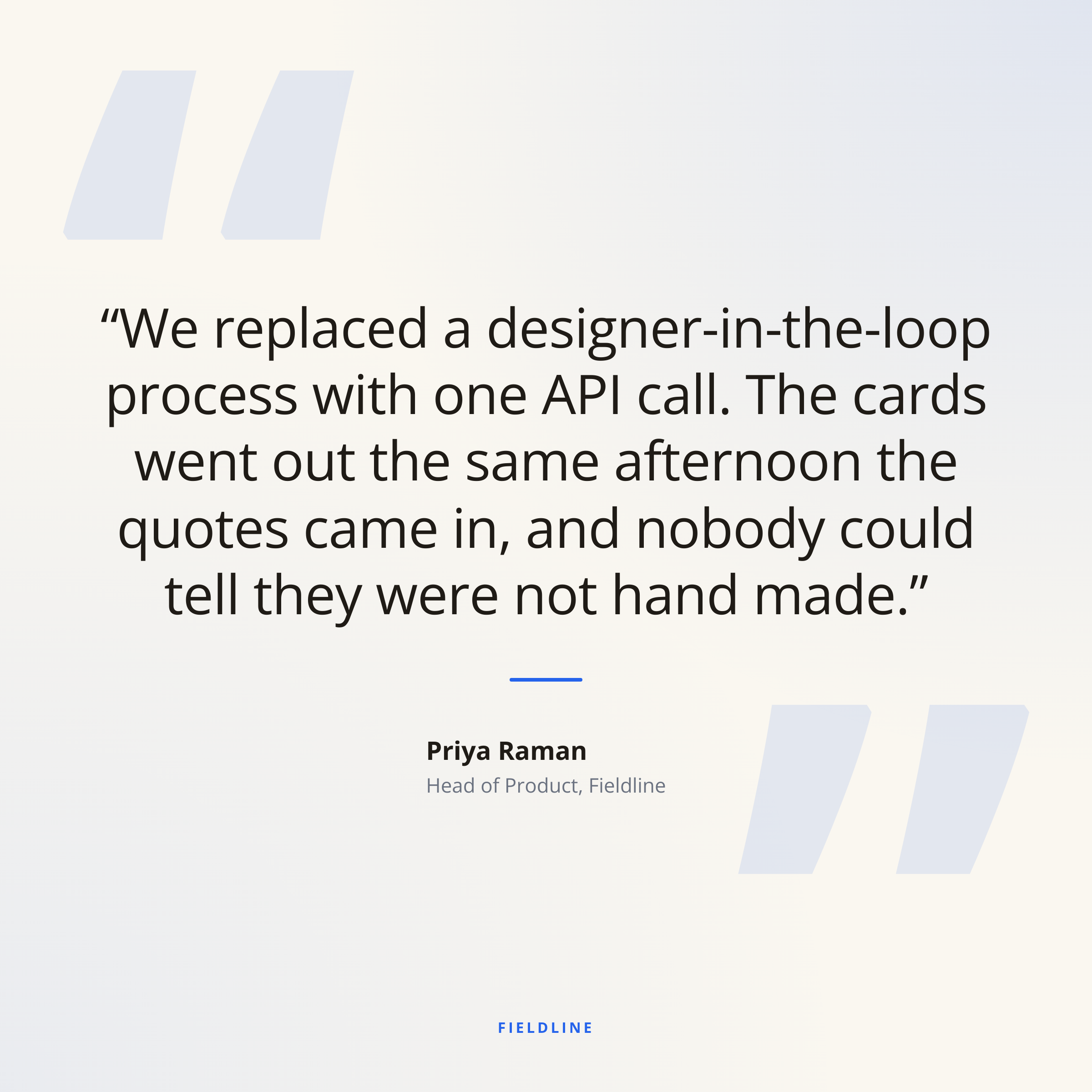
A few things the render does without being asked. The quote is 30 words and the type has been sized so it fills the middle of the card in six lines with even margins; send a ten-word quote and it comes back larger, not lonelier. The `accent_color` shows up as the rule under the quote and the brand name at the bottom, and nowhere else, so a single hex value keeps the card on-brand without letting the colour take over. The decorative quotation marks are tinted from the background, not the accent, which is why they read as texture rather than competing with the words.
The file came back at 2400x2400, the template rendering at 2x, and at 1.5 MB. That is comfortably inside what every social platform accepts, and it is sharp on a retina feed. The template always renders at 2x, so if you need a lighter file for a page or an email, the HTML route below is the one to use: it renders at 1x unless you ask for more.
Two inputs are left out above. `avatar_url` takes a photo of the person and masks it into a circle beside the attribution, which is the right call for testimonials and podcast guests and the wrong one for an anonymous pull quote, so leave it out and the slot collapses. `logo_url` replaces the text brand name with your mark. Both are fetched at render time, so they need to be publicly reachable URLs. The [template reference](https://html2img.com/docs/templates/quote-card/) lists every input with its default, and the [Quote Card tool](https://html2img.com/tools/quote-card/) runs the same template in the browser if you want to settle on colours before writing the request.
## Route 2: your own layout through the HTML endpoint
The template is one design. A brand with an established testimonial style, a dark card with a serif face and a monogram avatar, say, needs its own markup. That is the HTML endpoint, and because you set the dimensions it is also how you get the 1200x630 version for a link preview:
```
curl -X POST https://app.html2img.com/api/html \
-H "X-API-Key: $HTML2IMG_API_KEY" \
-H "Content-Type: application/json" \
-d @- <<'JSON'
{
"width": 1200,
"height": 630,
"html": "
“
We replaced a designer-in-the-loop process with one API call. The cards went out the same afternoon the quotes came in.
PR
Priya Raman
Head of Product, Fieldline
Fieldline · Customer stories
"
}
JSON
```
That produced this, a native 1200x630 PNG at 192 KB:
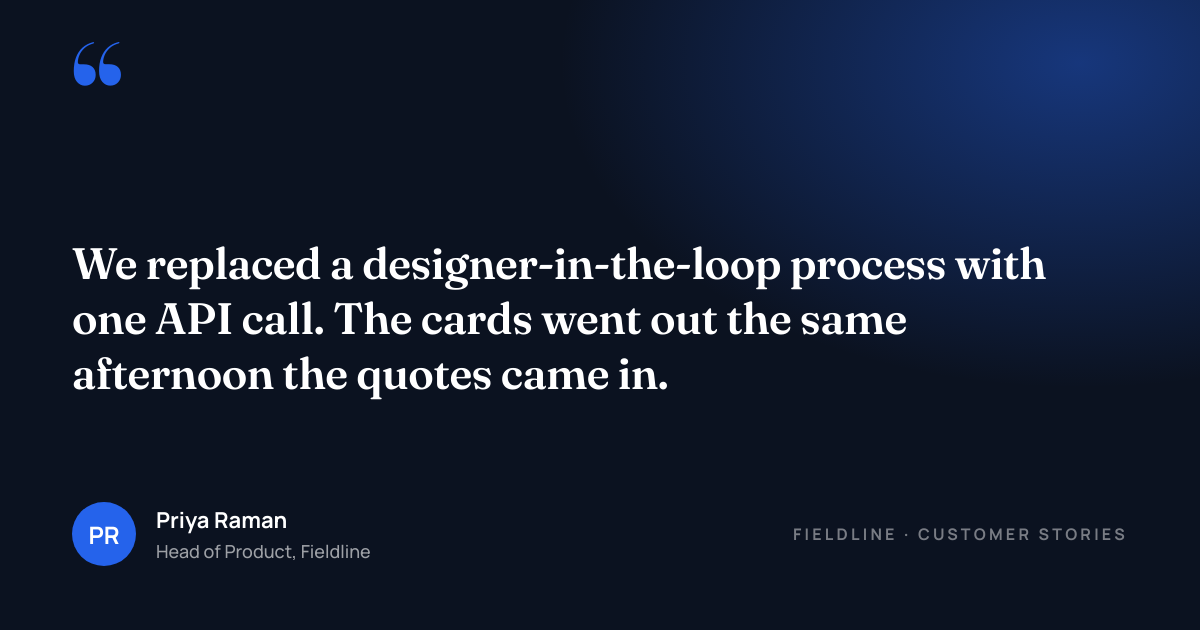
The markup is ordinary CSS. Google Fonts load through `@import`, so a serif for the quote and a sans for the attribution costs one line. The `.wrap` is a flex column with `justify-content: space-between`, which pins the quotation mark to the top and the attribution to the bottom whatever length the quote in the middle turns out to be. The monogram avatar is a `div` with initials, which sidesteps fetching a headshot and is what many brands prefer for customer quotes anyway.
Two things to carry over from the template route. First, `overflow: hidden` on the body and an explicit `width` and `height` matching the request, so a long quote cannot push the attribution below the canvas. Second, the rendered image is a real browser screenshot, so anything you can express in CSS you can put on the card: a background photo with a dark overlay, a gradient border, a second column for a product screenshot.
## Sizing the type to the quote
The template scales the font for you. In your own markup you have to do it, and the simplest way is to pick the size on the server before you send the HTML rather than trying to do it in CSS:
```
function quoteFontSize(text) {
const words = text.trim().split(/\s+/).length;
if (words <= 12) return 60;
if (words <= 25) return 48;
if (words <= 40) return 40;
return 34;
}
```
Drop the result into an inline style on the `blockquote` and a 12-word quote renders at 60px while a 40-word one renders at 40px, both filling the middle of the card. Four bands are enough; the eye does not notice the steps, only whether the card looks full. If you would rather not maintain the bands, a small inline `