---
title: "Puppeteer and Chrome on AWS Lambda: What Breaks and What to Use Instead"
description: "Puppeteer and headless Chrome on AWS Lambda: the 250MB limit, chrome-aws-lambda vs @sparticuz/chromium, memory leaks, cold starts and the API alternative."
url: "https://html2img.com/articles/puppeteer-lambda-alternative-screenshots/"
section: "Comparisons"
published: "2026-04-12T14:48:44.239Z"
updated: "2026-08-17T13:47:45.127Z"
---
# Puppeteer and Chrome on AWS Lambda: What Breaks and What to Use Instead
By Mike Griffiths. https://html2img.com/articles/puppeteer-lambda-alternative-screenshots/

My chrome-aws-lambda function had been running fine for about eight months. Then Chrome shipped a new major version, the pinned Chromium binary in my layer went stale, pages started rendering with missing fonts, and the Lambda cold starts crept from two seconds up to nearly nine. I spent a weekend rebuilding the layer, swapping to `@sparticuz/chromium`, and arguing with webpack about why `puppeteer-core` kept bundling things it shouldn't.
That was the third time in two years I'd done some version of that weekend. At that point I started seriously looking at Puppeteer Lambda alternatives, because the pattern was clear: running headless Chrome inside a 250MB function limit is a thing you can make work, but it's not a thing that stays working without active maintenance.
This article is about what I moved to instead. It's specifically for people who have a working Puppeteer-on-Lambda setup that's getting expensive to maintain, or who are about to build one and want to know if there's a less painful option. The short version: yes, and the trade-off is usually worth it.
## Why Puppeteer on Lambda gets expensive to own
The problems compound. Individually none of them are deal-breakers, but together they chew through engineering time.
Lambda has a 250MB unzipped deployment size limit. A full Chromium binary is around 170MB compressed, more unzipped, so you're immediately using a Lambda layer or container image. Every project that needs screenshots now has infrastructure decisions to make before it renders a single pixel.
Chrome ships a new major version roughly every four weeks. `chrome-aws-lambda` famously stopped receiving updates, and its successor `@sparticuz/chromium` needs a matching `puppeteer-core` version. Mismatch them and pages render oddly, or not at all. I've had a deployment where screenshots of the same URL produced different results locally (using a Chrome 120 binary) versus on Lambda (pinned to 114), and spent half a day figuring out why a flexbox layout was collapsing only in production.
Cold starts are the user-facing tax. Booting a headless Chrome instance inside a Lambda container takes two to four seconds even on warm infrastructure, more if the binary has to be extracted from the layer first. You can keep functions warm, but that undoes some of the cost argument for serverless in the first place.
Memory is the quiet killer. Chrome's per-page memory footprint is unpredictable. A page with a complex JavaScript-rendered chart can briefly spike to 700MB. Your function runs fine on a 1024MB allocation ninety-five percent of the time, and then a specific URL causes an OOM and the whole invocation fails. You discover this in production.
None of these are bugs. They're the shape of the problem. Running a browser engine inside a serverless function is just an awkward fit, and the fit doesn't improve over time.
## Chrome on AWS Lambda: chrome-aws-lambda vs @sparticuz/chromium
If you're staying on Lambda anyway, the package choice matters, so here's the map of that territory.
`chrome-aws-lambda` was the standard way to get Chrome into a Lambda for years, and then updates stopped. The repo sits frozen on an old Chromium, which means unpatched browser CVEs and a rendering engine that drifts further from the Chrome your users run every month. `@sparticuz/chromium` is the community fork that carried the work forward, and it's the only sensible choice for anything new. If you're still on `chrome-aws-lambda`, that's not a neutral decision, it's a slowly compounding liability.
The fork doesn't remove the version discipline. Each `@sparticuz/chromium` release pairs with a specific `puppeteer-core` version, and the project publishes a support matrix for exactly that reason. Install "latest" of both independently and you'll eventually get the mismatch symptoms: protocol errors on launch, or pages that render subtly differently between local and deployed.
Fitting inside the platform is its own discipline. Lambda's 250MB unzipped limit is why `@sparticuz/chromium` ships the browser as a Brotli-compressed archive that gets extracted to `/tmp` on cold start. That extraction is a second or more of your cold start, and `/tmp` defaults to 512MB, which the extracted binary shares with Chrome's user-data directories and anything your function downloads. Long-lived warm containers can quietly fill it. The container-image route lifts the ceiling to 10GB and skips the extraction, at the price of heavier images and their own cold start profile.
Then there are the memory leaks, which deserve their own paragraph because they're the failure mode that takes longest to diagnose. The classic causes: `browser.close()` skipped on an error path, so every failed render leaks a whole browser (wrap it in `try/finally`, always); a browser instance cached across warm invocations that accumulates pages and contexts nobody closes; and orphaned Chrome processes that survive between invocations because Lambda freezes the sandbox rather than killing it. Each leaked page holds tens of megabytes. The symptom is a function that runs fine for hours, gradually slows, then starts throwing OOMs on inputs that worked yesterday. The mitigations are a fresh browser per invocation (or ruthless `page.close()` plus a periodic hard restart of the cached one), clearing `/tmp` when you're near the limit, and watching max memory used in CloudWatch rather than average.
You can absolutely run this stack well. The point is how much platform knowledge the last four paragraphs contain, all of it in service of producing a PNG.
## The alternative: treat the browser as an API
The pattern I settled on is to treat rendering as a third-party service rather than infrastructure I own. My Lambda function does what Lambdas are good at, which is receiving an event, doing some business logic, and making HTTP calls. When it needs an image, it posts to a rendering API and gets back a PNG. The browser lives somewhere else, maintained by someone whose entire job is keeping it running.
There are a few services that do this. I landed on [html2img.com](https://html2img.com) because its API accepts raw HTML directly, which matters when the thing I'm trying to screenshot is something I've generated server-side (invoices, social cards, receipts) rather than a public URL. For URL-based screenshots it also works fine, but the HTML-first path is what got me off Puppeteer.
The migration is mostly subtractive. You delete the Chromium layer, remove `puppeteer-core` from your dependencies, swap the browser-launching block for a `fetch` call, and your Lambda package size drops by about 80%.
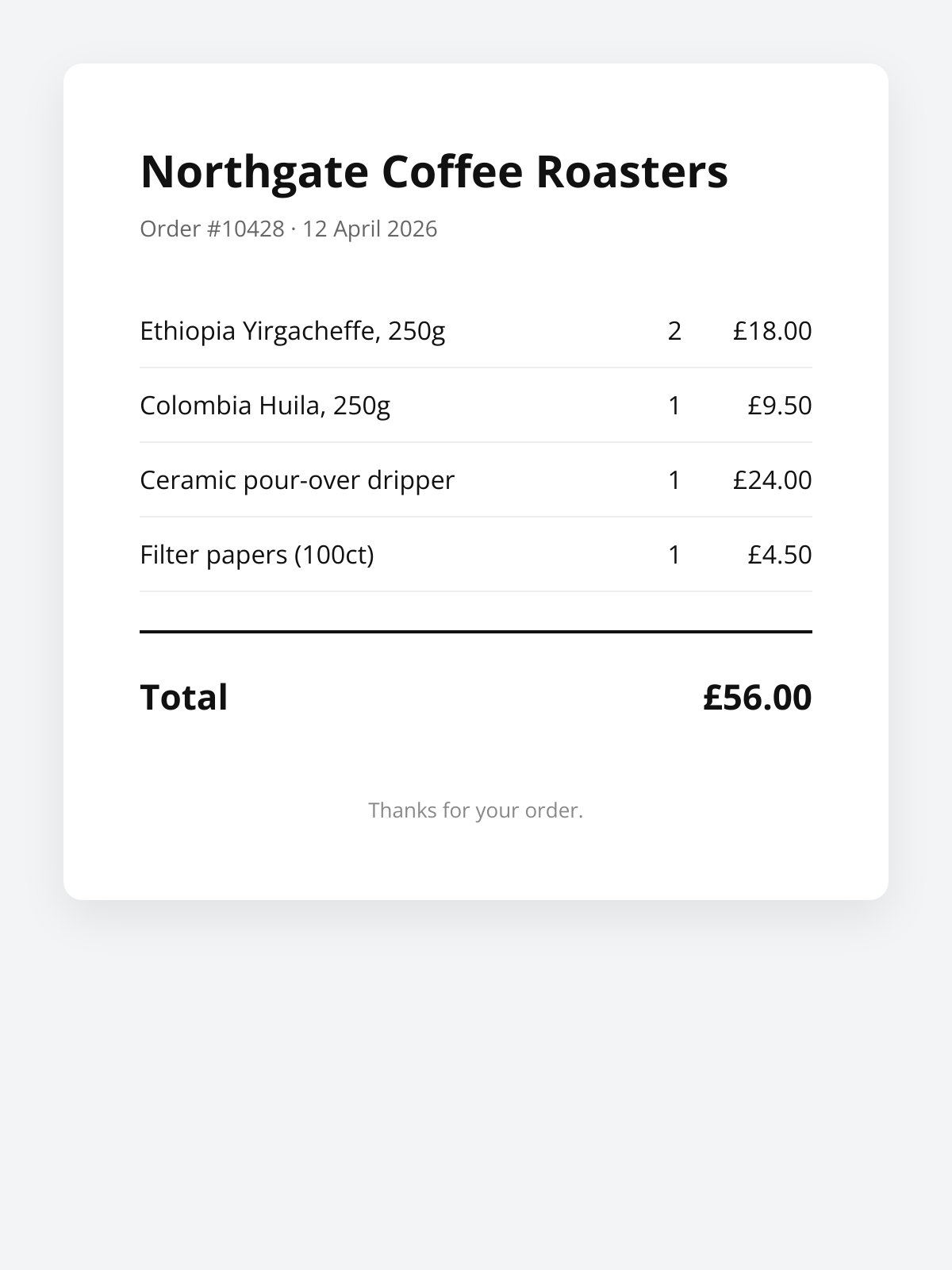
Here's what we're going to be making:
## What the replacement looks like in practice
Here's a before-and-after for a Lambda function that generates a receipt image when an order is placed. The before version uses `@sparticuz/chromium` and `puppeteer-core`. The after version uses `fetch`.
The Puppeteer version, trimmed for readability:
```
const chromium = require('@sparticuz/chromium');
const puppeteer = require('puppeteer-core');
exports.handler = async (event) => {
const { order } = JSON.parse(event.body);
const html = buildReceiptHtml(order);
const browser = await puppeteer.launch({
args: chromium.args,
executablePath: await chromium.executablePath(),
headless: chromium.headless,
});
try {
const page = await browser.newPage();
await page.setViewport({ width: 600, height: 800, deviceScaleFactor: 2 });
await page.setContent(html, { waitUntil: 'networkidle0' });
const png = await page.screenshot({ type: 'png' });
return {
statusCode: 200,
headers: { 'Content-Type': 'image/png' },
body: png.toString('base64'),
isBase64Encoded: true,
};
} finally {
await browser.close();
}
};
```
This works. It's also 180MB of dependencies, takes three seconds to cold start, and will break the next time Chrome updates and you forget to bump the Chromium package.
The replacement:
```
exports.handler = async (event) => {
const { order } = JSON.parse(event.body);
const html = buildReceiptHtml(order);
const response = await fetch('https://api.html2img.com/v1/render', {
method: 'POST',
headers: {
'Content-Type': 'application/json',
Authorization: `Bearer ${process.env.HTML2IMG_API_KEY}`,
},
body: JSON.stringify({
html,
viewport_width: 600,
viewport_height: 800,
device_scale_factor: 2,
wait_for_selector: '.total',
}),
});
if (!response.ok) {
const err = await response.text();
throw new Error(`Render failed: ${response.status} ${err}`);
}
const png = Buffer.from(await response.arrayBuffer());
return {
statusCode: 200,
headers: { 'Content-Type': 'image/png' },
body: png.toString('base64'),
isBase64Encoded: true,
};
};
function buildReceiptHtml(order) {
const rows = order.items.map(item => `
| ${escape(item.name)} |
${item.quantity} |
£${item.price.toFixed(2)} |
`).join('');
return `
${escape(order.businessName)}
Order #${order.id} · ${order.date}
Total£${order.total.toFixed(2)}
`;
}
function escape(str) {
return String(str)
.replace(/&/g, '&')
.replace(//g, '>');
}
```
Same input, same output. No browser to boot, no layer to maintain, no Chromium version to track. The Lambda deployment is now just your handler code and whatever you were doing before the Puppeteer block, which in my case was about 40KB zipped.
A couple of things worth pointing out in the replacement. The `wait_for_selector` parameter tells the renderer to wait until `.total` exists in the DOM before capturing, which matters if your HTML has any client-side rendering or webfonts. `device_scale_factor: 2` gives you a retina-quality PNG rendered into the specified viewport, which is typically what you want for anything that'll be displayed or printed. And `escape` is doing the job that `page.setContent` was implicitly doing for you before, which is preventing user-supplied data from breaking your HTML.
## Gotchas worth knowing
The big behavioural difference is latency. An API call adds a round-trip that your in-Lambda Puppeteer didn't have. In practice this has been faster overall for me, because the cold start I was paying on Lambda was longer than the API round-trip, but it's worth measuring for your own workload. If you're doing thousands of renders synchronously inside a single request handler, you'll want to parallelise the API calls or use the webhook flow so the render happens asynchronously.
For anything bulk or latency-sensitive, the webhook pattern is worth knowing about. You post the HTML with a `webhook_url` parameter, get back a job ID immediately, and html2img posts the finished PNG to your webhook when it's done. Your Lambda returns in milliseconds, and a separate function handles the completed image. This is how I run anything that generates more than one image per invocation.
Error handling needs more thought than with Puppeteer, because you now have a network dependency. Wrap the fetch in a retry with backoff for 5xx responses. Log the response body on failure, not just the status code, because the API's error messages usually tell you exactly what's wrong (a missing selector, an HTML syntax error, a timeout). And make sure your function timeout is higher than the API's maximum render time plus a margin.
Finally, don't commit your API key. It reads as obvious advice but I've seen people check a key into a repo because their Lambda needs it at runtime and "it's just for a test." Use Parameter Store, Secrets Manager, or at minimum an environment variable set through the console, never a hardcoded literal.
If you're doing this from Laravel on Vapor, the [Browsershot guide](https://html2img.com/articles/browsershot-alternative-laravel/) covers the same trap from the PHP side, and if the output is documents rather than screenshots, the [serverless HTML to PDF guide](https://html2img.com/articles/puppeteer-html-to-pdf-serverless/) is the sibling walkthrough. For a line-by-line self-hosting versus API breakdown, see the [Puppeteer comparison](https://html2img.com/compare/puppeteer).
The [Node.js usage guide](https://html2img.com/docs/usage) covers the full parameter surface, and the [webhook documentation](https://html2img.com/docs/parameters/webhook-url) walks through the async flow if you're doing bulk work. If you're specifically migrating existing Puppeteer screenshot code, the [parameters reference](https://html2img.com/docs/parameters) maps the Puppeteer options you're used to (viewport, wait conditions, full-page capture) to the equivalent API parameters.
Less infrastructure, fewer weekends lost to Chrome version drift, same PNGs out the other end. For any Lambda that currently boots a browser, that's a good trade.