---
title: "Open Graph Meta Tags: The Complete Set Every Page Needs (and a Generator That Writes Them)"
description: "Open Graph meta tags explained line by line: the complete 14-tag block, what each platform reads, the six mistakes that break previews, and a free generator that writes it."
url: "https://html2img.com/articles/open-graph-meta-tags/"
section: "Tutorials"
published: "2026-09-03T09:18:11.979Z"
updated: "2026-09-03T09:18:11.979Z"
---
# Open Graph Meta Tags: The Complete Set Every Page Needs (and a Generator That Writes Them)
By Mike Griffiths. https://html2img.com/articles/open-graph-meta-tags/

You ship a page, someone pastes the link into Slack, and the preview that unfurls is a grey box with the bare domain in it. Or it is the right image squashed into a small square. Or it is a headline from a different page entirely, because the platform cached the card a week ago and nobody told it to look again. Every one of those is a meta tag problem, and every one is fixable in the `` in under a minute, provided you know which of the fourteen or so lines is missing or wrong.
The tags are not hard. That is the whole trouble with them. They get typed from memory, one page at a time, and memory leaves out `og:image:width`, sets `twitter:card` to the wrong value and writes a relative URL where an absolute one is required. This article is the complete set, what each line does on each platform, the six mistakes that account for nearly every broken preview, and the [Open Graph Meta Tag Generator](https://html2img.com/tools/open-graph-meta-tags), a free tool that writes the block for you with a live preview and character counts, so you can stop relying on memory.
## The fourteen lines
Here is a complete, correct block for an article page. Every tag in it earns its place; the sections that follow explain why.
```
```
Ten `og:` tags and four `twitter:` tags. Notice that the Open Graph tags use `property=` and the Twitter tags use `name=`. That is not a convention you can swap: the Open Graph protocol is built on RDFa, which uses `property`, and Twitter's card parser was written to read `name`. Most parsers are forgiving about it now, but "most" is doing a lot of work in that sentence, and the cost of being correct is zero.
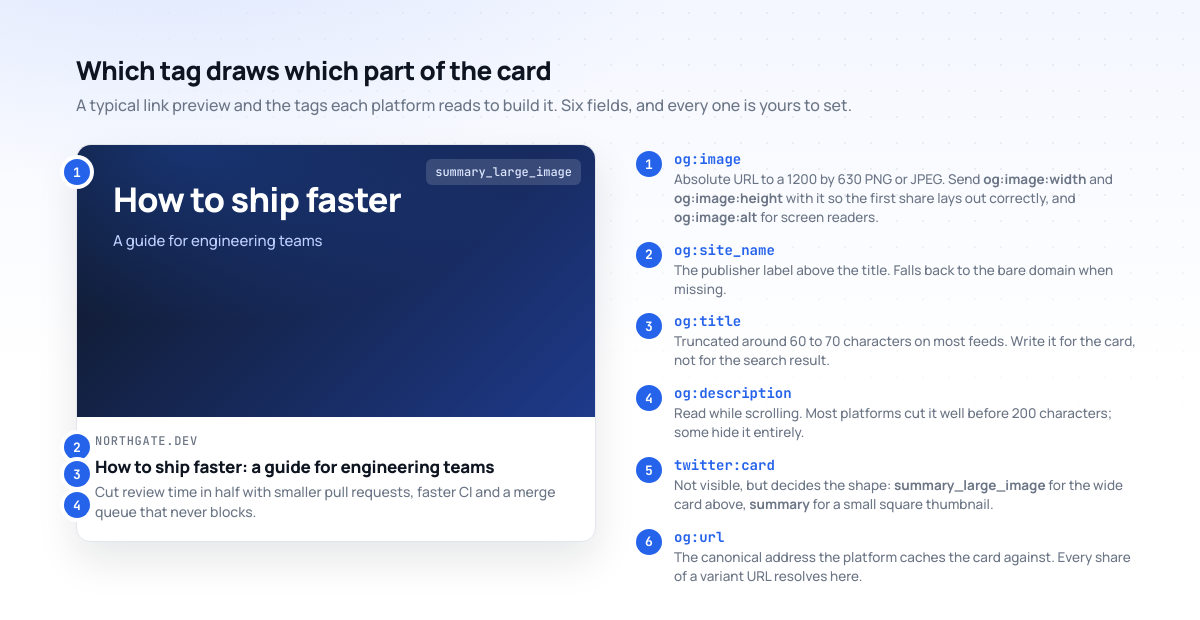
## What each tag does, platform by platform
### og:title
The headline on the card. It is not the `` element and should not be the same string, because the two are read in different places. A `<title>` is written for a search results page and usually carries a site suffix: "How to ship faster | Northgate Blog". A card already shows the site name separately, so the suffix is wasted characters, and the title gets truncated at roughly 60 to 70 characters on X and LinkedIn and closer to 90 on Facebook. Write it as a headline. If `og:title` is missing, every platform falls back to `<title>`, suffix and all.
### og:description
The line or two under the headline. It is read while someone scrolls, which makes it a different job from a meta description written to win a click from Google. Shorter and more direct works better. Facebook shows around 200 characters on desktop and far fewer on mobile; X shows it on `summary` cards and currently shows little or none of the text on `summary_large_image` cards; LinkedIn truncates near 150; Slack and Discord show two or three lines. Aim for 100 to 150 characters and put the point in the first clause.
### og:image, og:image:width and og:image:height
The image is the card. A 1200 by 630 PNG or JPEG under about 1 MB is the size that renders as a large card on every platform without cropping, and the [OG image safe zone](https://html2img.com/articles/og-image-safe-zone/) article maps exactly where each platform trims or shrinks it. The URL must be absolute, with scheme and host, and it must be publicly fetchable without cookies or a login.
The width and height tags are the ones people leave out, and leaving them out causes the most-reported Open Graph bug of all: the first share of a new URL renders without an image, and every share after it renders correctly. Facebook's crawler lays out the card before it has finished downloading the image, and without declared dimensions it does not know what shape to draw, so it draws nothing. Declaring the size lets it reserve the space. If you have ever "fixed" a preview by sharing the link twice, that was the reason. The [OG image not showing](https://html2img.com/articles/og-image-not-showing/) article works through the rest of the causes.
### og:image:alt
Alt text for the card image. Screen readers on Facebook, LinkedIn and Mastodon read it aloud, and X uses it in place of the image when the image cannot be loaded. It is the only tag in the block that exists purely for the reader rather than the crawler, and it costs one line.
### og:url
The canonical URL of the page, and the key under which every platform caches the card. If someone shares `?utm_source=newsletter` or `?ref=slack`, the crawler follows `og:url` back to the clean address and serves the card cached against it, which is the behaviour you want: one card, one set of engagement counts, no duplicate scraping. It should match your `<link rel="canonical">` exactly, including the trailing slash. When the two disagree, Facebook trusts `og:url` and Google trusts `canonical`, and your analytics will disagree with both.
### og:type
`website` for a landing page or home page, `article` for a post, and occasionally `product`, `video.other` or `profile`. It changes very little about how the card looks, but `article` enables the `article:published_time`, `article:author` and `article:tag` extensions, which some readers and aggregators use, and Facebook's parser is stricter about required tags on `article` pages. When in doubt, `website`. Never leave it out; a missing `og:type` is one of the warnings the Facebook debugger raises every time.
### og:site\_name
The small publisher label above or below the title. Without it, platforms fall back to the bare domain in capitals, which is fine for `northgate.dev` and unfortunate for `app-prod-eu-west-2.example.com`.
### og:locale
`en_GB`, `en_US`, `de_DE` and so on, in the `language_TERRITORY` form with an underscore. It tells Facebook which language the content is in, and it is what the `og:locale:alternate` tags hang off if you serve translations. Harmless when the page is monolingual English; important when it is not.
### twitter:card
The tag that decides the shape of the card on X, and it has exactly two values worth using. `summary_large_image` draws the wide card with the image on top. `summary` draws a small square thumbnail with the text beside it. If you have a 1200 by 630 image and you set `summary`, X crops the middle third of it into a square and puts your headline next to a picture of nothing in particular. This is the second most common cause of "the card looks wrong on X" after a missing image. When the tag is absent, X may draw no card at all rather than falling back to Open Graph.
### twitter:title, twitter:description and twitter:image
X reads the `og:` equivalents when these are missing, so strictly these three are optional. Two reasons to include them anyway. First, X's fallback behaviour has changed several times and is not documented, so relying on it is relying on a policy that may not survive the next redesign. Second, they let you tailor the text: a shorter title for the 70-character truncation, or a different image with a 2:1 ratio if you want to avoid X's crop. If you do not need that, set them to the same values and move on; the generator does this automatically.
## The six mistakes that break nearly every card
Run a hundred pages through the [Open Graph Checker](https://html2img.com/tools/open-graph-checker) and the failures cluster into a short list.
1. **A relative **`og:image`** URL.** `/og/post.png` is valid HTML and invalid Open Graph. The specification requires an absolute URL, several crawlers refuse to resolve a relative one, and the card renders with no image. This is the single most common fault.
2. `twitter:card`** set to **`summary`** with a wide image.** The card renders, the image is cropped to a square, and it looks like a mistake because it is one.
3. **Missing **`og:image:width`** and **`og:image:height`**.** The first share of every new URL renders without its image, then fixes itself. Nobody notices the fix; everybody notices the first share.
4. **A description written for search.** 155 characters of keyword-led sentence that gets cut at "Learn how to..." in every feed.
5. `og:url`** that does not match the canonical.** Two cached cards for one page, split engagement counts, and a crawler that occasionally serves the stale one.
6. **An image that is not publicly fetchable.** It works in your browser because you are logged in, or because your CDN allows your office IP, and the crawler gets a 403. The checker fetches the page from a neutral host for exactly this reason.
None of these is difficult. All of them come from writing the block by hand and stopping when it looks complete.
## Multiple images, videos and the other extensions
Everything above covers ninety-five percent of pages. The remaining five percent have questions that come up often enough to answer here.
You can declare more than one `og:image`. List them in preference order and repeat the `og:image:width` and `og:image:height` tags directly after each one, because the structured properties attach to the most recent `og:image` above them. Facebook lets the sharer pick from the list; most other platforms take the first.
```
<meta property="og:image" content="https://northgate.dev/og/wide.png">
<meta property="og:image:width" content="1200">
<meta property="og:image:height" content="630">
<meta property="og:image" content="https://northgate.dev/og/square.png">
<meta property="og:image:width" content="1080">
<meta property="og:image:height" content="1080">
```
For article pages, the `article:` namespace adds structured metadata that some readers surface:
```
<meta property="article:published_time" content="2026-09-03T09:00:00+01:00">
<meta property="article:modified_time" content="2026-09-03T09:00:00+01:00">
<meta property="article:author" content="https://northgate.dev/authors/kat/">
<meta property="article:section" content="Engineering">
<meta property="article:tag" content="code review">
<meta property="article:tag" content="continuous integration">
```
`og:video` and `twitter:player` exist for embedding a playable video in the card, but they require the video to be hosted on a domain the platform has approved, which in practice means very few sites use them. If you have a video page, set `og:type` to `video.other`, give it a strong `og:image` poster frame, and let the platform link through to the page.
Finally, `fb:app_id`. The Facebook debugger warns when it is missing. It is only needed if you use Facebook Insights for your domain, and the warning can be ignored otherwise.
## Why the card is still wrong after you fix the tags
Every platform caches cards, and the cache lives on their side. Facebook holds a card for around 30 days. LinkedIn holds it for about a week. Slack, Discord and WhatsApp hold it for a shorter and undocumented period. X re-scrapes more readily but not on every share. So the sequence you see is: fix the tags, redeploy, share the link, see the old card, conclude the fix did not work.
It did work. The platform has not looked. Facebook's [Sharing Debugger](https://developers.facebook.com/tools/debug/) has a "Scrape Again" button that clears its cache for one URL, and LinkedIn's Post Inspector does the same. For the platforms without a debugger, the only reliable trick is a cache-busting query string on the shared link, which is ugly but works because the crawler sees a URL it has not cached, follows `og:url` to the canonical, and stores the fresh card against it.
The order of operations, then: fix, deploy, verify the live HTML is serving the new tags, clear the platform caches you can, and only then share. The verify step is where the checker earns its place: it fetches the deployed page from a neutral IP, parses the tags the way a crawler does, and renders previews for six platforms side by side, so you can see the fix is live before you ask anyone to look again.
## Generating the block instead of writing it
The [Open Graph Meta Tag Generator](https://html2img.com/tools/open-graph-meta-tags) takes the four fields that matter, title, description, image URL and canonical URL, plus the type, site name, locale and card type, and writes the full fourteen-line block. Three things it does that a hand-written block does not:
**Character counters on the title and description** show the truncation points for each platform as you type, so a title that is going to be cut on X shows as cut before it ships.
**A live preview of the card** updates with every keystroke. It is the fastest way to learn which tag controls which pixel, and a faster way to write a description than counting characters in your head.
**The tags people forget are already in the block.** Width, height, alt, type, site name and locale are filled in rather than remembered, and the `twitter:` set is mirrored from the `og:` values unless you override it.
Copy the output into the `<head>`, deploy, and run the live URL through the checker. If the checker flags a missing or undersized image, the [Open Graph Image Generator](https://html2img.com/tools/open-graph-image) will build a compliant 1200 by 630 one from the same title and subtitle, and the [Open Graph Image template](https://html2img.com/templates/open-graph-image) does the same from code for every page on the site.
## Putting the block into a layout
The generator is for one page at a time. For a site, generate the block once with placeholder values and drop it into the layout with your template variables in place. Here it is in the three layouts people ask about most.
### Astro
```
---
const { title, description, image, canonical, type = 'website' } = Astro.props;
const site = 'https://northgate.dev';
const imageUrl = new URL(image, site).href;
const pageUrl = new URL(canonical ?? Astro.url.pathname, site).href;
---
<meta property="og:title" content={title}>
<meta property="og:description" content={description}>
<meta property="og:image" content={imageUrl}>
<meta property="og:image:width" content="1200">
<meta property="og:image:height" content="630">
<meta property="og:image:alt" content={title}>
<meta property="og:url" content={pageUrl}>
<meta property="og:type" content={type}>
<meta property="og:site_name" content="Northgate">
<meta property="og:locale" content="en_GB">
<meta name="twitter:card" content="summary_large_image">
<meta name="twitter:title" content={title}>
<meta name="twitter:description" content={description}>
<meta name="twitter:image" content={imageUrl}>
```
The two `new URL(...)` lines are the whole point of the component. They turn whatever path a page hands over into an absolute URL, so mistake number one cannot happen. The [static blog OG images](https://html2img.com/articles/dynamic-og-images-in-astro-hugo-and-eleventy/) article covers generating the image itself at build time for Astro, Hugo and Eleventy.
### Next.js (App Router)
```
// app/blog/[slug]/page.tsx
import type { Metadata } from 'next';
export async function generateMetadata({ params }): Promise<Metadata> {
const post = await getPost(params.slug);
const url = `https://northgate.dev/blog/${params.slug}/`;
return {
title: post.title,
description: post.summary,
alternates: { canonical: url },
openGraph: {
title: post.title,
description: post.summary,
url,
type: 'article',
siteName: 'Northgate',
locale: 'en_GB',
images: [{ url: post.ogImage, width: 1200, height: 630, alt: post.title }],
},
twitter: {
card: 'summary_large_image',
title: post.title,
description: post.summary,
images: [post.ogImage],
},
};
}
```
Next's metadata object emits the same fourteen tags with the correct `property` and `name` attributes. Set `metadataBase` in the root layout and relative image paths are made absolute for you. If you are generating the image on the fly, the [Next.js without ](https://html2img.com/articles/dynamic-og-images-nextjs-without-vercel-og/)`@vercel/og` guide shows the render step.
### Laravel Blade
```
{{-- resources/views/partials/og.blade.php --}}
<meta property="og:title" content="{{ $ogTitle }}">
<meta property="og:description" content="{{ $ogDescription }}">
<meta property="og:image" content="{{ url($ogImage) }}">
<meta property="og:image:width" content="1200">
<meta property="og:image:height" content="630">
<meta property="og:image:alt" content="{{ $ogTitle }}">
<meta property="og:url" content="{{ url()->current() }}">
<meta property="og:type" content="{{ $ogType ?? 'website' }}">
<meta property="og:site_name" content="{{ config('app.name') }}">
<meta property="og:locale" content="en_GB">
<meta name="twitter:card" content="summary_large_image">
<meta name="twitter:title" content="{{ $ogTitle }}">
<meta name="twitter:description" content="{{ $ogDescription }}">
<meta name="twitter:image" content="{{ url($ogImage) }}">
```
`url()` makes the image absolute against `APP_URL`, and `url()->current()` strips the query string, which is what you want for `og:url`. The [dynamic OG images in Laravel](https://html2img.com/articles/how-to-generate-dynamic-open-graph-images-in-laravel/) article generates `$ogImage` per page and caches it.
For WordPress and Statamic the tags are usually a plugin's job rather than a template's, and both the [WordPress](https://html2img.com/articles/wordpress-dynamic-og-images/) and [Statamic](https://html2img.com/articles/statamic-open-graph-images/) guides cover the image side, which is the part the plugins tend to leave to you.
## The checklist
Before you share a page for the first time:
- The block has all fourteen lines, with `property=` on the `og:` tags and `name=` on the `twitter:` ones.
- `og:image` and `og:url` are absolute URLs with scheme and host.
- The image is 1200 by 630, under 1 MB, and returns 200 to a request with no cookies.
- `og:image:width` and `og:image:height` are declared and match the file.
- `twitter:card` is `summary_large_image`.
- `og:url` matches `<link rel="canonical">` character for character.
- The description is under 150 characters and makes its point in the first clause.
- The live URL has been run through the checker and all six previews look right.
Generate the block, paste it, verify it. Ten minutes on the first page, and the layout carries it to every page after that.
---
Need the image to go with the tags? [Browse the templates gallery](https://html2img.com/templates) for a 1200 by 630 share card you can render from one API call, or [read the docs](https://html2img.com/docs) to get started.