---
title: "html2canvas vs html-to-image vs modern-screenshot: Tested on One Component"
description: "html2canvas vs html-to-image vs modern-screenshot on one card in Chrome and WebKit: what each drops, the font and CORS traps, and when to render server-side."
url: "https://html2img.com/articles/html2canvas-vs-html-to-image/"
section: "Comparisons"
published: "2026-10-09T20:08:07.021Z"
updated: "2026-10-09T20:08:07.021Z"
---
# html2canvas vs html-to-image vs modern-screenshot: Tested on One Component
By Mike Griffiths. https://html2img.com/articles/html2canvas-vs-html-to-image/

You need a "download as image" button, a shareable stats card, or a PNG of a chart, and the first three npm results are html2canvas, html-to-image and modern-screenshot. Between them they were downloaded about 120 million times last month. They do not work the same way, and the differences only show up once your component uses a web font, a photo from another domain, or any CSS written in the last five years.
So I ran all three against the same card, in Chromium and in WebKit (the engine behind Safari), with each library's defaults, and rendered the same markup on a server for comparison. Every image below is real output.
One naming note before the results: html-to-image, the npm package, has no connection to HTML to Image, the rendering API this blog belongs to. The library is covered here on its merits, alongside the other two.
## The test card
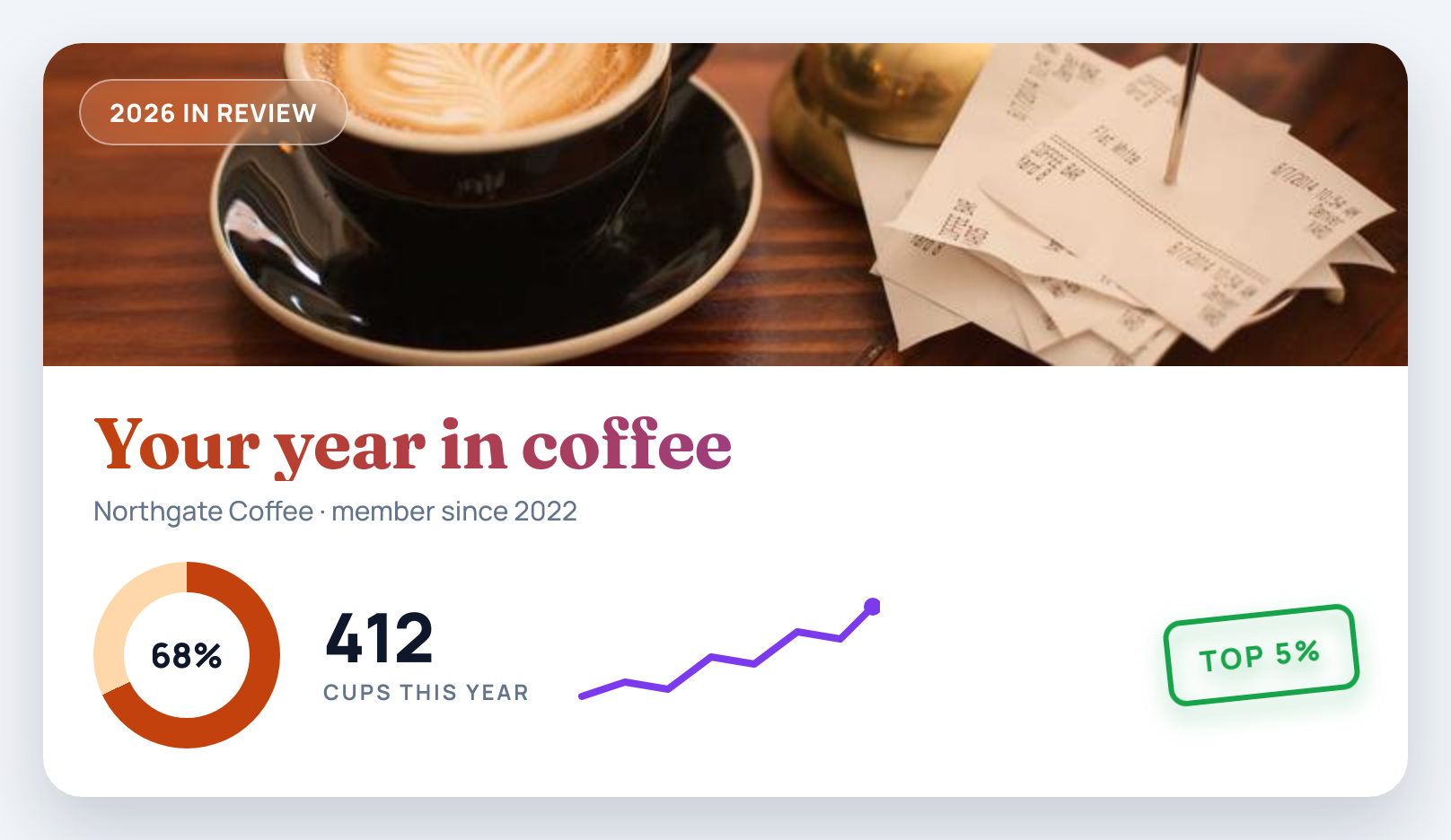
The component is a 760×420 "year in review" card of the kind apps let you download and share. Each part of it exercises something a capture library has to get right:
- **Fonts:** Fraunces for the headline and Manrope for everything else, loaded from Google Fonts with a `` tag.
- **A cover photo from another origin**, which is how most apps serve user and product images.
- **A frosted badge** over the photo, using `backdrop-filter: blur()`.
- **A gradient headline**, using `background-clip: text`.
- **A donut chart** drawn with `conic-gradient`.
- **An inline SVG sparkline.**
- **A rotated stamp** with `filter: drop-shadow()`.
This is the card as Chrome renders it:
The capture code is each library's documented one-liner, run on the same node:
```
import html2canvas from 'html2canvas';
import { toPng } from 'html-to-image';
import { domToPng } from 'modern-screenshot';
const node = document.getElementById('frame');
const fromHtml2canvas = (await html2canvas(node, { useCORS: true })).toDataURL('image/png');
const fromHtmlToImage = await toPng(node);
const fromModernScreenshot = await domToPng(node);
```
The versions tested were html2canvas 1.4.1, which is still its latest release and dates from January 2022, html-to-image 1.11.13 from February 2025, and modern-screenshot 4.7.0 from April 2026. The browsers were Playwright's Chromium 153 and WebKit 26.6 builds, at a device pixel ratio of 1.
## Two ways to turn the DOM into pixels
The results make sense once you know there are only two techniques here.
**html2canvas repaints the page itself.** It walks the DOM, reads each element's computed styles, and draws every box, border, gradient and line of text onto a canvas with its own code. Layout comes from the browser, but painting does not, so any CSS feature html2canvas has not implemented is skipped.
**html-to-image and modern-screenshot let the browser paint.** They clone the node, copy the computed styles onto the clone, embed every font and image as a data URL, and wrap the result in an SVG ``. The browser then draws that SVG onto a canvas with its real rendering engine, so modern CSS comes through. The catch is the embedding step: every font file and image has to be readable by JavaScript, which puts CORS in charge of what ends up in your PNG.
## The results in Chromium
With the fonts fixed (more on that in a moment), this is what each library produced, next to the same markup rendered by Chrome on a server:
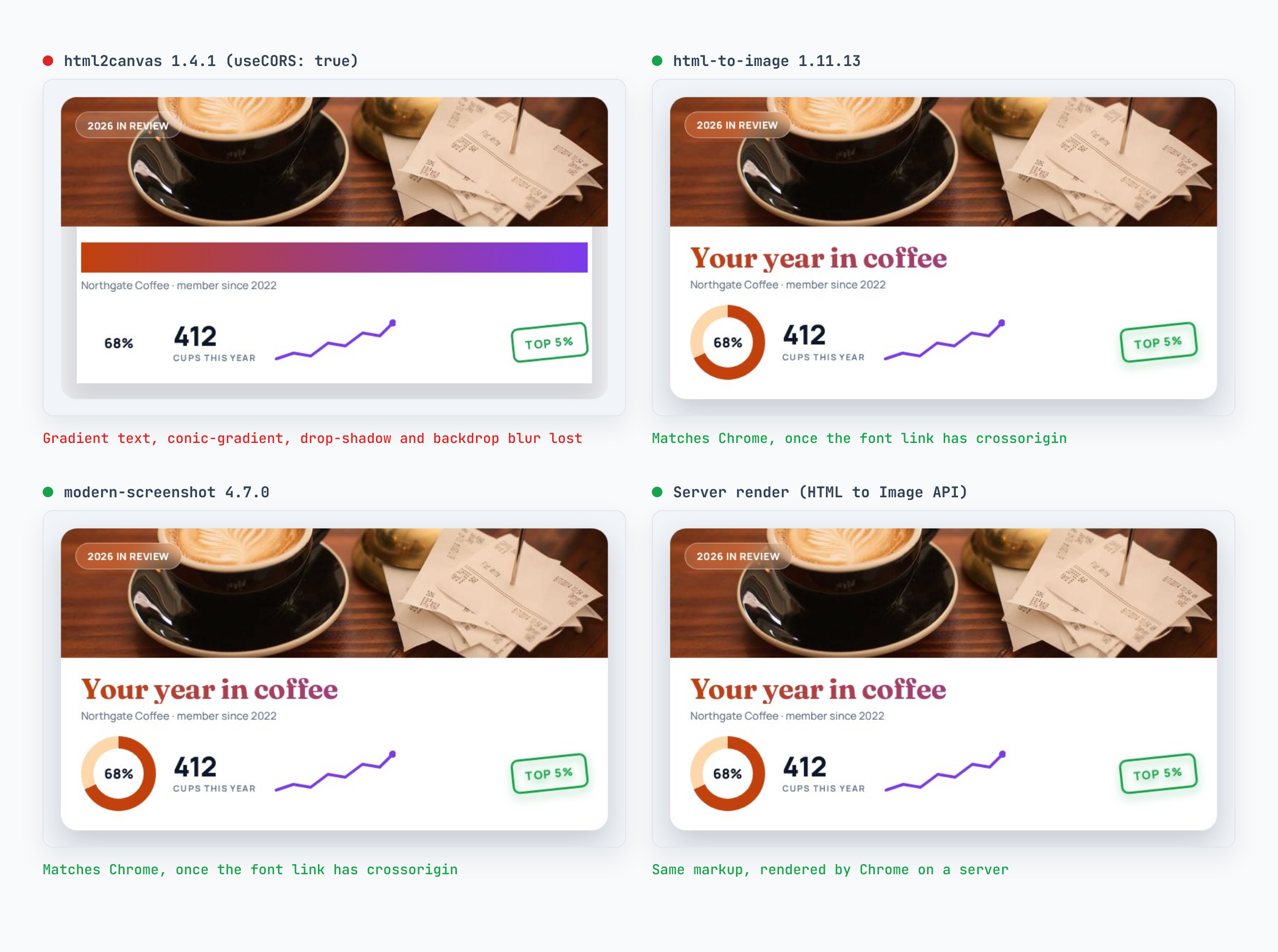
html2canvas lost four of the seven features. The headline came out as a solid gradient bar with no text, because `background-clip: text` is not implemented, so it painted the background and never cut the letters out of it. The donut vanished with `conic-gradient`. The stamp lost its glow because `filter` is ignored, and the badge lost its frosting because `backdrop-filter` is too. It is also the only library that skips cross-origin images by default: without `useCORS: true`, the cover photo is simply left blank.
It was fast, though. Without the photo a capture took about 100 ms; with it, 0.7 to 0.9 seconds.
html-to-image and modern-screenshot both matched the on-screen render. html-to-image's first capture took 1.3 seconds while it fetched and inlined the fonts and the photo, and a second capture on the same page took 52 ms because those were cached. modern-screenshot took 0.6 to 0.7 seconds every time.
That is the good news. The next three sections are what it took to get there, and what happened when the conditions were less friendly.
## Trap 1: web fonts from a `` tag
On the first run, the two foreignObject libraries produced a card in the wrong fonts. The badge, the "cups this year" label and the stamp all wrapped onto two lines, because the fallback font was wider than Manrope:
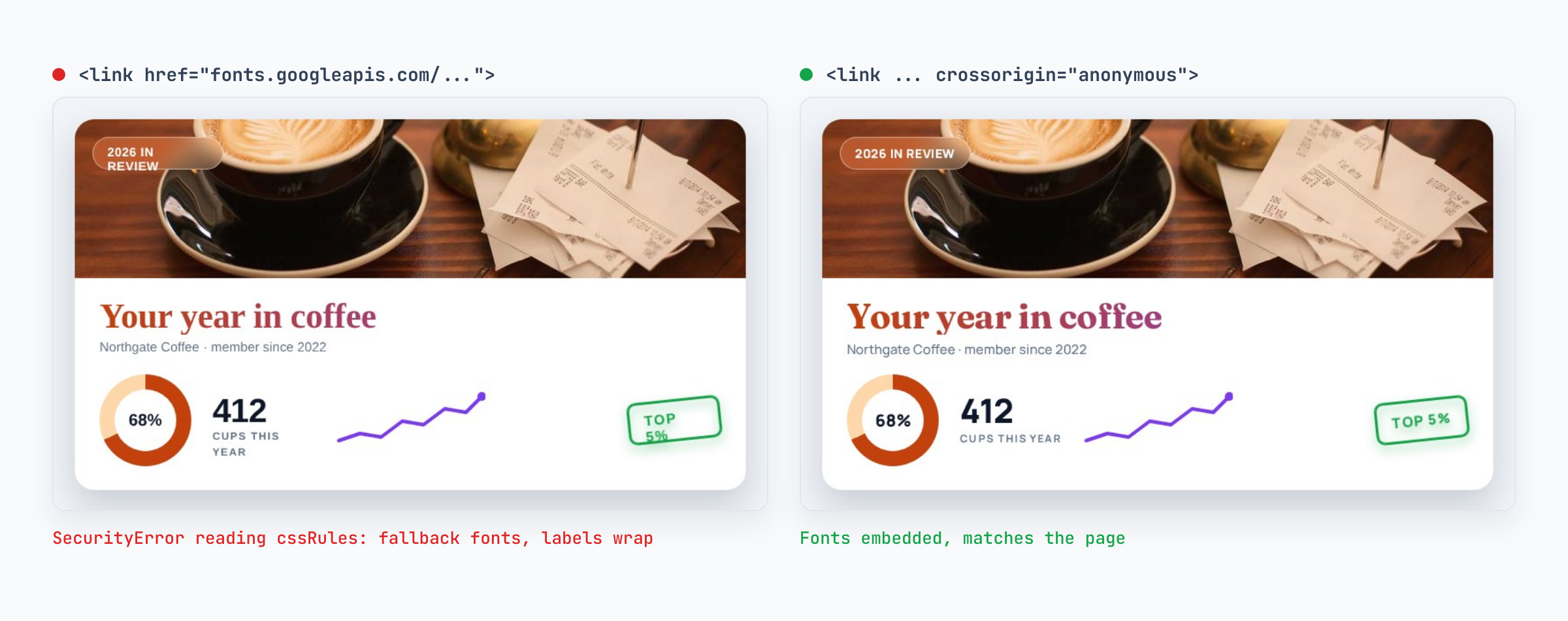
To embed a font, these libraries need the `@font-face` rules, and a script cannot read the rules of a stylesheet from another origin unless the stylesheet was fetched in CORS mode. html-to-image says so in the console:
```
Error while reading CSS rules from https://fonts.googleapis.com/css2?family=Fraunces...
SecurityError: Failed to read the 'cssRules' property from 'CSSStyleSheet': Cannot access rules
```
modern-screenshot hit the same wall without logging anything. Google Fonts sends `Access-Control-Allow-Origin: *`, so the fix is one attribute:
```
```
Self-hosting the font files on your own origin works too. html2canvas is not affected by this one, because it draws text onto the canvas with whatever fonts the page has already loaded.
## Trap 2: the first capture in Safari's engine
WebKit is where the libraries separated. html-to-image's first `toPng()` call returned the card without its cover photo, and a second call on the same page, a moment later, included it:
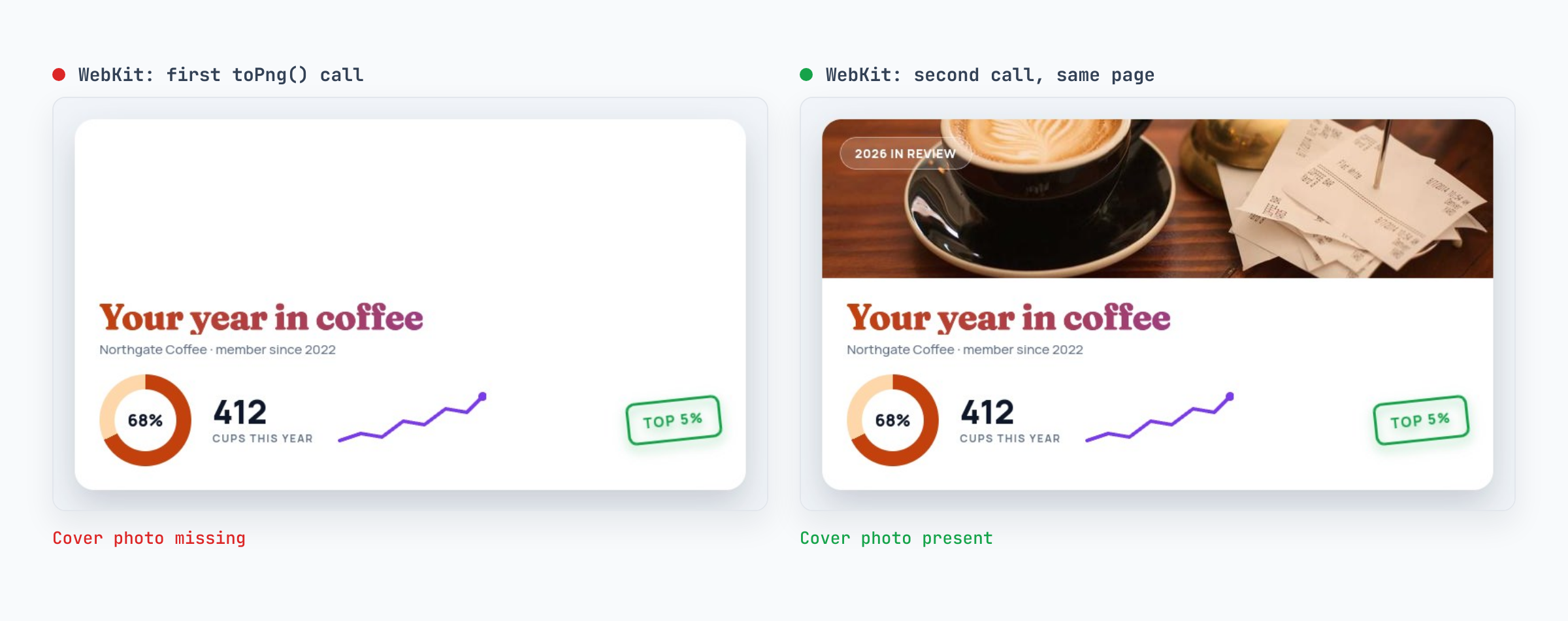
It happened in both test runs, with and without the font fix, and nothing in the markup changed between the two calls. modern-screenshot was correct on the first call in WebKit every time. html2canvas behaved the same in both browsers, which in this case means the same four missing features.
If you stay on html-to-image, capturing twice and keeping the second result worked in every WebKit run here. It also doubles the work of every capture in Safari.
## Trap 3: images from a host without CORS headers
The cover photo in the runs above came from a host that sends `Access-Control-Allow-Origin`. Plenty do not: an S3 bucket only sends it once someone adds a CORS configuration, and many image hosts never do. So I moved the same photo to a host that sends no CORS headers and ran everything again:
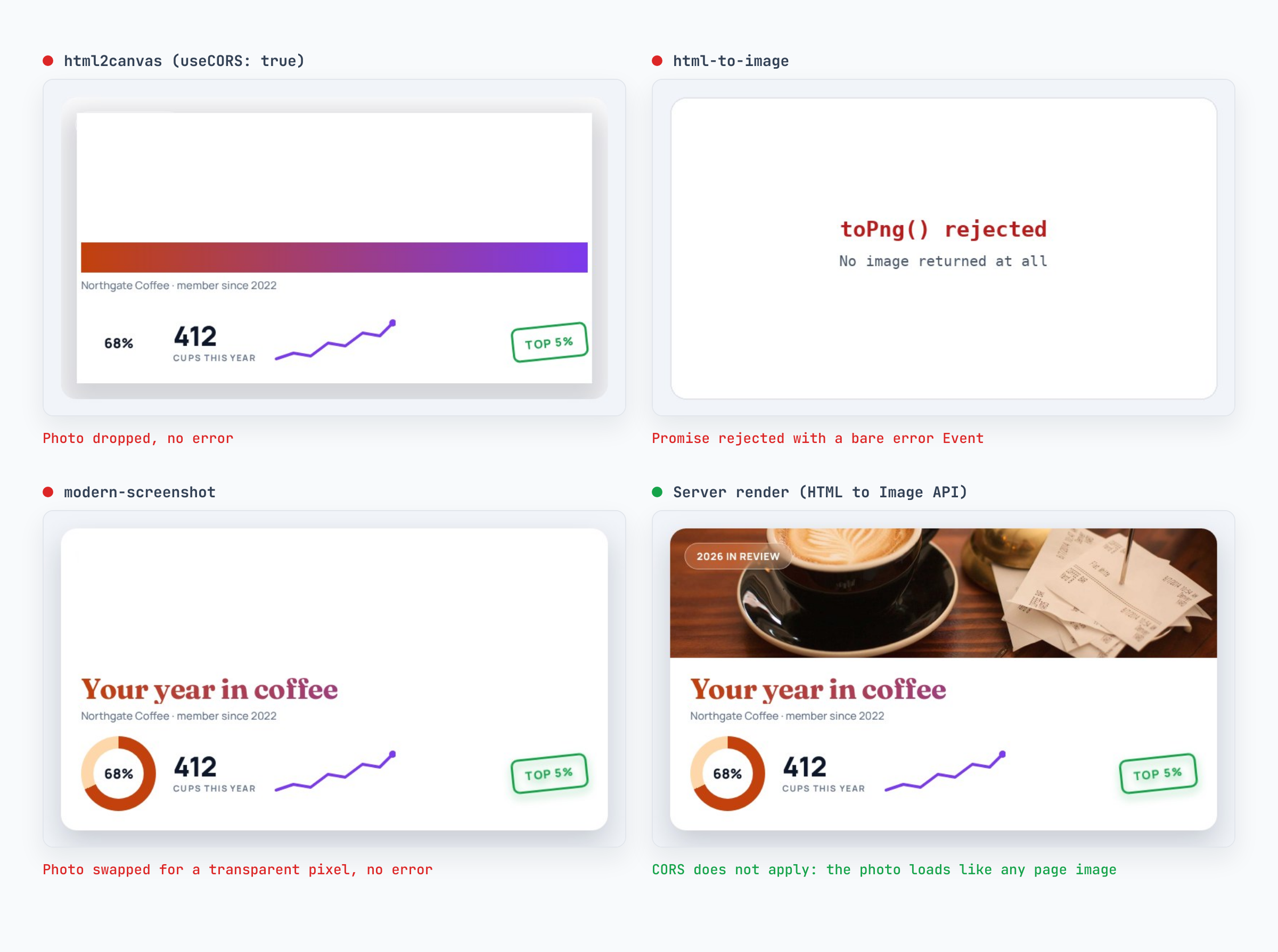
Each library failed differently, and only one of them told you:
- **html2canvas** dropped the photo, with or without `useCORS`, and resolved normally.
- **html-to-image** rejected the whole capture. The rejection was a DOM `Event` with the type `error`, not an `Error`, so `err.message` is undefined and a typical logger records nothing useful.
- **modern-screenshot** replaced the photo with its default placeholder, a transparent 1×1 GIF, and resolved normally.
Wherever you capture client-side, wrap the call so a failure says what it was:
```
async function captureCard(node) {
try {
return await toPng(node);
} catch (err) {
// A failed image load rejects with a DOM Event, not an Error.
const reason = err instanceof Event ? `${err.type} event while loading an image` : err.message;
throw new Error(`Card capture failed: ${reason}`);
}
}
```
Both foreignObject libraries can also put a stand-in in place of a broken image: `imagePlaceholder` in html-to-image, and `fetch.placeholderImage` in modern-screenshot. That keeps the capture from failing, but the photo is still missing. The real fixes are on the server: add CORS headers to the image host, proxy images through your own origin, or render somewhere CORS does not apply.
## The scorecard
Defaults, the same card, both browsers:
| | html2canvas 1.4.1 | html-to-image 1.11.13 | modern-screenshot 4.7.0 | Server render |
| --- | --- | --- | --- | --- |
| Web fonts from a `` | Yes | Only with `crossorigin` | Only with `crossorigin` | Yes |
| Cross-origin image, host sends CORS | Only with `useCORS: true` | Yes | Yes | Yes |
| Cross-origin image, no CORS headers | Dropped silently | Capture rejects | Transparent pixel | Yes |
| `background-clip: text` | Solid bar | Yes | Yes | Yes |
| `conic-gradient` | Missing | Yes | Yes | Yes |
| `filter: drop-shadow()` | Ignored | Yes | Yes | Yes |
| `backdrop-filter` | Ignored | Yes | Yes | Yes |
| First call in WebKit | Same as later calls | Photo missing | Correct | Not applicable |
| Capture time, Chromium, with photo | 0.7 to 0.9 s | 1.3 s, then 0.05 s | 0.6 to 0.7 s | About 2 s including network |
If you are choosing a client-side library today, modern-screenshot was the most dependable of the three in this test. html-to-image is close behind once you deal with the font link and the first Safari capture. html2canvas has not had a release since January 2022 and only suits components built from flat colours, borders and plain text.
## When the browser is the wrong place to render
Everything above assumes the image should come from the visitor's browser. That is the right call for a download button: the user is looking at the card, the libraries are free, and nothing leaves the device.
It is the wrong call when the output has to be the same for everyone. The PNG a client-side library produces depends on the visitor's browser, their installed fonts, and whether every image host on the page sends CORS headers. Server-side, all three of those stop being variables. Render on a server when the image is a share card or an Open Graph image, goes [into an email](https://html2img.com/articles/images-in-email-render-everywhere/), is generated without anyone's browser open (a cron job, a webhook, [a batch of certificates](https://html2img.com/articles/how-to-generate-signed-digital-certificates-at-scale/)), or uses images from hosts you do not control.
The server-side version of the card is the same HTML and CSS sent to an API. In Node, with the official client:
```
import { Html2img } from '@html2img/client';
const client = new Html2img(process.env.HTML2IMG_API_KEY);
const response = await client.html({
html: cardHtml, // the card's markup with its