---
title: "How to Bulk Generate Images from a Spreadsheet (CSV, Excel or Google Sheets)"
description: "Bulk generate images from a spreadsheet: one row in, one image out. Python, Node and Apps Script for CSV, Excel and Google Sheets, with retries and resume."
url: "https://html2img.com/articles/bulk-images-from-spreadsheet/"
section: "Tutorials"
published: "2026-11-18T16:08:40.666Z"
updated: "2026-11-18T16:08:40.666Z"
---
# How to Bulk Generate Images from a Spreadsheet (CSV, Excel or Google Sheets)
By Mike Griffiths. https://html2img.com/articles/bulk-images-from-spreadsheet/

You have a spreadsheet and every row in it needs to become an image. Eight hundred conference attendees who each need a ticket. Three thousand graduates who each need a certificate. A product catalogue where every line needs a card for the feed.
Search for how to do it and you get tutorials for drag-and-drop editors with a CSV upload button, written by the companies that sell them. They work, and you pay for the editor on every image. If you can run a script, you do not need one. A row is a small bundle of named values, an image API wants a small bundle of named values, and the code that joins them fits on one screen.
This guide gives you that code three ways: a Python script for CSV and Excel exports, the same job in Node, and a Google Apps Script that writes each image URL back into the sheet. All three call the HTML to Image [Templates API](https://html2img.com/docs/templates/). The Python version also handles the parts the tutorials skip: bad rows, retries, resuming a half-finished batch, and PDF output.
## What a run produces
Here is a real one. The sheet holds eight attendees. One command turned it into eight tickets, each with the attendee's name, seat and a scannable QR code, in 5.5 seconds.
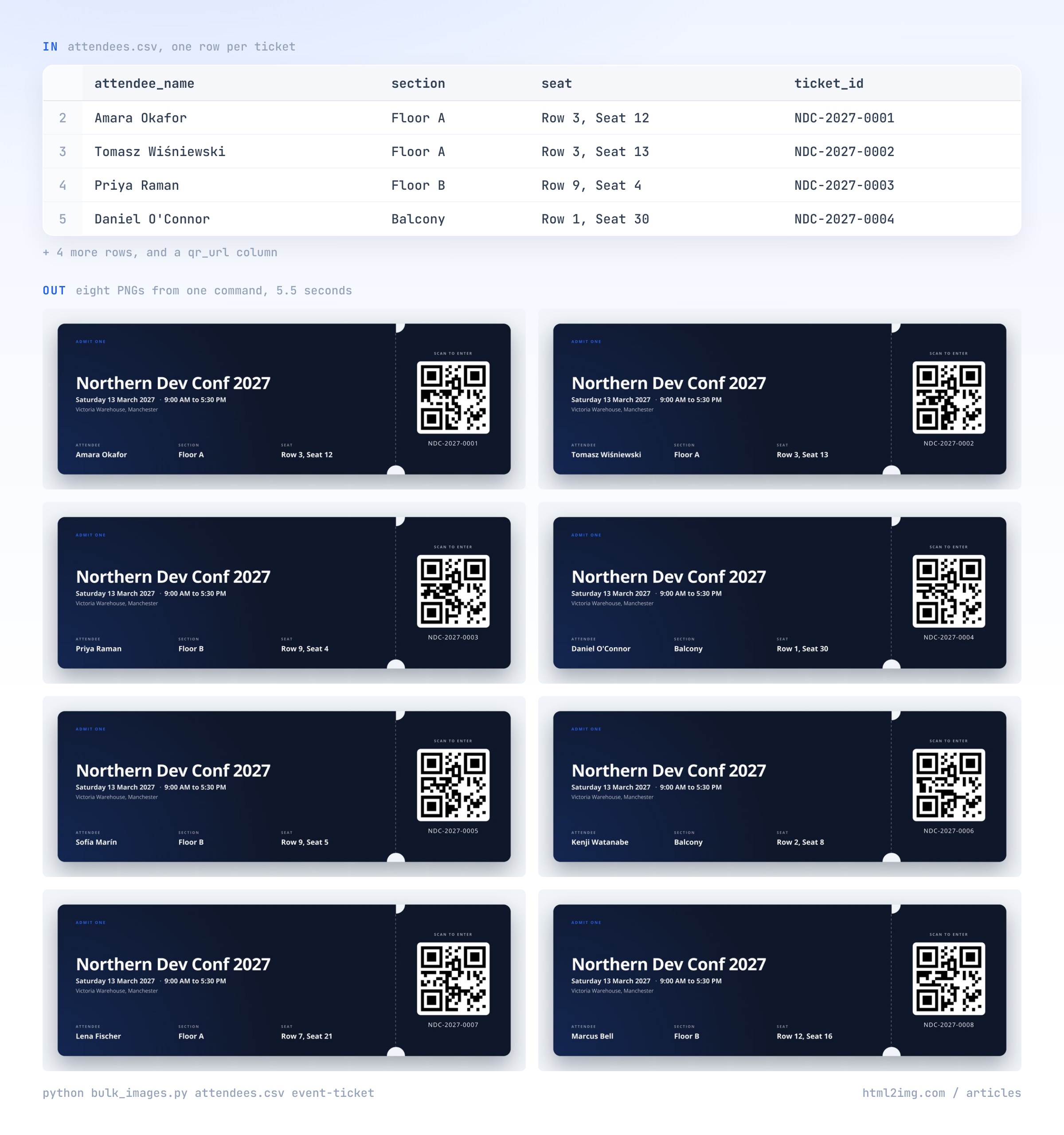
Alongside the images you get `results.csv`: one line per row with the ID, the hosted image URL, and the error if that row failed. That file is what makes the batch restartable, and it is the thing you join back onto your data afterwards.
## How a spreadsheet row becomes an image
A template is a finished design that lives on our side. You send it the values, as JSON, and get back the URL of a rendered PNG. One row of the ticket sheet, sent by hand:
```
curl -X POST https://app.html2img.com/api/v1/templates/event-ticket \
-H "X-API-Key: $HTML2IMG_API_KEY" \
-H "Content-Type: application/json" \
-d '{
"event_name": "Northern Dev Conf 2027",
"event_date": "Saturday 13 March 2027",
"attendee_name": "Amara Okafor",
"section": "Floor A",
"seat": "Row 3, Seat 12",
"ticket_id": "NDC-2027-0001"
}'
```
The response is a small JSON envelope with a `url` on the CDN. So the whole trick is this: **name your spreadsheet columns after the template's inputs**, and each row is already a request body.
Pick the template that matches the job, then set your headers to match.
| Job | Template | Columns you must have | Useful optional columns |
| --- | --- | --- | --- |
| Tickets and passes | [Event ticket](https://html2img.com/templates/event-ticket/) | `event_name`, `event_date`, `attendee_name` | `section`, `seat`, `ticket_id`, `qr_url`, `venue` |
| Course and training certificates | [Certificate of completion](https://html2img.com/templates/certificate-of-completion/) | `recipient_name`, `course_name`, `completion_date`, `issuer_name` | `certificate_id`, `issuer_signature_url`, `seal_url` |
| Name badges and staff cards | [Business card](https://html2img.com/templates/business-card/) | `name` | `title`, `company`, `email`, `layout_variant` |
| Discount codes | [Coupon voucher](https://html2img.com/templates/coupon-voucher/) | `discount_text`, `code`, `brand_name` | `expiry`, `terms`, `logo_url` |
| Catalogue and price cards | [Product card](https://html2img.com/templates/product-card/) | `product_name`, `price` | `sale_price`, `badge`, `product_image_url` |
| Property listings | [Real estate listing](https://html2img.com/templates/real-estate-listing/) | `price`, `address` | `beds`, `baths`, `sqft`, `property_image_url`, `agent_name` |
| Testimonials | [Quote card](https://html2img.com/templates/quote-card/) | `quote`, `attribution_name` | `attribution_role`, `avatar_url` |
| A month of social posts | [Instagram square post](https://html2img.com/templates/instagram-square-post/) | `title` | `subtitle`, `eyebrow`, `cta`, `background_image_url` |
There are 25 in the [templates gallery](https://html2img.com/templates), and each has a reference page listing every input, such as the [event ticket reference](https://html2img.com/docs/templates/event-ticket/).
Three details make real sheets easier:
- **Values that never change do not need a column.** The event name is the same on all 800 tickets. Pass it once on the command line and keep the sheet for what varies.
- **Extra columns are ignored.** We sent a row with `email` and `notes` fields the ticket template has never heard of and it rendered normally. Leave your other columns where they are.
- **Per-row pictures are just URLs.** A photo, a logo or a QR code goes in as a column holding a public image URL. For a QR code per ticket, build the URL with a spreadsheet formula: `="https://api.qrserver.com/v1/create-qr-code/?size=240x240&data="&D2`, where `D2` is the ticket ID.
## The Python script
Save this as `bulk_images.py`. It needs Python 3.8 or later and `pip install requests`.
```
#!/usr/bin/env python3
"""One spreadsheet row in, one image out.
python bulk_images.py attendees.csv event-ticket \
--set event_name="Northern Dev Conf 2027" --set event_date="Saturday 13 March 2027"
Column headers must match the template's input names. Results go to
results.csv; rerun the same command and finished rows are skipped.
"""
import argparse, csv, os, sys, time
from concurrent.futures import ThreadPoolExecutor, as_completed
import requests
API = "https://app.html2img.com/api/v1/templates/{slug}"
KEY = os.environ["HTML2IMG_API_KEY"]
def render(slug, payload, attempts=4):
"""POST one row. Retries rate limits and server errors, nothing else."""
for attempt in range(1, attempts + 1):
try:
r = requests.post(API.format(slug=slug), json=payload, timeout=60,
headers={"X-API-Key": KEY})
except requests.RequestException as exc:
error = str(exc)
else:
if r.status_code == 200:
return r.json()["url"], ""
if r.status_code == 402:
raise SystemExit("Out of credits. Top up, then rerun to resume.")
error = f"{r.status_code} {r.text[:200]}"
if r.status_code not in (429, 500, 502, 503, 504):
return "", error # bad row: retrying will not fix it
if r.headers.get("Retry-After", "").isdigit():
time.sleep(int(r.headers["Retry-After"]))
time.sleep(2 ** attempt)
return "", error
def main():
ap = argparse.ArgumentParser()
ap.add_argument("csv_file")
ap.add_argument("template")
ap.add_argument("--set", action="append", default=[], metavar="NAME=VALUE",
help="an input that is the same on every row")
ap.add_argument("--id-column", help="column that identifies a row (default: row number)")
ap.add_argument("--format", choices=["png", "pdf"], default="png")
ap.add_argument("--workers", type=int, default=4)
ap.add_argument("--out", default="results.csv")
args = ap.parse_args()
shared = dict(item.split("=", 1) for item in args.set)
with open(args.csv_file, newline="", encoding="utf-8-sig") as fh:
rows = list(csv.DictReader(fh))
def row_id(index, row):
return row[args.id_column] if args.id_column else str(index + 2)
done = set()
if os.path.exists(args.out):
with open(args.out, newline="", encoding="utf-8") as fh:
done = {r["id"] for r in csv.DictReader(fh) if r["url"]}
todo = [(row_id(i, row), row) for i, row in enumerate(rows)
if row_id(i, row) not in done]
print(f"{len(rows)} rows, {len(done)} already rendered, {len(todo)} to do")
def job(rid, row):
payload = {**shared, **{k: v for k, v in row.items() if v not in ("", None)}}
if args.format == "pdf":
payload["format"] = "pdf"
return (rid, *render(args.template, payload))
new_file = not os.path.exists(args.out)
failed = 0
with open(args.out, "a", newline="", encoding="utf-8") as fh, \
ThreadPoolExecutor(args.workers) as pool:
out = csv.writer(fh)
if new_file:
out.writerow(["id", "url", "error"])
for future in as_completed([pool.submit(job, rid, row) for rid, row in todo]):
rid, url, error = future.result()
out.writerow([rid, url, error])
fh.flush()
failed += not url
print(("ok " if url else "FAIL ") + rid, url or error)
print(f"done: {len(todo) - failed} rendered, {failed} failed -> {args.out}")
sys.exit(1 if failed else 0)
if __name__ == "__main__":
main()
```
Put your key in the environment (it is on your dashboard, and the [authentication guide](https://html2img.com/docs/authentication/) covers keeping it out of your repository), then run it:
```
export HTML2IMG_API_KEY="your-key"
python bulk_images.py attendees.csv event-ticket \
--id-column ticket_id \
--set event_name="Northern Dev Conf 2027" \
--set event_date="Saturday 13 March 2027" \
--set event_time="9:00 AM to 5:30 PM" \
--set venue="Victoria Warehouse, Manchester" \
--set background_color="#0F172A" \
--set accent_color="#2563EB"
```
This is the output of the run pictured above, trimmed. Rows finish in whatever order the renders come back, which is why the IDs are out of sequence:
```
8 rows, 0 already rendered, 8 to do
ok NDC-2027-0004 https://i.html2img.com/image-1795016003106-763962.png
ok NDC-2027-0003 https://i.html2img.com/image-1795016003287-420448.png
ok NDC-2027-0001 https://i.html2img.com/image-1795016003228-935902.png
...
done: 8 rendered, 0 failed -> results.csv
```
### What it does that a plain loop does not
A `for` loop over the rows works on eight of them. At three thousand, these are the things that decide whether you finish.
**It separates bad rows from bad luck.** A row with a missing required value will fail however many times you send it, so the script records it and moves on. We left the name off one row to check:
```
FAIL T-2 422 {"error":"Validation failed","code":"validation_error","details":{"attendee_name":["The attendee_name field is required."]}}
```
The message names the column, so fixing the sheet is quick. A rate limit or a server error is different: the script waits and tries again, doubling the pause each time.
**It resumes.** Every result is written to `results.csv` the moment it arrives. Stop the script, lose your connection or run out of credits, and rerunning the same command skips every row that already has a URL. Rows that failed are tried again, which is what you want once you have fixed them.
**It never renders a row twice.** That matters because each render is one credit. Use `--id-column` with something unique, such as a ticket or order number, so the script can tell rows apart even if you re-sort the sheet between runs.
**It works four rows at a time.** Across three runs of the eight-ticket sheet, four workers took between five and eight seconds, a little over one image a second. At that pace a thousand rows takes somewhere between ten and seventeen minutes. Check your balance first with a free call to `GET /api/me` so the batch does not stop at row 900.
### Excel files
In Excel, choose Save As and pick "CSV UTF-8". The UTF-8 part matters: the plain CSV option mangles names like Wiśniewski and Marín. The script opens the file as `utf-8-sig`, which copes with the invisible marker Excel puts at the start.
### PDFs instead of PNGs
Tickets and certificates often need to print. Add `--format pdf` and each row comes back as a vector PDF with selectable text, for the same single credit as a PNG. The [format parameter reference](https://html2img.com/docs/parameters/format/) covers how PDF output behaves, and if you want a print file and a shareable image for every row, run the script twice with different `--out` files.
### Saving the files under real names
On a paid plan the URLs in `results.csv` are permanent, so for most jobs you store the URL and never touch the file. If you need the files themselves, to zip and hand to a printer for instance, this names each one after its row ID:
```
import csv, os, requests
os.makedirs("images", exist_ok=True)
with open("results.csv", newline="", encoding="utf-8") as fh:
for row in csv.DictReader(fh):
if row["url"]:
ext = row["url"].rsplit(".", 1)[-1] # png or pdf
with open(f"images/{row['id']}.{ext}", "wb") as out:
out.write(requests.get(row["url"], timeout=60).content)
```
Downloads do not cost credits.
## The same job in Node
Node 18 or later, and `npm install csv-parse`. Save it as `bulk-images.mjs`. The logic is the same: skip finished rows, retry rate limits and server errors, give up on bad rows, write each result as it lands.
```
// node bulk-images.mjs attendees.csv event-ticket
import { readFileSync, existsSync, appendFileSync, writeFileSync } from 'node:fs';
import { parse } from 'csv-parse/sync';
const [file, template] = process.argv.slice(2);
const KEY = process.env.HTML2IMG_API_KEY;
const OUT = 'results.csv';
const WORKERS = 4;
// Inputs that are the same on every row.
const shared = {
event_name: 'Northern Dev Conf 2027',
event_date: 'Saturday 13 March 2027',
};
const rows = parse(readFileSync(file), { columns: true, bom: true, skip_empty_lines: true });
const done = new Set(
existsSync(OUT)
? parse(readFileSync(OUT), { columns: true }).filter((r) => r.url).map((r) => r.id)
: []
);
if (!existsSync(OUT)) writeFileSync(OUT, 'id,url,error\n');
const sleep = (ms) => new Promise((resolve) => setTimeout(resolve, ms));
async function render(row) {
const body = { ...shared, ...Object.fromEntries(Object.entries(row).filter(([, v]) => v !== '')) };
let error = '';
for (let attempt = 1; attempt <= 4; attempt++) {
try {
const res = await fetch(`https://app.html2img.com/api/v1/templates/${template}`, {
method: 'POST',
headers: { 'X-API-Key': KEY, 'Content-Type': 'application/json' },
body: JSON.stringify(body),
});
if (res.ok) return { url: (await res.json()).url, error: '' };
if (res.status === 402) throw new Error('out of credits');
error = `${res.status} ${(await res.text()).slice(0, 200)}`;
if (![429, 500, 502, 503, 504].includes(res.status)) break; // bad row
} catch (err) {
if (err.message === 'out of credits') throw err;
error = err.message;
}
await sleep(2 ** attempt * 1000);
}
return { url: '', error };
}
const queue = rows
.map((row, i) => ({ id: row.ticket_id ?? String(i + 2), row }))
.filter(({ id }) => !done.has(id));
console.log(`${rows.length} rows, ${done.size} already rendered, ${queue.length} to do`);
await Promise.all(
Array.from({ length: WORKERS }, async () => {
for (let job = queue.shift(); job; job = queue.shift()) {
const { url, error } = await render(job.row);
appendFileSync(OUT, `${job.id},${url},"${error.replaceAll('"', '""')}"\n`);
console.log(url ? 'ok ' : 'FAIL', job.id, url || error);
}
})
);
```
Change `row.ticket_id` to whichever column identifies a row in your sheet. If you would sooner call a client library than `fetch`, the [JavaScript](https://html2img.com/integrations/javascript/) and [Python](https://html2img.com/integrations/python/) integration pages cover the official packages.
## Google Sheets: write the image URL back into the sheet
If the data lives in Google Sheets and the person running the batch does not have a terminal, put the script in the sheet. This one adds an **Images** menu, renders every row that does not yet have a URL, and writes each URL into an `image_url` column as it goes.
In the sheet, open Extensions, then Apps Script, and replace the contents of the editor with:
```
const TEMPLATE = 'event-ticket';
const URL_COLUMN = 'image_url';
// Inputs that are the same on every row.
const SHARED = {
event_name: 'Northern Dev Conf 2027',
event_date: 'Saturday 13 March 2027',
};
function onOpen() {
SpreadsheetApp.getUi()
.createMenu('Images')
.addItem('Generate missing images', 'generateImages')
.addToUi();
}
function generateImages() {
const key = PropertiesService.getScriptProperties().getProperty('HTML2IMG_API_KEY');
const sheet = SpreadsheetApp.getActiveSheet();
const data = sheet.getDataRange().getDisplayValues();
const headers = data[0];
let urlCol = headers.indexOf(URL_COLUMN);
if (urlCol === -1) {
urlCol = headers.length;
sheet.getRange(1, urlCol + 1).setValue(URL_COLUMN);
}
const started = Date.now();
let made = 0;
for (let r = 1; r < data.length; r++) {
if (data[r][urlCol]) continue; // already rendered
if (Date.now() - started > 5 * 60 * 1000) break; // stop before the time limit
const body = Object.assign({}, SHARED);
headers.forEach(function (name, c) {
if (name && c !== urlCol && data[r][c] !== '') body[name] = data[r][c];
});
const res = UrlFetchApp.fetch('https://app.html2img.com/api/v1/templates/' + TEMPLATE, {
method: 'post',
contentType: 'application/json',
headers: { 'X-API-Key': key },
payload: JSON.stringify(body),
muteHttpExceptions: true,
});
const cell = sheet.getRange(r + 1, urlCol + 1);
if (res.getResponseCode() === 200) {
cell.setValue(JSON.parse(res.getContentText()).url);
made++;
} else if (res.getResponseCode() === 402) {
break; // out of credits
} else {
cell.setNote(res.getContentText().slice(0, 300)); // why this row failed
}
}
SpreadsheetApp.getActive().toast(made + ' images generated. Run again to continue.');
}
```
Then:
1. In the Apps Script editor, open Project Settings, scroll to Script Properties, and add a property named `HTML2IMG_API_KEY` holding your key. That keeps the key out of the code and out of the cells.
2. Save, go back to the sheet and reload it. An **Images** menu appears next to Help.
3. Choose Images, then Generate missing images. Google asks you to authorise the script the first time.
Rows fill in from the top. A row that fails gets a note on its cell explaining why, and stays empty so the next run tries it again. To see the pictures in the sheet, put `=IMAGE(F2)` in the next column, pointing at the URL cell.
Two limits to know about. Apps Script stops any run after about six minutes on a standard Google account, so the script stops itself at five and tells you to run it again; it picks up at the first empty row. And it renders one row at a time, so it is slower than the Python script. It is the right tool for a few hundred rows that a colleague maintains. For thousands, export the sheet as CSV and use Python.
## When the design is yours, not a template
Templates cover the common shapes. When the image has to match your brand exactly, send your own HTML to the [HTML endpoint](https://html2img.com/docs/parameters/html/) and fill it from the row yourself. This also gives you per-row design decisions in plain code. Here a VIP gets a different badge colour:
```
import csv, html, os, requests
BADGE = """
{tier}
{name}
{company}
"""
def badge_html(row):
vip = row["tier"].strip().lower() == "vip"
return BADGE.format(
background="#7C2D12" if vip else "#0F172A", # per-row design decision
tier=html.escape(row["tier"]),
name=html.escape(row["name"]),
company=html.escape(row["company"]),
)
def render_html(row):
r = requests.post(
"https://app.html2img.com/api/html",
headers={"X-API-Key": os.environ["HTML2IMG_API_KEY"]},
json={"html": badge_html(row), "width": 1000, "height": 600},
timeout=60,
)
r.raise_for_status()
return r.json()["url"]
if __name__ == "__main__":
with open("badges.csv", newline="", encoding="utf-8-sig") as fh:
for row in csv.DictReader(fh):
print(row["name"], render_html(row))
```
Note the `html.escape` on every value. Spreadsheet data contains ampersands and angle brackets, and a company called `Bell ` will break unescaped markup. To put this inside the bulk script, swap its `render` call for `render_html`. The longer walkthrough of this route is in [HTML to image in Python](https://html2img.com/articles/html-to-image-python/).
You often do not need to go this far. Nearly every template accepts `accent_color`, and many accept `background_color`, so a colour column in the sheet already gives you per-row styling with no code changes.
## What a batch costs
One row is one credit, and a PDF costs the same as a PNG.
| Rows in the sheet | Plan that covers it | Cost per image |
| --- | --- | --- |
| Up to 1,000 a month | $9 | 0.9 cents |
| Up to 3,000 a month | $25 | 0.8 cents |
| Up to 10,000 a month | $60 | 0.6 cents |
| Up to 30,000 a month | $120 | 0.4 cents |
There is no per-seat charge, and nothing is billed beyond the plan: when credits run out the API says so, the script stops, and a rerun resumes after you upgrade or the month renews. The full ladder is on the [pricing page](https://html2img.com/pricing/).
For comparison, the template editors that rank for this job charge for the editor as well as the render. On their own pricing pages on 18 November 2026, [Bannerbear](https://www.bannerbear.com/pricing/) listed $49 a month for 1,000 credits, [Templated](https://templated.io/pricing/) $29 a month for 1,000 on annual billing, and [Creatomate](https://creatomate.com/pricing) $45 a month for 2,000 on annual billing, with spreadsheet batches on that plan limited to 1,000 rows. What they give you for the money is a visual editor and an upload button. If nobody on your team will ever run a script, that is worth paying for. If someone will, it is not. Our comparisons with [Bannerbear](https://html2img.com/compare/bannerbear/) and [Templated](https://html2img.com/compare/templated/) go through the differences.
The free tier is 50 credits with no card, which is enough to prove the whole pipeline on real data before you pay anything. Run the first 50 rows of your actual sheet:
```
head -n 51 attendees.csv > sample.csv
python bulk_images.py sample.csv event-ticket --id-column ticket_id --out sample-results.csv
```
Free renders are hosted for seven days. Moving to any paid plan makes them permanent.
## What goes wrong at row 2,000
**The longest value.** Designs are tested with names like "Jane Smith". Sort your sheet by name length, render the longest five first and look at them. Do the same for the longest course title and the longest address.
**Commas inside cells.** "Row 3, Seat 12" is one value. Any code that splits a line on commas will cut it in two. All three scripts here use a real CSV parser for that reason; keep it that way if you adapt them.
**Dates and numbers that change shape.** A cell showing 13 March 2027 may be stored as a number. The Apps Script reads display values, so the image shows what the sheet shows. In a CSV export, format the column as text first if the date matters.
**Image URLs that are not public.** A photo in a private Google Drive folder is not reachable from a renderer. Host per-row images somewhere that serves them without a login.
**Duplicate IDs.** If two rows share an ID, the second is treated as already done. Check the ID column for duplicates before a big run, or drop `--id-column` and let the script use row numbers.
**Two people running it at once.** The resume logic assumes one run at a time per results file. In a shared sheet, agree who presses the button.
## What to do with the URLs
A column of image URLs is the start of most of the jobs people build this for.
- **Email them.** Mail merge the `image_url` column into your email tool so each recipient gets their own ticket or voucher. [Images in email that render everywhere](https://html2img.com/articles/images-in-email-render-everywhere/) covers why an image is the dependable way to carry a design into an inbox.
- **Issue certificates that can be verified.** A certificate ID in the sheet becomes a QR code that resolves to a verification page. The storage and verification half is in [generating signed digital certificates at scale](https://html2img.com/articles/how-to-generate-signed-digital-certificates-at-scale/), and you can try a single one in the browser with the [certificate generator](https://html2img.com/tools/certificate/).
- **Generate as rows arrive, not in a batch.** If the sheet is fed by a form, trigger a render per submission instead. [Image generation in n8n](https://html2img.com/articles/n8n-image-generation/) builds exactly that with one HTTP node.
- **Keep a catalogue current.** For a shop, render only the rows whose price or stock changed. The [Shopify product card pipeline](https://html2img.com/articles/shopify-product-card-images/) shows the change-detection side.
---
Have a spreadsheet that needs turning into images this week? The free tier covers your first 50 rows with no card. [Browse the templates gallery](https://html2img.com/templates) to pick a design, or [read the docs](https://html2img.com/docs) and point the script at your own HTML.